The QuickType keyboard on the iPad has been updated in iOS 11 to introduce a super handy new Flick feature designed to let you enter numbers and symbols without the shift key.

When you upgrade to iOS 11 and take a look at the keyboard on the iPad, you'll notice that all of the keys now display letters and number/symbols. A tap lets you enter the main letter on the keyboard, while a flick lets you enter the secondary symbol or number. Here's how to use it:

  1. Bring up the iPad's keyboard, either in an app or using the search feature.ios11keyboardipad
  2. Tap on a key if you want to enter the standard letter or symbol.
  3. To enter the "flick" symbol, touch a key and then pull downwards.
  4. As you pull down, the symbol will replace the letter on the keyboard and it'll be entered into the text field.ios11ipadkeyboardflick

Typing symbols and numbers this way is simple, intuitive, and a lot faster than taking the time to use the shift key. With this keyboard, you can still access the special characters and accent marks by holding down on a key.

Turning Off the Flick Key Option

  1. Open the Settings app.
  2. Tap "General."
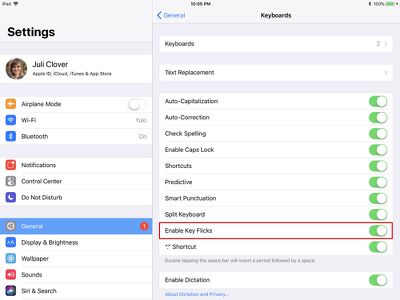
  3. Select the "Keyboard" option.ios11ipadkeyflickssettings
  4. Toggle off "Enable Key Flicks."

Compatibility

The new key flicking feature is available for almost all iPads that are able to run iOS 11, with the exception of the 12.9-inch iPad Pro. With the larger iPad Pro model, you won't be able to use key flicks. It is, however, available on all other iPad Pro models, the iPad Air and later, the iPad mini 2 and later, and the 5th generation iPad.


Related Forum: iOS 11

Top Rated Comments

HiRez Avatar
109 months ago
This is a great feature and for people who mix a lot of numbers into their text (like me) it's going to be a huge time saver. However, to me they got the direction wrong. It's much more intuitive to flick up, towards the symbol you're "shifting" to IMO. Maybe it's just one of those things that makes sense for some people and not for others, for example up-down flight controls in games with inverted option. Unfortunately as far as I can tell, Apple isn't providing an option to invert it.
Score: 3 Votes (Like | Disagree)
Cmbqwerty79 Avatar
109 months ago
Why not on the 12.9?
Score: 2 Votes (Like | Disagree)
Scott6666 Avatar
109 months ago
I love this thing. Agree the gray is too light. Thought I’d be getting it on the phone as well. Really miss it there.
Score: 2 Votes (Like | Disagree)
tkatz Avatar
109 months ago
This is one of my favorite features of iOS 11. Before, I remember thinking how good the Win 10 keyboard (at least on the SP3) was with being able to long press on the top row and then swipe up to access the numbers directly, without having to switch to the number keyboard. I would often try to do that by accident on iOS 10.

Now I find myself doing the opposite and trying to use flick gestures on the SP3 keyboard. MS has even gone a step backwards (imo) in their preview releases and took a good idea and ruined it (you now have to long press and swipe up and right).
Score: 2 Votes (Like | Disagree)
Sanct1mon1a Avatar
109 months ago
Doesn’t work on the flagship 12.9 Pro?
It is on mine, I have the 1st Gen iPad Pro 12.9. Not sure if that was a typo or not. Had it on all the betas for it too.
Score: 2 Votes (Like | Disagree)
applejack1963 Avatar
109 months ago
This is a great feature and for people who mix a lot of numbers into their text (like me) it's going to be a huge time saver. However, to me they got the direction wrong. It's much more intuitive to flick up, towards the symbol you're "shifting" to IMO. Maybe it's just one of those things that makes sense for some people and not for others, for example up-down flight controls in games with inverted option. Unfortunately as far as I can tell, Apple isn't providing an option to invert it.
I'm OK with flick-down for digits & symbols; especially since what I'd really like is for Apple to add flick-up for uppercase.
Score: 1 Votes (Like | Disagree)

Popular Stories

Apple Logo Zoomed

Tim Cook Teases Plans for Apple's Upcoming 50th Anniversary

Thursday February 5, 2026 12:54 pm PST by
Apple turns 50 this year, and its CEO Tim Cook has promised to celebrate the milestone. The big day falls on April 1, 2026. "I've been unusually reflective lately about Apple because we have been working on what do we do to mark this moment," Cook told employees today, according to Bloomberg's Mark Gurman. "When you really stop and pause and think about the last 50 years, it makes your heart ...
wwdc sans text feature

Apple Rumored to Announce New Product on February 19

Thursday February 5, 2026 12:22 pm PST by
Apple plans to announce the iPhone 17e on Thursday, February 19, according to Macwelt, the German equivalent of Macworld. The report, citing industry sources, is available in English on Macworld. Apple announced the iPhone 16e on Wednesday, February 19 last year, so the iPhone 17e would be unveiled exactly one year later if this rumor is accurate. It is quite uncommon for Apple to unveil...
Finder Siri Feature

Why Apple's iOS 26.4 Siri Upgrade Will Be Bigger Than Originally Promised

Friday February 6, 2026 3:06 pm PST by
In the iOS 26.4 update that's coming this spring, Apple will introduce a new version of Siri that's going to overhaul how we interact with the personal assistant and what it's able to do. The iOS 26.4 version of Siri won't work like ChatGPT or Claude, but it will rely on large language models (LLMs) and has been updated from the ground up. Upgraded Architecture The next-generation...
iOS 26

iOS 26.3 and iOS 26.4 Will Add These New Features to Your iPhone

Tuesday February 3, 2026 7:47 am PST by
While the iOS 26.3 Release Candidate is now available ahead of a public release, the first iOS 26.4 beta is likely still at least a week away. Following beta testing, iOS 26.4 will likely be released to the general public in March or April. Below, we have recapped known or rumored iOS 26.3 and iOS 26.4 features so far. iOS 26.3 iPhone to Android Transfer Tool iOS 26.3 makes it easier...
maxresdefault

Apple Shows Off a Key Reason to Upgrade to the iPhone 17

Saturday February 7, 2026 9:26 am PST by
Apple today shared an ad that shows how the upgraded Center Stage front camera on the latest iPhones improves the process of taking a group selfie. "Watch how the new front facing camera on iPhone 17 Pro takes group selfies that automatically expand and rotate as more people come into frame," says Apple. While the ad is focused on the iPhone 17 Pro and iPhone 17 Pro Max, the regular iPhone...