

For iPhone 14 models, Apple expanded resolution options when shooting in Cinematic Mode. This article explains what Cinematic Mode is and how to enable the new higher 4K resolution settings.
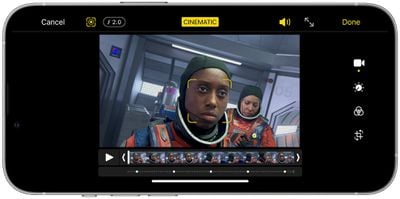
Cinematic Mode utilizes Dolby Vision HDR and a technique called "rack focus" to seamlessly shift the focus from one subject to another when you're shooting video. It does this by locking the focus on the subject in a scene and blurring the background to achieve depth of field. If you subsequently move the camera to center on a new subject or a new subject enters the scene, Cinematic mode automatically switches the focal point to this new subject and blurs out the background.
For example, if you're shooting video of someone and then a second person enters the scene, your iPhone will intelligently adjust the surrounding blur to focus-lock on the second person. It will even automatically switch back to the initial subject if the person's face looks away from the camera, effectively generating a sophisticated professional filmmaking effect on the fly.
On iPhone 13 series models, video in Cinematic Mode can be recorded in 1080p at 30fps. Apple improved Cinematic mode for the iPhone 14 series, which can record in 4K at 30fps and 4K at 24fps using the feature.
On all four iPhone 14 models, Cinematic mode videos can now be recorded in 4K, for higher resolution capture, at either 24 frames per second (film style) or 30 frames per second. The following steps show you how to change to the resolution.
- Launch the Settings app on your iPhone 14.
- Scroll down and tap through to Camera.
- Tap Record Cinematic.
- Select either 4K at 24 fps or 4K at 30 fps.
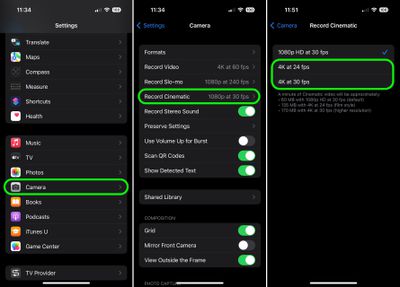
Note that a minute of Cinematic video will take up 135MB of storage with 4K at 24 fps (film style) selected, and 170MB of storage with 4K at 30 fps (higher resolution).




















