iPhone 14: How to Use Action Mode to Capture Smooth Video - MacRumors
Skip to Content

iPhone 14: How to Use Action Mode to Capture Smooth Video

by

Apple's newly launched iPhone 14 models include a new Action mode when recording video. Here's everything you need to know about the feature to start taking advantage of it.

action mode iphone 14

What is Action Mode?

In a nutshell, the new Action mode has been designed by Apple to help capture smooth-looking video that adjusts to significant shakes, motion, and vibrations, even when video is being captured in the middle of the action.

According to Apple, it uses the full camera sensor with more overscan and advanced roll correction to achieve this effect.


The feature is built into the iPhone's stock Camera app, and when enabled, should allow you to capture video that looks almost as if you were using a gimbal to do so. Action mode can record in up to 2.8K at 60 fps, and it supports Dolby Vision HDR, ensuring very good video quality.

Which iPhone Models Support Action Mode?

You don't even need a Pro device to make use of the feature, since all iPhone 14 models support Action mode out of the box, including iPhone 14, iPhone 14 Plus, iPhone 14 Pro, and iPhone 14 Pro Max. Here's how to start capturing video with it.

How to Use Action Mode When Shooting Video

  1. Launch the Camera app on your iPhone.
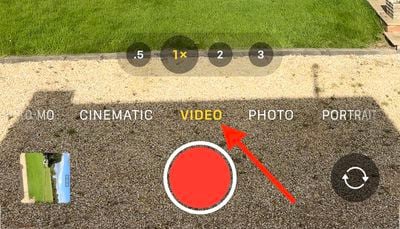
  2. Swipe the camera mode menu so that "Video" is highlighted.
    record video button

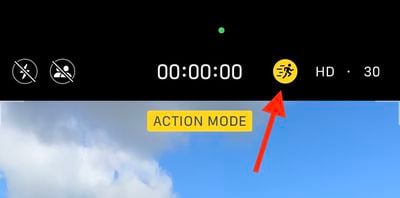
  3. Tap the Action mode button (it looks like a person running) above the viewfinder so that the icon turns yellow.
  4. When you're ready to start recording, tap the red Record button.
    camera

And that's it. Just toggle it on like so, for great-looking video without having to carry stabilizing equipment like a gimbal.


Related Forum: iPhone

Top Rated Comments

jav6454 Avatar
46 months ago

I'm guessing it works by throwing away unused parts of a higher resolution video?
Indeed. From what I have seen, it keep the subject in the center and crops away, using AI, the higher resolution to give you a stabilized video.

Quite neat actually and something already done in iMovie long ago; however, now being done on the fly.
Score: 3 Votes (Like | Disagree)
46 months ago

I think it has something to do with the camera being moved up to 48 megapixels? Not sure tho it is really weird...
That’s not it because this feature is also available on iPhone 14 which has a 12 MP camera. It is most likely Apple wanting to give iPhone 14 some unique features even though iPhone 13 Pro could handle this.

Btw, you can always stabilize the video post recording in iMovie.
Score: 3 Votes (Like | Disagree)
japanime Avatar
46 months ago

Does anyone know if there is a technical reason this is not included on the iPhone 13 Pros? Since the 14s have the same processor as the 13 Pros, it seems like this should work fine on them.
There's probably no reason this couldn't work on any iPhone released in the past two or three years. GoPro and other sports cams do with tech that isn't nearly as sophisticated as that found in iOS 16.
Score: 3 Votes (Like | Disagree)
richie510 Avatar
46 months ago

Not same. A15 vs A16.
The iphone 14 regular and plus have the same A15 as the iphone 13 pros.
Score: 2 Votes (Like | Disagree)
jav6454 Avatar
46 months ago
The article forgot to mention how this type of video is cropped, which means you don't get full resolution as a normal non-Action video.
Score: 2 Votes (Like | Disagree)
AppleTheorist Avatar
46 months ago
This may or may not be an unpopular opinion, but this looks really good! I think it will help a lot for filming on bikes, getting cool action shots, and more.
Score: 2 Votes (Like | Disagree)

Popular Stories

iOS 26

iOS 26.4 Adds Two New Features to CarPlay

Tuesday March 24, 2026 1:55 pm PDT by
iOS 26.4 was released today, and it includes a couple of new features for CarPlay: an Ambient Music widget and support for voice-based chatbot apps. To update your iPhone 11 or newer to iOS 26.4, open the Settings app and tap on General → Software Update. CarPlay will automatically offer the new features so long as the iPhone connected to your vehicle is running iOS 26.4 or later....
Apple Business hero

Apple Unveils 'Apple Business' All-in-One Platform

Tuesday March 24, 2026 8:53 am PDT by
Apple today announced Apple Business, a new all-in-one platform that unifies device management, productivity tools, and customer outreach features. The service is designed to be a consolidated replacement for several of Apple's existing business-focused offerings, including Apple Business Essentials, Apple Business Manager, and Apple Business Connect. It provides organizations with a single...
AirPods Pro Firmware Feature

Apple Releases New Firmware for AirPods Pro 3, AirPods Pro 2 and AirPods 4

Tuesday March 24, 2026 12:31 pm PDT by
Apple today released new firmware for the AirPods Pro 2, AirPods Pro 3, and the AirPods 4. The firmware has a version number of 8B39, up from 8B34 on the AirPods Pro 3, 8B28 on the AirPods Pro 2, and 8B21 on the AirPods 4. There is no word on what's included in the firmware, but Apple has a support document with limited notes. Most updates are limited to bug fixes and performance...