

Apple's iPhone 15 Pro and iPhone 16 models feature an Action button to which you can assign a custom function. Officially, the Action button only supports one function, but there is a way to switch between two actions using a special Shortcut. Keep reading to learn how it's done.
On iPhone 15 Pro and iPhone 16 devices, the iOS Settings app includes an Action button menu that includes several programmable functions that you can assign to the Action button, which is located above the volume buttons in place of the traditional Silent/Ring switch.
This menu lets you choose one option for the Action button, like opening the Camera app or turning on Silent mode, but there is a way to assign two functions to the Action button via the Shortcut option.
Thanks to a freely available third-party shortcut called MultiButton made by MacStories' Federico Viticci, it's possible to automatically cycle between two shortcuts by pressing the Action button multiple times in rapid succession. In a nutshell, if you press the Action button once it runs a primary shortcut, and if you press it again within a few seconds, it runs a secondary shortcut.
What the primary and secondary shortcuts are is entirely up to you, so have a look at what's available in the Shortcuts app before your proceed. Once you've decided on them, make a note of their names, then follow the steps below.
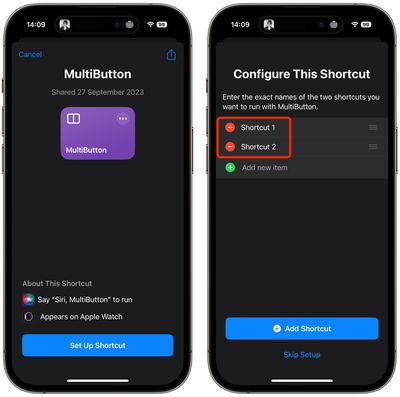
- Download and install the free MultiButton shortcut.
- During setup, you'll be asked to enter the names of the two shortcuts you want to run with MultiButton. Be sure to enter their exact names. (Alternatively, tap Skip Setup and choose these shortcuts later in the MultiButton editor.)
- Tap Add Shortcut.
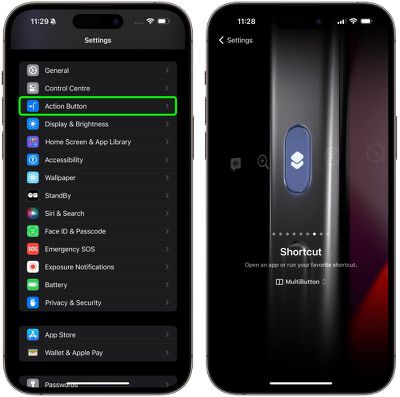
- Now, open the Settings app and tap Action Button.
- Swipe to the Shortcut option.
- Tap the selection button below "Shortcut" and select MultiButton.

- Now, long press the Action button.
- If you're prompted to, give MultiButton permission to access your iCloud Drive (don't worry, MultiButton doesn't read any other files or contact any third-party servers, and you won't be prompted again).
After following these steps, you should see your primary shortcut run on the first Action button press. If you press the Action button again within 7 seconds of the first press, your secondary shortcut will run. If you wait longer than 7 seconds, MultiButton will run the default, primary shortcut instead.
Note that you can't press the Action button a second time while the first shortcut is still running. You'll have to wait for the primary shortcut to finish running. Unfortunately, the Shortcuts app doesn't support running two shortcuts from the Action button at the same time.
Changing the 7-Second Threshold
Developer Federico Viticci chose the default 7 seconds as the threshold for pressing the Action button twice based on his own real-life usage, but you can modify the limit.
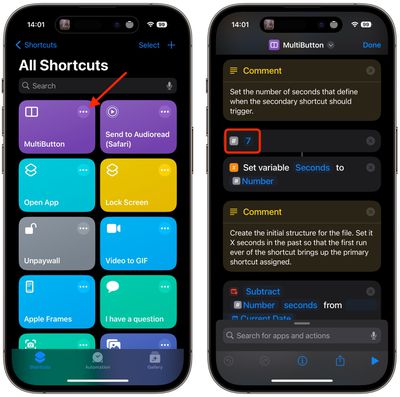
Open the Shortcuts app, tap the round ellipsis (three dots) button on the MultiButton shortcut card, then scroll down to the hash symbol and change the number "7" to your preferred threshold duration in seconds. Tap Done to save your changes.
Assign Primary/Secondary Shortcuts
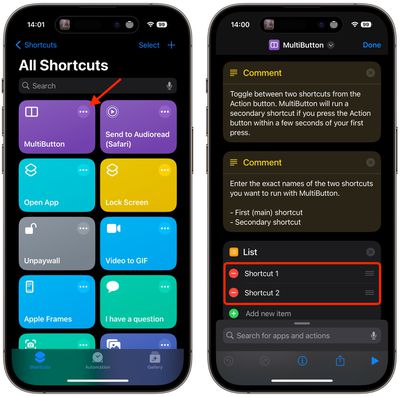
Open the Shortcuts app, tap the round ellipsis (three dots) button on the MultiButton shortcut card, then replace the Shortcut 1 and Shortcut 2 lines with the exact names of the shortcuts you want to assign to one and two Action button presses. Lastly, tap Done to save your shortcut changes.
What do you think of Viticci's MultiButton shortcut for the Action button on iPhone 15 Pro and iPhone 16 models? Got a useful shortcuts setup you'd like to share? Let us know in the comments.




















