
iPhone 16: Edit Photographic Styles After Shooting - MacRumors
Skip to Content

iPhone 16: Edit Photographic Styles After Shooting

by

With Apple's iPhone 16 models, you can use new Photographic Styles to adjust specific colors in certain parts of your photos to create the exact look you want. Photographic Styles can also be changed after shooting. Keep reading to learn how.
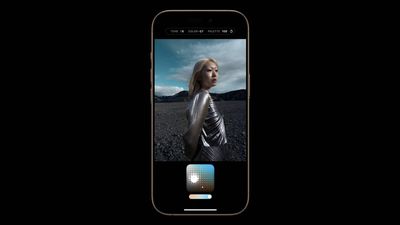
photographic styles iphone 16
When you choose a default Photographic Style, it's saved and reflected across all of the photos you take, and you can make adjustments to it in the Camera app or edit it in the Photos app. Think of this capability as providing flexibility similar to ProRAW, though with less creative control.

Here's how to adjust photos taken in a Photographic Style after shooting:

  1. Open the Photos app on your iPhone 16.
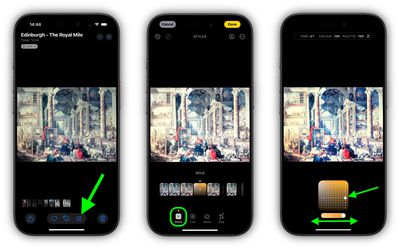
  2. Choose a picture taken with a photographic style, then tap the Edit icon (it looks like three sliders).
  3. Tap Styles in the editing toolbar, then drag along the row of predefined styles to preview each one. Available styles include: Cool Rose, Neutral, Rose Gold, Gold, Amber, Vibrant, Natural, Luminous, Dramatic, Quiet, Cosy, Ethereal, Muted B&W, and Stark B&W.
  4. To adjust one of the predefined styles, simply tap it, then drag your finger on the dotted square to simultaneously adjust the tone and color. Drag your finger on the slider below the square to adjust the intensity level. When you're finished, tap a space on the screen to return to the editing tools UI.
  5. When you're happy with the result, tap Done.
photographic styles photos iphone 16

Bear in mind that as you make adjustments to a photographic style, the values for tone, color, and intensity will be shown at the top of the screen. To reset these values, simply tap the circular arrow.


Related Roundup: iPhone 16
Related Forum: iPhone

Popular Stories

iOS 26

iOS 26.4 Adds Two New Features to CarPlay

Tuesday March 24, 2026 1:55 pm PDT by
iOS 26.4 was released today, and it includes a couple of new features for CarPlay: an Ambient Music widget and support for voice-based chatbot apps. To update your iPhone 11 or newer to iOS 26.4, open the Settings app and tap on General → Software Update. CarPlay will automatically offer the new features so long as the iPhone connected to your vehicle is running iOS 26.4 or later....
Apple Business hero

Apple Unveils 'Apple Business' All-in-One Platform

Tuesday March 24, 2026 8:53 am PDT by
Apple today announced Apple Business, a new all-in-one platform that unifies device management, productivity tools, and customer outreach features. The service is designed to be a consolidated replacement for several of Apple's existing business-focused offerings, including Apple Business Essentials, Apple Business Manager, and Apple Business Connect. It provides organizations with a single...
AirPods Pro Firmware Feature

Apple Releases New Firmware for AirPods Pro 3, AirPods Pro 2 and AirPods 4

Tuesday March 24, 2026 12:31 pm PDT by
Apple today released new firmware for the AirPods Pro 2, AirPods Pro 3, and the AirPods 4. The firmware has a version number of 8B39, up from 8B34 on the AirPods Pro 3, 8B28 on the AirPods Pro 2, and 8B21 on the AirPods 4. There is no word on what's included in the firmware, but Apple has a support document with limited notes. Most updates are limited to bug fixes and performance...















