
The iPhone 17 lineup brings a new video feature that lets you record from both the front and rear cameras simultaneously. Dual Capture creates picture-in-picture recordings that should be perfect for reaction videos, tutorials, or any scenario where you want to capture both yourself and the action in front of you. Here's what you need to know about the feature.
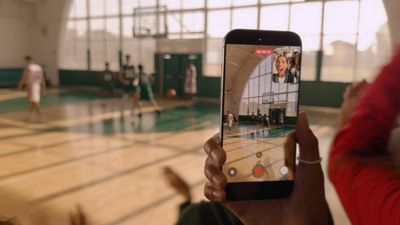
iphone 17 dual capture video
Dual Capture works across the iPhone 17 series, including the iPhone Air. Here's how to get up and running with the new feature.

iPhone 17: How to Enable Dual Capture Mode

  1. Open the Camera app on your iPhone.
  2. Tap Video at the bottom.
  3. Tap the icon made up of dots at the top right of the interface, or alternatively, tap again the selected video option in the carousel at the bottom of the interface.
  4. Select Dual Capture from the pop-up menu, then tap in the viewfinder.
  5. Tap the shutter to start recording via both front and rear cameras.
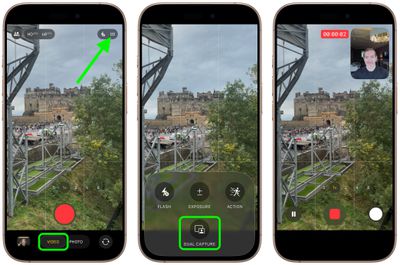
enable dual capture video iphone 17

Once you have used Dual Capture mode, for the rest of the app session the camera interface will show a handy new icon in the top-right corner, allowing you to turn it on and off without involving the pop-up menu.
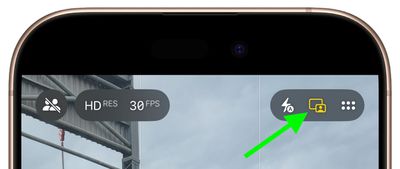
iphone 17 dual capture icon

What You Can Do While Recording

Once you start recording, you gain several useful controls. On iPhone 17 Pro and Pro Max models, you can switch between the 48MP main camera, 48MP ultrawide, and 48MP telephoto lenses for different perspectives without stopping your recording.

The smaller front camera window can also be moved around the screen by dragging it with your finger, which is handy if the preview window blocks something important in your shot. Bear in mind that any repositioning of the window gets saved in your final video, though.
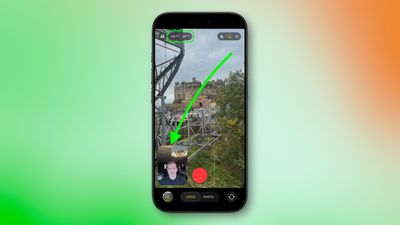
iphone 17 dual capture move camera window

Recording Quality and Limitations

Dual Capture records in either 1080p or 4K resolution at 24 or 30 fps. For maximum editing flexibility later, 4K at 30fps will likely deliver the best results.

The feature does come with some trade-offs. For one, you're locked into Apple's single layout design, where the rear camera takes up most of the frame while the front camera appears in a smaller window. Unlike Samsung's similar feature, you can't switch the feeds or choose a split-screen layout that shows both cameras equally.

Lastly, bear in mind that everything saves as one video file, not separate clips for each camera.


Related Roundups: iPhone 17, iPhone 17 Pro, iPhone Air
Related Forum: iPhone

Top Rated Comments

TheMountainLife Avatar
20 weeks ago
I'm not looking forward to more reaction videos
Score: 25 Votes (Like | Disagree)
mihighil Avatar
20 weeks ago

Understand & know this is new, but anyone know why it’s limited to the 17 series? Must be hardware requirements.
Use the rode capture app (usable on older models) its a arbitrary limitation on older models.
Score: 15 Votes (Like | Disagree)
Yourbigpalal83 Avatar
20 weeks ago
Theres been apps doing this for years. I used to use DoubleTake when i was still doing Youtube. Hell of a good app. You could also record two seperate feeds though that and edit it how you like later on.
Score: 11 Votes (Like | Disagree)
Ralfi Avatar
20 weeks ago
This will result in very corny videos with non-genuine & staged reactions.

When the broadcasters script fans in the crowd to yell something when the camera pans to them, it’s fake, cringy & very off-putting.
Score: 7 Votes (Like | Disagree)
mihighil Avatar
20 weeks ago
This was available through the Rode Capure app, great app and its free (no in app purchases)
Score: 6 Votes (Like | Disagree)
berrymetal Avatar
20 weeks ago
I wish the videos were non-destructive, in a way that you can reposition the selfie PiP later on when you edit the video (and resize it maybe). Perhaps that's something we will see in the future...
Score: 6 Votes (Like | Disagree)

Popular Stories

Apple Logo Zoomed

Tim Cook Teases Plans for Apple's Upcoming 50th Anniversary

Thursday February 5, 2026 12:54 pm PST by
Apple turns 50 this year, and its CEO Tim Cook has promised to celebrate the milestone. The big day falls on April 1, 2026. "I've been unusually reflective lately about Apple because we have been working on what do we do to mark this moment," Cook told employees today, according to Bloomberg's Mark Gurman. "When you really stop and pause and think about the last 50 years, it makes your heart ...
iOS 26

iOS 26.3 and iOS 26.4 Will Add These New Features to Your iPhone

Tuesday February 3, 2026 7:47 am PST by
While the iOS 26.3 Release Candidate is now available ahead of a public release, the first iOS 26.4 beta is likely still at least a week away. Following beta testing, iOS 26.4 will likely be released to the general public in March or April. Below, we have recapped known or rumored iOS 26.3 and iOS 26.4 features so far. iOS 26.3 iPhone to Android Transfer Tool iOS 26.3 makes it easier...
imac video apple feature

Apple Makes Its Second-Biggest Acquisition Ever

Tuesday February 3, 2026 12:45 pm PST by
Apple recently acquired Israeli startup Q.ai for close to $2 billion, according to Financial Times sources. That would make this Apple's second-biggest acquisition ever, after it paid $3 billion for the popular headphone maker Beats in 2014. This is also the largest known Apple acquisition since the company purchased Intel's smartphone modem business and patents for $1 billion in 2019....
wwdc sans text feature

Apple Rumored to Announce New Product on February 19

Thursday February 5, 2026 12:22 pm PST by
Apple plans to announce the iPhone 17e on Thursday, February 19, according to Macwelt, the German equivalent of Macworld. The report, citing industry sources, is available in English on Macworld. Apple announced the iPhone 16e on Wednesday, February 19 last year, so the iPhone 17e would be unveiled exactly one year later if this rumor is accurate. It is quite uncommon for Apple to unveil...
Finder Siri Feature

Why Apple's iOS 26.4 Siri Upgrade Will Be Bigger Than Originally Promised

Friday February 6, 2026 3:06 pm PST by
In the iOS 26.4 update that's coming this spring, Apple will introduce a new version of Siri that's going to overhaul how we interact with the personal assistant and what it's able to do. The iOS 26.4 version of Siri won't work like ChatGPT or Claude, but it will rely on large language models (LLMs) and has been updated from the ground up. Upgraded Architecture The next-generation...














