The iPhone 17 Pro marks Apple's biggest leap yet in professional mobile video, introducing ProRes RAW recording for the first time. Unlike standard ProRes, RAW preserves all of the camera's sensor data – including ISO, shutter, and especially white balance – allowing filmmakers to make critical adjustments later in post-production without quality loss.

Version 2.0 of Apple's Final Cut Camera app supports ProRes RAW on iPhone 17 Pro, and Apple is also providing an API so third-party apps can add compatibility. The Blackmagic Camera app for iPhone and DaVinci Resolve have also been updated to natively support ProRes RAW. This means iPhone 17 Pro owners can slot their footage directly into the same workflows used on high-end cinema productions.
Shooting ProRes RAW on iPhone 17 Pro
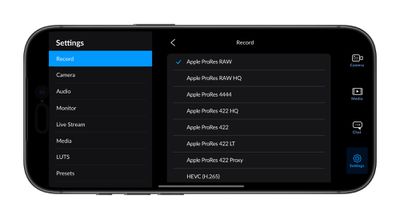
- Install Blackmagic Camera (available for free on the App Store) or Final Cut Camera 2.0 (available late Sept 2025).
- In Record settings, under "Codec," choose Apple ProRes RAW or Apple ProRes RAW HQ.
- Adjust resolution, frame rate, and storage options as needed. For the highest data-rate modes, a fast external SSD connected over USB-C will be required.
- Hit record – your footage will now capture with RAW flexibility for ISO and white balance adjustments in post.
To handle these large files, Apple has introduced a new 2TB storage option for the iPhone 17 Pro Max, while keeping ProRes RAW relatively efficient: it's more compressed than ProRes HQ, so it strikes a balance between flexibility and storage demands.
Other pro-focused upgrades complement the format. For multi-camera shoots, the iPhone 17 Pro now supports genlock, which keeps multiple iPhone setups perfectly in sync. And Blackmagic will soon debut its ProDock accessory, a $299 compact expansion box with USB-C ports, HDMI, and genlock, designed to make the iPhone easier to integrate into professional rigs.