iOS 15.2 Beta: How to Use Find My to Locate Items That Can Track You - MacRumors
Skip to Content

iOS 15.2 Beta: How to Use Find My to Locate Items That Can Track You

by

Update December 13: This change did not make it into the final release of iOS 15.2, but may reappear in a future update.


In iOS 15.2, which is available in beta right now, Apple introduced new features for the Find My app, including a way to search for items that might be used to track your location.

FindMy Feature
The new Unknown Items feature is called "Items That Can Track Me," and when activated, it will scan for anything that's nearby that belongs to someone else and let you know about it.

If anything is detected, such as an AirTag or other Find My-enabled item, Apple will provide you with more details on the item and instructions on how to disable it so that it can no longer be used for tracking purposes.

The following steps show you how to activate the feature in iOS 15.2. Note that items can only be found if they are not in range of their owner's device, up to 50 meters.

  1. Launch the Find My app on your iPhone.
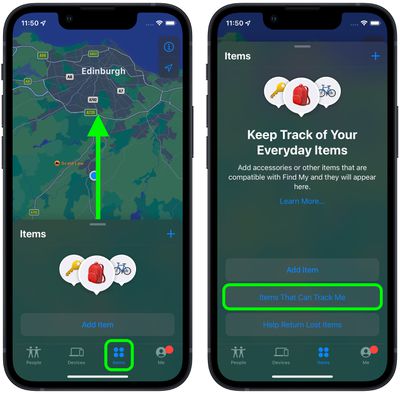
  2. Tap the Items tab at the bottom of the screen.
  3. Drag the items card further up onto the screen using the small pill-shaped handle to reveal more options.
  4. Tap Items That Can Track Me.
    find my

  5. Tap the Search button.
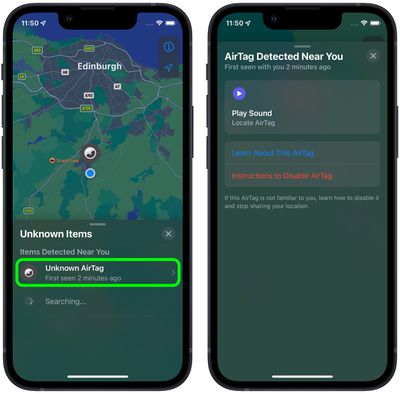
  6. Look at the list titled "Items Detected Near You." If a device is discovered, tap it for more information.

  7. If it's an ‌AirTag‌, you can tap Play Sound to more exactly locate it. You can also tap Learn More About This AirTag to see if its owner has added contact details in case the item is lost. If you want to disable the ‌AirTag‌ to prevent it from potentially tracking you, tap Instructions to Disable AirTag and follow the instructions to remove the battery.
    find my

‌AirTags‌ and items with ‌‌Find My‌‌ integration are meant to allow users to track their lost devices, but there have been concerns that ‌AirTags‌ can be planted on people for stalking purposes. To prevent stalking with ‌AirTags‌ and other devices, Apple has implemented several safety measures.

‌AirTags‌ are designed to start playing a sound between eight and 24 hours after being separated from their owner, and iPhone users are alerted if an ‌AirTag‌ is traveling with them. Apple is also working on an Android app that will let Android users detect an unknown ‌AirTag‌ or ‌‌Find My‌‌ network-enabled item to prevent ‌AirTags‌ from being used to stalk Android users.

Related Roundup: AirTag
Buyer's Guide: AirTag (Buy Now)

Top Rated Comments

57 months ago
Hmm, this basically means airtags are no good for securing items - they're only going to be good for "lost" things.

For example, if someone steals my bike which has an airtag attached to it - all they need to do is go 50m scan for tracking devices and disable it - not cool.
Score: 9 Votes (Like | Disagree)
XNorth Avatar
57 months ago
This article has a poor explanation, missing some crucial information. So if I can disable someone’s AirTag near me and away from the owner, does that mean the owner cant find it anymore? Explain that. Surely that’s not how it would work.
Score: 6 Votes (Like | Disagree)
57 months ago
As the article says, you only see AirTags near you that are not near their owners.
Score: 5 Votes (Like | Disagree)
Robin Bonathan Avatar
57 months ago
Anyone want to buy a pack of AirTags ?
Score: 4 Votes (Like | Disagree)
57 months ago

Hmm, this basically means airtags are no good for securing items - they're only going to be good for "lost" things.

For example, if someone steals my bike which has an airtag attached to it - all they need to do is go 50m scan for tracking devices and disable it - not cool.
Exactly. Not a good look. I’m not happy that Apple is actively removing utility from these devices after I’ve purchased them.

Before with the “traveling with you” warnings, at least then the owner of a stolen item would have 1-2 hours to discover it was stolen before the tracker was disabled. Now a thief can actively target valuables and disable a tracker before the theft has even occurred. Apple definitely taking its “tracking/stalking” paranoia about 5 steps too far.
Score: 3 Votes (Like | Disagree)
jlc1978 Avatar
57 months ago

I’d like to know how this is going to work when travelling on a plane, train, bus. In theory you’ll be able to play a sound from any AirTag near you, as well as see the contact info of the owner if they’ve enabled it?
It should still be close enough to not respond.


When in a plane and in airplane mode, the AirTag does not know it is near its owner.
If airplane mode is properly enabled, it would not receive or send a signal. Not sure how AirTags use it.


This article has a poor explanation, missing some crucial information. So if I can disable someone’s AirTag near me and away from the owner, does that mean the owner cant find it anymore? Explain that. Surely that’s not how it would work.
You can't disable the AirTag, only it's ability to use your phone to report location. If you are the only phone close enough to respond then yes, you disable teh Find Me feature until another phone gets close enough.


So all a thief needs to do is use this feature and they can prevent the owner from finding the stolen goods?

Kinda lame if so. I hope apple gets this figured out.
That was my thought as well. Not only can a their check for trackers, but disable them from using their phone to track it.


Hmm, this basically means airtags are no good for securing items - they're only going to be good for "lost" things.

For example, if someone steals my bike which has an airtag attached to it - all they need to do is go 50m scan for tracking devices and disable it - not cool.
Better yet - go 50 meters, have it play a sound so if it is hidden it can be located. Toss teh AirTag in the trash, stick it on a car or bus, etc. Even if someone isn't interested in stealing it it opens up a new pranking scenario.

I think Apple clearly does not care about the ability to use AirTags to recover stolen property over their potential use for stalking and the negative publicity it would generate if someone used them for tat and harmed someone.

On a separate note? Why just AirTags? How about beacons used to track movement?
Score: 3 Votes (Like | Disagree)

Popular Stories

iOS 26

iOS 26.4 Adds Two New Features to CarPlay

Tuesday March 24, 2026 1:55 pm PDT by
iOS 26.4 was released today, and it includes a couple of new features for CarPlay: an Ambient Music widget and support for voice-based chatbot apps. To update your iPhone 11 or newer to iOS 26.4, open the Settings app and tap on General → Software Update. CarPlay will automatically offer the new features so long as the iPhone connected to your vehicle is running iOS 26.4 or later....
Apple Business hero

Apple Unveils 'Apple Business' All-in-One Platform

Tuesday March 24, 2026 8:53 am PDT by
Apple today announced Apple Business, a new all-in-one platform that unifies device management, productivity tools, and customer outreach features. The service is designed to be a consolidated replacement for several of Apple's existing business-focused offerings, including Apple Business Essentials, Apple Business Manager, and Apple Business Connect. It provides organizations with a single...
AirPods Pro Firmware Feature

Apple Releases New Firmware for AirPods Pro 3, AirPods Pro 2 and AirPods 4

Tuesday March 24, 2026 12:31 pm PDT by
Apple today released new firmware for the AirPods Pro 2, AirPods Pro 3, and the AirPods 4. The firmware has a version number of 8B39, up from 8B34 on the AirPods Pro 3, 8B28 on the AirPods Pro 2, and 8B21 on the AirPods 4. There is no word on what's included in the firmware, but Apple has a support document with limited notes. Most updates are limited to bug fixes and performance...