
On iPhone 16 Pro and iPhone 16 Pro Max, the Voice Memos app includes a recording feature that lets you record a second audio layer – like vocals, narration, or an extra instrument – over an existing memo, all without needing headphones. Keep reading to learn how it's done.
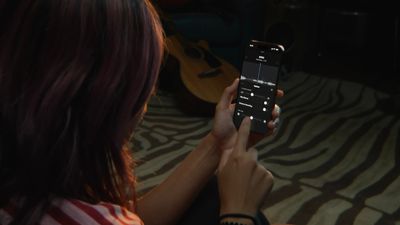
voice memos multitrack
Thanks to the A18 Pro chip's advanced audio processing, iPhone 16 Pro models can play an original Voice Memo recording through the speakers while simultaneously isolating and capturing new audio cleanly. Whether you're capturing a quick harmony, adding context to a saved memo, or simply experimenting with sound, layering recordings like this offers a seamless way to capture richer ideas.

Once finished, layered recordings can be edited, separated, and fine-tuned directly on the iPhone or easily transferred to apps like Logic Pro for more advanced mixing. For musicians, podcasters, or anyone who regularly records voice notes, it's a bit like having a mini studio setup right in your pocket. Here's how to make your first layered recording.

Add a Second Layer to a Recording

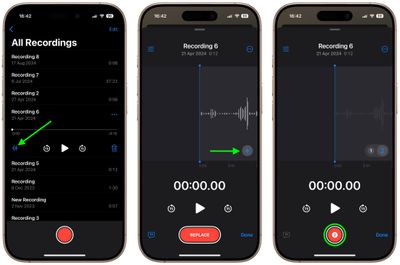
  1. Open the Voice Memos app (in the Utilities folder) on your iPhone.
  2. Tap the recording you want to add a vocal layer to, then tap the waveform icon to view the waveform.
  3. Tap the plus (+) button.
  4. When you're ready to record the second layer, tap the red record button.
voice memos

The recording will appear in Voice Memos' list of recordings with a layered symbol (two overlapping tiles) next to it.

Mix the Layers

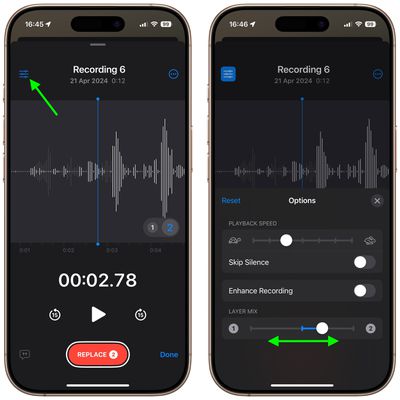
While viewing the waveform, you can easily mix the layers by tapping the settings button in the top-left corner and dragging the Layer Mix slider.
voice-memos

Separate the Layers

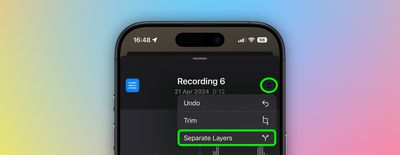
You can also separate the two layers to edit or play them separately: Simply tap the More button (three encircled dots) in the top-right corner, then tap Separate Layers. If you then tap Done, you'll see the two layers appear as separate recordings in the list. From there, you can select them, edit them, and play them separately.
voice memos

Things to Know

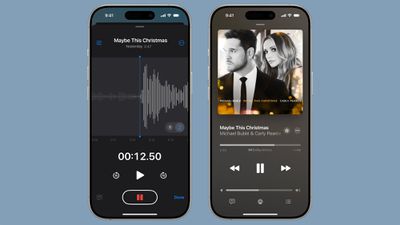
While creating layered recordings is exclusive to the iPhone 16 Pro and iPhone 16 Pro Max, playback is more widely supported. Any device running iOS 18.2, iPadOS 18.2, macOS Sequoia 15.2, or later can play layered recordings without issue.
ios 18 2 layered voice memos
It's worth noting that layered recordings are saved in the QuickTime Audio (QTA) format. Devices on earlier software versions, such as iOS 18.1, iPadOS 18.1, or macOS Sequoia 15.1, won't display layered memos. However, if you separate the layers, each track is converted into an individual .m4a file, making them accessible across older devices. Also, keep in mind that only the original layer can be transcribed or recorded in stereo – additional layers are captured in mono.


Top Rated Comments

Cameront9 Avatar
10 months ago
RIP Music Memos app which automatically detected the chords you were playing and was perfect for little demos you could export into GarageBand. No idea why they got rid of that app.
Score: 9 Votes (Like | Disagree)
WarmWinterHat Avatar
10 months ago
Trying to start a new career?


Attachment Image
Score: 2 Votes (Like | Disagree)
subjonas Avatar
10 months ago

To know that multitrack recording (with only two tracks!) has been possible on any phone for a decade I should... make my own multitrack recording app?
Are you joking? You can't be serious.
I know birds can fly easily even if I can't fly.
Just like I know that multitrack recording has been a thing forever on phones. There's absolutely no hardware limitations, even on very old and weak phones.
Now, I don't know what that "enhance recording" button does, may be AI that doesn't work on weaker phone but... they could just hide it.

Blocking upgrades that aren't related to hardware on phones that are still supported and were promised OS upgrades just means they just lied for money: OS upgrades will be limited so even phones that are one or two years old don't get some software upgrades, forcing you to upgrade.
Take the AI stuff: some run locally and require hardware but all the features that don't could easily run on an iPhone 6S. And I know that because other Apps make it possible (even if I didn't develop them myself). Still Apple makes them iPhone 16 exclusives (also with those scammy ads) to make people buy it. Again, because all recent phones feel really similar.
Your rant is founded on a misunderstanding. The feature in question is not plain old two layer audio recording—the feature is doing so without the need for headphones. Up until now, in order to isolate the second track from the first, headphones were needed while recording, otherwise the second track would pick up audio from the first track in the background. In this new feature, while recording without headphones machine learning removes the first track audio from the second track to keep them isolated from each other, which takes extra processing power. It’s explained in the article as well.
Score: 2 Votes (Like | Disagree)
coolfactor Avatar
10 months ago

RIP Music Memos app which automatically detected the chords you were playing and was perfect for little demos you could export into GarageBand. No idea why they got rid of that app.
Strange, I don't even recall knowing about Music Memos. Seems like it was too niche to gain much of a user base?
Score: 1 Votes (Like | Disagree)
CalMin Avatar
10 months ago
Bummer this requires iPhone 16.
Score: 1 Votes (Like | Disagree)
cicalinarrot Avatar
10 months ago
Why this very simple software just on the latest phones??
Is Apple starting to rely more and more on software locks to differentiate newer and pricier phones because they've all been feeling like the same for 4 years now?
Score: 1 Votes (Like | Disagree)

Popular Stories

Apple Logo Zoomed

Tim Cook Teases Plans for Apple's Upcoming 50th Anniversary

Thursday February 5, 2026 12:54 pm PST by
Apple turns 50 this year, and its CEO Tim Cook has promised to celebrate the milestone. The big day falls on April 1, 2026. "I've been unusually reflective lately about Apple because we have been working on what do we do to mark this moment," Cook told employees today, according to Bloomberg's Mark Gurman. "When you really stop and pause and think about the last 50 years, it makes your heart ...
wwdc sans text feature

Apple Rumored to Announce New Product on February 19

Thursday February 5, 2026 12:22 pm PST by
Apple plans to announce the iPhone 17e on Thursday, February 19, according to Macwelt, the German equivalent of Macworld. The report, citing industry sources, is available in English on Macworld. Apple announced the iPhone 16e on Wednesday, February 19 last year, so the iPhone 17e would be unveiled exactly one year later if this rumor is accurate. It is quite uncommon for Apple to unveil...
Finder Siri Feature

Why Apple's iOS 26.4 Siri Upgrade Will Be Bigger Than Originally Promised

Friday February 6, 2026 3:06 pm PST by
In the iOS 26.4 update that's coming this spring, Apple will introduce a new version of Siri that's going to overhaul how we interact with the personal assistant and what it's able to do. The iOS 26.4 version of Siri won't work like ChatGPT or Claude, but it will rely on large language models (LLMs) and has been updated from the ground up. Upgraded Architecture The next-generation...
iOS 26

iOS 26.3 and iOS 26.4 Will Add These New Features to Your iPhone

Tuesday February 3, 2026 7:47 am PST by
While the iOS 26.3 Release Candidate is now available ahead of a public release, the first iOS 26.4 beta is likely still at least a week away. Following beta testing, iOS 26.4 will likely be released to the general public in March or April. Below, we have recapped known or rumored iOS 26.3 and iOS 26.4 features so far. iOS 26.3 iPhone to Android Transfer Tool iOS 26.3 makes it easier...
maxresdefault

Apple Shows Off a Key Reason to Upgrade to the iPhone 17

Saturday February 7, 2026 9:26 am PST by
Apple today shared an ad that shows how the upgraded Center Stage front camera on the latest iPhones improves the process of taking a group selfie. "Watch how the new front facing camera on iPhone 17 Pro takes group selfies that automatically expand and rotate as more people come into frame," says Apple. While the ad is focused on the iPhone 17 Pro and iPhone 17 Pro Max, the regular iPhone...















