
How to Enable LED Flash Notifications on iPhone and iPad Pro - MacRumors
Skip to Content

How to Enable LED Flash Notifications on iPhone and iPad Pro

by

Unlike some Android phones, Apple's iPhones don't have a dedicated notification LED that lights up when you get a call, text, or other alert. What iPhones do include is an optional Accessibility feature for the deaf and hard of hearing that blinks the rear camera flash and provides a visual cue for incoming notifications.
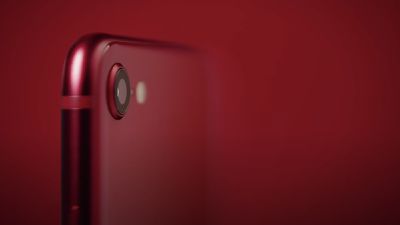
2020 iphone se camera red
Even if your hearing is fine, having a visual cue for incoming alerts can be handy to have if, say, you're in a quiet environment and don't want to disturb the peace. An LED flash notification can be useful when your iPhone or iPad is lying on a table with vibration alerts off, for instance.

Follow the steps below to turn on LED flash alerts on your iPhone or iPad Pro. Just remember to leave your iOS device locked with the screen down and the rear camera system in your line of sight.
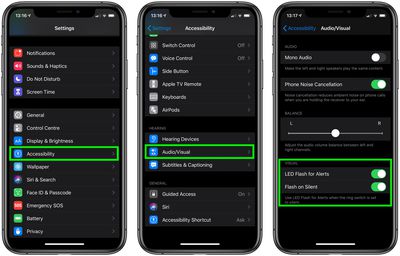
led flash iPhone

  1. Launch the Settings app on your device.
  2. Tap Accessibility.
  3. Turn on LED Flash for Alerts using the toggle switch.
  4. Turn on Flash on Silent if you only want LED flash alerts when your iPhone or ‌iPad Pro‌ is silenced.

Note that the LED Flash for Alerts option only works on ‌iPad Pro‌ 2016 or later models, but is compatible with all iPhones that have a rear flash feature.

Top Rated Comments

76 months ago
super annoying to anyone else in the room...
Score: 22 Votes (Like | Disagree)
76 months ago
Be careful. I ended up being a very weird guy when sitting just opposite of a cute girl on the train due to this. You do not wanna have to explain this.
Score: 17 Votes (Like | Disagree)
JPack Avatar
76 months ago
What... year is this?

This has been a feature since iPhone 5 at least.
Score: 8 Votes (Like | Disagree)
76 months ago
Even if your hearing is fine, having a visual cue for incoming alerts can be handy to have if, say, you're in a quiet environment and don't want to disturb the peace.
In my experience, this still disturbs all kinds of peace unless, say, your quiet environment is occupied by blind people. A camera flash is a pretty aggressive notifier.

My pre-iPhone devices had little LEDs in the cases that would be green to show they were on, and orange to show there was a notification, for example. The room would have to basically be dark for anyone to be annoyed by this. I get that orange and green LEDs are just too garish and un-color-coordinated for Apple, but how about a cute little white LED that doesn't even glow unless there's a notification, similar to the power/sleep indicator on the old MBPs?
Score: 7 Votes (Like | Disagree)
76 months ago

Since my phone is always face up, I would never notice it. Apple perhaps could put a front flash instead of lighting up the screen. However I really doubt they'll add more to the front camera display.
I use a clear case with my iPhone 7. The clear case amplifies the flash and you definitely see it light up around the phone. Kind of a cool effect.
Score: 7 Votes (Like | Disagree)
ghostface147 Avatar
76 months ago
Since my phone is always face up, I would never notice it. Apple perhaps could put a front flash instead of lighting up the screen. However I really doubt they'll add more to the front camera display.
Score: 6 Votes (Like | Disagree)

Popular Stories

iOS 26

iOS 26.4 Adds Two New Features to CarPlay

Tuesday March 24, 2026 1:55 pm PDT by
iOS 26.4 was released today, and it includes a couple of new features for CarPlay: an Ambient Music widget and support for voice-based chatbot apps. To update your iPhone 11 or newer to iOS 26.4, open the Settings app and tap on General → Software Update. CarPlay will automatically offer the new features so long as the iPhone connected to your vehicle is running iOS 26.4 or later....
Apple Business hero

Apple Unveils 'Apple Business' All-in-One Platform

Tuesday March 24, 2026 8:53 am PDT by
Apple today announced Apple Business, a new all-in-one platform that unifies device management, productivity tools, and customer outreach features. The service is designed to be a consolidated replacement for several of Apple's existing business-focused offerings, including Apple Business Essentials, Apple Business Manager, and Apple Business Connect. It provides organizations with a single...
AirPods Pro Firmware Feature

Apple Releases New Firmware for AirPods Pro 3, AirPods Pro 2 and AirPods 4

Tuesday March 24, 2026 12:31 pm PDT by
Apple today released new firmware for the AirPods Pro 2, AirPods Pro 3, and the AirPods 4. The firmware has a version number of 8B39, up from 8B34 on the AirPods Pro 3, 8B28 on the AirPods Pro 2, and 8B21 on the AirPods 4. There is no word on what's included in the firmware, but Apple has a support document with limited notes. Most updates are limited to bug fixes and performance...
















