
Chrome 90: How to Link Directly to Specific Text on a Webpage - MacRumors
Skip to Content

Chrome 90: How to Link Directly to Specific Text on a Webpage

by

With the release of Chrome 90, Google is rolling out a new browser feature that lets you create a shareable link to a section of text you've highlighted on a webpage. Here's how to use it.
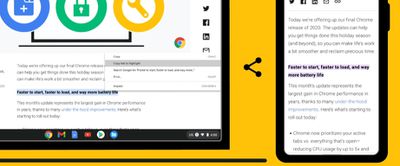
chrome link to highlight
Sometimes when you share a webpage link with someone, you just want to bring their attention to a specific passage or sentence to make your point, rather than have them read through the entire article.

Last year, Google created an extension called Link to Text Fragment that does just this. Recognizing its utility, the tech giant has integrated the function into its browser to coincide with the release of Chrome 90.

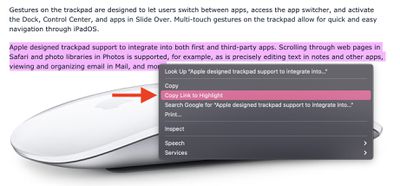
To use the feature, visit a web page and simply highlight the text you want to create a link to, then right-click and choose Copy Link to Highlight from the dropdown menu.
chrome

The "Copy Link to Highlight" option

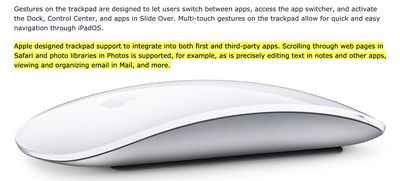
This will generate a URL that includes a hash (#) symbol. All you need to do is share the link with someone, and when they click it they'll be sent directly to that part of the webpage with the specific passage highlighted, as shown below.
chrome

The shared link in action

Unfortunately, the highlight links that Chrome generates only work in Edge and Chrome, therefore users running other browsers won't see the highlighted text. However, they'll still be sent to the webpage in question, so the link isn't completely useless to Safari or Firefox users.

Google says the copy link to highlight feature is currently rolling out to desktop and Android devices, and is coming soon to iOS. If you're using the desktop browser and you've updated to Chrome 90 but you're not seeing the option yet, you can enable it manually by navigating to Chrome://flags and enabling the copy-link-to-text flag (use the search field to find it).


Tag: Chrome

Top Rated Comments

64 months ago
These little stupid features is what I truly miss from chrome.
Score: 7 Votes (Like | Disagree)
MBAir2010 Avatar
64 months ago
which means more tracking while browsing websites, well:

"Apple WebKit security and privacy engineer John Wilander expressed concern that Google's FLoC algorithm, being tested in Google's Chrome browser, can be used to construct identifiers for tracking people as they visit different websites." Thomas Claburn Sat 17 Apr 2021

google should FLoC off!
Score: 6 Votes (Like | Disagree)
Vol Braakzakje Avatar
64 months ago
I actually like this feature. It's just a pity I will never use any Google products.
Score: 6 Votes (Like | Disagree)
itsmeaustend Avatar
64 months ago
No thanks. If it means using Chrome as my daily browser then I’m better off without.
Score: 6 Votes (Like | Disagree)
Gabebear Avatar
64 months ago
This feature seems poorly conceived. Text constantly changes and these links won’t be good for long. The web already lets you link to text on pages in anchored tags(e.g. the heading above what is highlighted in the example).
If this was a way to more easily find anchors on pages for linking it would be nice… as is, it’s another kludge that is half-broken on launch.
Score: 6 Votes (Like | Disagree)
ForkHandles Avatar
64 months ago
Link to a specific piece of text, analyse that text, add it to your personality profile, serve you more tempting adverts. I mean just why would you want that?
Score: 5 Votes (Like | Disagree)

Popular Stories

iOS 26

iOS 26.4 Adds Two New Features to CarPlay

Tuesday March 24, 2026 1:55 pm PDT by
iOS 26.4 was released today, and it includes a couple of new features for CarPlay: an Ambient Music widget and support for voice-based chatbot apps. To update your iPhone 11 or newer to iOS 26.4, open the Settings app and tap on General → Software Update. CarPlay will automatically offer the new features so long as the iPhone connected to your vehicle is running iOS 26.4 or later....
Apple Business hero

Apple Unveils 'Apple Business' All-in-One Platform

Tuesday March 24, 2026 8:53 am PDT by
Apple today announced Apple Business, a new all-in-one platform that unifies device management, productivity tools, and customer outreach features. The service is designed to be a consolidated replacement for several of Apple's existing business-focused offerings, including Apple Business Essentials, Apple Business Manager, and Apple Business Connect. It provides organizations with a single...
AirPods Pro Firmware Feature

Apple Releases New Firmware for AirPods Pro 3, AirPods Pro 2 and AirPods 4

Tuesday March 24, 2026 12:31 pm PDT by
Apple today released new firmware for the AirPods Pro 2, AirPods Pro 3, and the AirPods 4. The firmware has a version number of 8B39, up from 8B34 on the AirPods Pro 3, 8B28 on the AirPods Pro 2, and 8B21 on the AirPods 4. There is no word on what's included in the firmware, but Apple has a support document with limited notes. Most updates are limited to bug fixes and performance...














