

 In iOS 13 and iPadOS, Apple combined the earlier Find My Friends and Find My iPhone apps into a single app called "Find My," a sort of catch-all place on your iOS device that you can use for finding whatever you need to find.
Find My works much like the apps it replaces. For example, the new app features a section that allows you to locate friends and family members that have shared their location with you, and lets you share your location in kind.
The following steps show you how you can locate your friends using the Find My app.
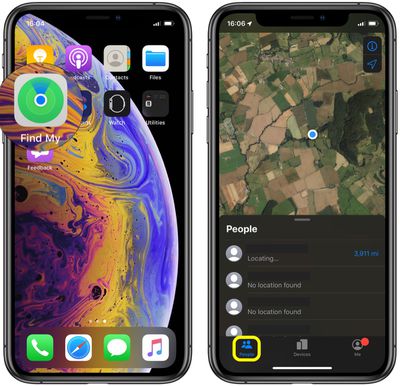
- Launch the Find My app on your iPhone or iPad. (The Find My app is available by default on all new iOS devices, but if you've deleted it, you need to download the free app from the App Store.)
- Tap the People tab at the bottom of the screen, if it's not already selected.

- Drag up the People card onto the screen with a swipe of your finger to see a list of people who are sharing their location with you, or who have shared their location with you in the past.
- Tap a person who has been located to see their whereabouts on the map. (If no location is found, it's possible that person's device is turned off or they have stopped sharing their location with you.)
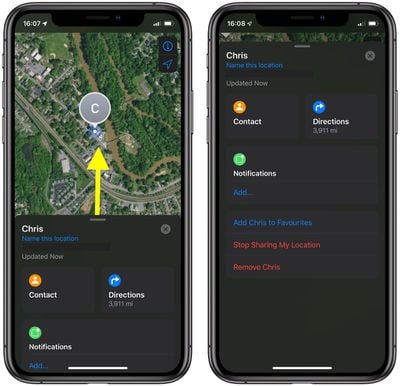
Note that the person's location card appears below the map showing their location, and provides some actions and links that can come in handy. From here, you can access their contact card, as well as directions for getting to their location.
Drag up the person's location card over the map and you'll see additional actions including an option to add them to your favorites, remove them from the People section, or get notifications when they leave or arrive at a specific location.
Tapping Add... under Notifications also gives you the option of notifying your friend when you leave or arrive at a specific notification (assuming you've shared your location with them).




















