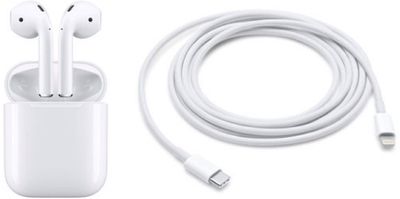
Apple's AirPods generally do a great job of staying in your ears, even during a run or workout. Of course, that doesn't mean you won't ever lose one or even both earbuds –- especially if you forget to put them back in their charging case when not in use. In the how to below, we'll go over your options in case one of your AirPods go missing.

Use Just One AirPod
If you don't want to shell out the cash for another AirPod when you've lost one, your AirPods won't be entirely useless. Apple has designed the AirPods so you can use just one at a time. A single AirPod functions just like two AirPods, so as long as you have one AirPod and the Charging Case, you can listen to music, podcasts, and more.
Get a New AirPod From Apple
If you've had no luck using Apple's Find My iPhone app to locate a lost AirPod (or AirPods), or if you have a faulty AirPod, it might be time to consider ordering a replacement from Apple.
Apple doesn't offer AppleCare+ for first- or second-generation AirPods, and instead provides a standard one-year warranty that's included with all Apple products. If your AirPods need service during that one year period, all work will be covered for free.
After the one-year warranty has expired, Apple charges a $69 fee for out-of-warranty service repairs, as described on its iPhone Service Pricing page. If your AirPods or AirPods Charging Case loses battery capacity, battery service is free during the one-year warranty period or $49 out of warranty.
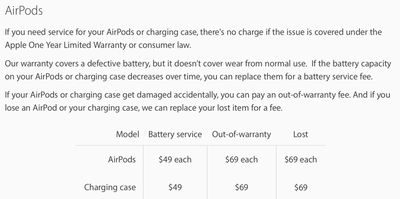
Apple charges $69 for a replacement AirPod and $59 for a replacement standard Charging Case, regardless of whether or not the AirPods are under warranty. Costs for a Wireless Charging Case are slightly different, with Apple charging $69 for an out-of-warranty repair and $79 to replace a lost one. The pricing in Apple's support document is U.S. pricing, and will vary based on country.
Setting up a Replacement AirPod or Charging Case
When you receive your replacement AirPod, follow these steps to set it up. Note that these steps can also be used set up a replacement Charging Case and Wireless Charging Case.
- Put both AirPods in the charging case.
- Open the lid and check that the status light is flashing amber (on a Wireless Charging Case, this light is located on the front of the case).
- Press and hold the button on the back of the case for five seconds, after which the status light should flash white. If it's still flashing amber, connect the case to a power source using a Lightning-to-USB or Lightning-to-USB-C cable (or a wireless charging mat if you have a Wireless Charging Case), close the case lid, and wait 10 minutes.

- Navigate to the Home screen on your iPhone.
- Open the charging case so the AirPods are visible inside and hold it next to your iPhone.
- When the setup animation appears, tap Connect, then tap Done.