
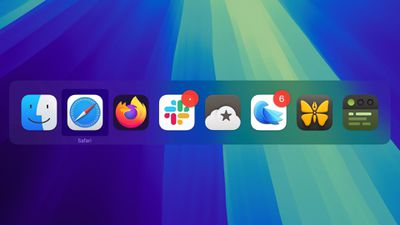
Most long-time macOS users will be aware of the Application Switcher. It's invoked using the Command+Tab keyboard shortcut, and lists all of the apps currently running on your Mac, enabling you to quickly switch between them.
macos app switcher
In this article, we'll run through the Mac App Switcher's most basic functions, and then highlight some of our favorite lesser-known App Switcher tricks that you're bound to find useful once you're familiar with it.

Basic Functions of the App Switcher

When you hold Command and press Tab, the App Switcher overlay appears above all other open windows on your desktop, and remains visible until you release the Command key. Letting go switches you to the last active app, prior to the one you were just using. As you might expect, repeating this action switches you back to the previous active app (you'll see the order change in the row of apps).

app switcher
Repeatedly tapping Tab with the Command key held down cycles you through the list of apps in the App Switcher from left to right, while releasing Command takes you to the selected app. If you continue to hold down Command and press the Tilde (~), the selection moves from right to left.

You can also press the right and left arrow keys to move the selection box forwards and backwards. A two-finger drag on a trackpad does the same thing, or you can use your mouse cursor to highlight an app in the list and then click to select it.

Bring Back a Minimized App

While the App Switcher allows you to cycle through open apps, selecting an app with minimized windows doesn't automatically restore those windows. To do that, activate the App Switcher and navigate through the row of icons. With the desired app highlighted, press and hold the Option key, then release the Command key. This action should restore the minimized window of the app in question.

Show All Windows and Select Between Them

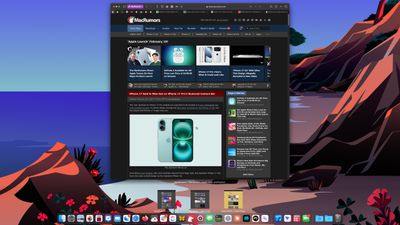
If you press the up or down arrow keys with an icon highlighted in the App Switcher overlay, Exposé will be activated for the selected app, which causes all of its windows to be displayed on screen. (Pressing the 1 key achieves the same result.) Note: Unless you have multiple displays, this won't work if the app is in fullscreen mode.
safari
Open windows are shown front and center, while minimized windows (assuming you are not using Stage Manager) appear along the bottom of the Dock. You can use the arrow keys to switch between them and press Enter to open the one you want, or simply select one using your mouse cursor in the usual way.

Drag and Drop Files

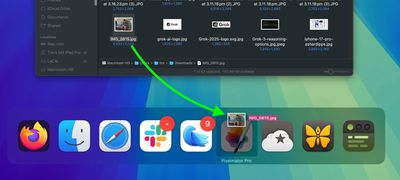
An oft-overlooked function of the App Switcher is its ability to open files. Simply begin to drag a file from a Finder window, then invoke the App Switcher and drag the file onto the relevant app icon in the overlay. Let go of the file and it should open in the selected app.
finder

Close and Hide Apps Via the App Switcher

Pressing the H key in the App Switcher hides all the windows of the selected app (pressing the H key again reveals them). Try cycling through the overlay with the Tab key and tap H as you go – it's a neat way to quickly clear a space on a desktop cluttered with windows. This method streamlines window management by avoiding minimization. By invoking the App Switcher again you can switch back to the hidden app.

Lastly, highlighting an icon in the App Switcher and tapping Q has to be one of the fastest ways to individually quit open Mac apps, and probably qualifies as our favorite App Switcher trick. Do you know any App Switcher functions we haven't covered here? Let us know in the comments.


Top Rated Comments

meson Avatar
13 months ago
Nice little write up. I didn't realize there were so many ways to cycle through the apps in switcher. I always used shift+tab to cycle from right to left. It also never occurred to me to drag and drop files onto the switcher. I've always just used the Dock or a second Finder window to show the destination app.
Score: 14 Votes (Like | Disagree)
Unity451 Avatar
13 months ago

The shift key used to reverse the order but I guess they moved it to the Tilda key now?
⌘ + Shift + Tab still goes in reverse. That's what I use.
Score: 13 Votes (Like | Disagree)
numenorian Avatar
13 months ago
Always nice to discover a new trick with something you've used for 20 years!
Score: 10 Votes (Like | Disagree)
bricefr Avatar
13 months ago
Nice article. I have learned something today, thanks.
Score: 8 Votes (Like | Disagree)
barrina Avatar
13 months ago
One more key to consider is the W key that will close the foremost window of the application highlighted in the App Switcher. Handy if you are presenting, want to switch to that app, but remember the foremost window is not one you want to present.
Score: 5 Votes (Like | Disagree)
mihighil Avatar
13 months ago
Alt-tab can preview all the open windows, and you dont need to use 3+ keys for a basic function. Plus its free.
Score: 4 Votes (Like | Disagree)

Popular Stories

Apple Logo Zoomed

Tim Cook Teases Plans for Apple's Upcoming 50th Anniversary

Thursday February 5, 2026 12:54 pm PST by
Apple turns 50 this year, and its CEO Tim Cook has promised to celebrate the milestone. The big day falls on April 1, 2026. "I've been unusually reflective lately about Apple because we have been working on what do we do to mark this moment," Cook told employees today, according to Bloomberg's Mark Gurman. "When you really stop and pause and think about the last 50 years, it makes your heart ...
Finder Siri Feature

Why Apple's iOS 26.4 Siri Upgrade Will Be Bigger Than Originally Promised

Friday February 6, 2026 3:06 pm PST by
In the iOS 26.4 update that's coming this spring, Apple will introduce a new version of Siri that's going to overhaul how we interact with the personal assistant and what it's able to do. The iOS 26.4 version of Siri won't work like ChatGPT or Claude, but it will rely on large language models (LLMs) and has been updated from the ground up. Upgraded Architecture The next-generation...
wwdc sans text feature

Apple Rumored to Announce New Product on February 19

Thursday February 5, 2026 12:22 pm PST by
Apple plans to announce the iPhone 17e on Thursday, February 19, according to Macwelt, the German equivalent of Macworld. The report, citing industry sources, is available in English on Macworld. Apple announced the iPhone 16e on Wednesday, February 19 last year, so the iPhone 17e would be unveiled exactly one year later if this rumor is accurate. It is quite uncommon for Apple to unveil...
iOS 26

iOS 26.3 and iOS 26.4 Will Add These New Features to Your iPhone

Tuesday February 3, 2026 7:47 am PST by
While the iOS 26.3 Release Candidate is now available ahead of a public release, the first iOS 26.4 beta is likely still at least a week away. Following beta testing, iOS 26.4 will likely be released to the general public in March or April. Below, we have recapped known or rumored iOS 26.3 and iOS 26.4 features so far. iOS 26.3 iPhone to Android Transfer Tool iOS 26.3 makes it easier...
iphone 17 pro dark blue 1

iPhone 18 Pro Max Rumored to Deliver Next-Level Battery Life

Friday February 6, 2026 5:14 am PST by
The iPhone 18 Pro Max will feature a bigger battery for continued best-in-class battery life, according to a known Weibo leaker. Citing supply chain information, the Weibo user known as "Digital Chat Station" said that the iPhone 18 Pro Max will have a battery capacity of 5,100 to 5,200 mAh. Combined with the efficiency improvements of the A20 Pro chip, made with TSMC's 2nm process, the...














