
Last week we explained how you can use a simple Terminal command to insert spaces in your macOS Dock and visibly group together app icons. In this article, we're going to highlight another simple Terminal hack that turns the Dock into more of a straightforward app switcher by making it display only apps that are currently running on your Mac.
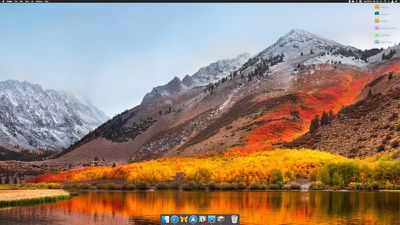
macos dock only open apps
Seeing only active apps at the bottom of your desktop can be a refreshing change if your Dock has become cluttered with various app shortcuts over time, and you can always use Spotlight (key combination Command-Space to activate) or an alternative method to launch your Mac apps.

When following the simple steps below, just bear in mind that Terminal is a powerful app, so make sure you enter the commands properly, especially if you're not familiar with it.

How to Show Only Active Apps in Your Dock

  1. Launch the Terminal app found in Applications/Utilities. (To quickly open the Utilities folder in Finder, select Go -> Utilities from the menu bar, or use the key shortcut Shift-Command-U.)

  2. At the Terminal prompt, type the following command and press Enter: defaults write com.apple.dock static-only -bool true; killall Dock
    recent apps only dock Terminal command

  3. Your Dock will reboot in order to show only the currently running apps on your Mac in the order they were launched.

    mac dock only active apps

How to Revert the Dock Back to Its Original State

If you decide you don't like this way of using the Dock, follow the steps below to return it to its usual behavior.

  1. Launch the Terminal app again if it's not already open.

  2. At the Terminal prompt, type the following command and press Enter: defaults write com.apple.dock static-only -bool false; killall Dock

  3. Your Dock will reboot and revert to showing both running and non-running apps.

If there's a specific active app that you'd like to hide from the Dock for whatever reason, there are a couple of third-party utilities that might help. Dock Dodger is a free drag-and-drop tool that can hide certain apps from the Dock even when they're running (once placed on the tool's droplet, you have to restart the app in question to hide it, although our success rate varied depending on the app). If you're willing to open your wallet, GhostTile is a more recent and reliable paid-for alternative with similar functionality.


Top Rated Comments

sunapple Avatar
103 months ago
What’s the difference with removing all apps from the Dock and opening new ones from another place?
Score: 3 Votes (Like | Disagree)
frou Avatar
103 months ago
For the longest time, I have simply dragged all of the default app "shortcuts" off of my Dock, and used Spotlight via the keyboard to launch everything.
Score: 3 Votes (Like | Disagree)
sp3k0psv3t Avatar
103 months ago
This is nice. Really cleans things up a bit since I have a gazillion apps in my dock lol.

Thanks for the tutorial.
Score: 2 Votes (Like | Disagree)
Amazing Iceman Avatar
103 months ago
I hardly use the dock to launch apps. Using [COMMAND] [SPACE] and typing the app name to launch it is a faster approach.
Score: 2 Votes (Like | Disagree)
sirozha Avatar
103 months ago
I don't get this tip.

After I implemented this command, I was able to right-click on the icons of the running apps and select "Keep in Dock". After that, when I closed the apps, their icons remained on the Dock. So, how is this different from just dragging all your icons off the dock one at a time?
Score: 2 Votes (Like | Disagree)
chabig Avatar
103 months ago
Just apply the technique and then add the download folder manually (drag it to the dock).
Score: 1 Votes (Like | Disagree)

Popular Stories

Apple Logo Zoomed

Tim Cook Teases Plans for Apple's Upcoming 50th Anniversary

Thursday February 5, 2026 12:54 pm PST by
Apple turns 50 this year, and its CEO Tim Cook has promised to celebrate the milestone. The big day falls on April 1, 2026. "I've been unusually reflective lately about Apple because we have been working on what do we do to mark this moment," Cook told employees today, according to Bloomberg's Mark Gurman. "When you really stop and pause and think about the last 50 years, it makes your heart ...
Finder Siri Feature

Why Apple's iOS 26.4 Siri Upgrade Will Be Bigger Than Originally Promised

Friday February 6, 2026 3:06 pm PST by
In the iOS 26.4 update that's coming this spring, Apple will introduce a new version of Siri that's going to overhaul how we interact with the personal assistant and what it's able to do. The iOS 26.4 version of Siri won't work like ChatGPT or Claude, but it will rely on large language models (LLMs) and has been updated from the ground up. Upgraded Architecture The next-generation...
wwdc sans text feature

Apple Rumored to Announce New Product on February 19

Thursday February 5, 2026 12:22 pm PST by
Apple plans to announce the iPhone 17e on Thursday, February 19, according to Macwelt, the German equivalent of Macworld. The report, citing industry sources, is available in English on Macworld. Apple announced the iPhone 16e on Wednesday, February 19 last year, so the iPhone 17e would be unveiled exactly one year later if this rumor is accurate. It is quite uncommon for Apple to unveil...
iOS 26

iOS 26.3 and iOS 26.4 Will Add These New Features to Your iPhone

Tuesday February 3, 2026 7:47 am PST by
While the iOS 26.3 Release Candidate is now available ahead of a public release, the first iOS 26.4 beta is likely still at least a week away. Following beta testing, iOS 26.4 will likely be released to the general public in March or April. Below, we have recapped known or rumored iOS 26.3 and iOS 26.4 features so far. iOS 26.3 iPhone to Android Transfer Tool iOS 26.3 makes it easier...
iphone 17 pro dark blue 1

iPhone 18 Pro Max Rumored to Deliver Next-Level Battery Life

Friday February 6, 2026 5:14 am PST by
The iPhone 18 Pro Max will feature a bigger battery for continued best-in-class battery life, according to a known Weibo leaker. Citing supply chain information, the Weibo user known as "Digital Chat Station" said that the iPhone 18 Pro Max will have a battery capacity of 5,100 to 5,200 mAh. Combined with the efficiency improvements of the A20 Pro chip, made with TSMC's 2nm process, the...
















