macOS Sierra: How to Use Apple Pay on the Web - MacRumors
Skip to Content

macOS Sierra: How to Use Apple Pay on the Web

by

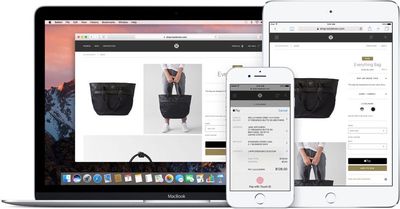
macOS Sierra and iOS 10 both include a new Continuity feature that allows Apple Pay to be used to make purchases on the web using Safari, giving Apple users an alternative to other web-based payment services like PayPal.

On Macs, Apple Pay for the web requires an iPhone with Touch ID and Apple Pay support or an Apple Watch, as payments are authenticated through the phone or watch. Apple Pay on the web requires merchants to adopt Apple Pay, so it isn't yet available everywhere, but support has started rolling out.
applepayweb
Sites like Time Inc., Wayfair, and Apple's own online Apple Store have started accepting Apple Pay, and payment processors like Stripe, Big Commerce, Shopify, and Squarespace all offer support, so it may be almost everywhere in just a couple of months.

Here's how it works:

  1. Visit a website that supports Apple Pay on the web, like Apple.com. I'll be using Apple's online store as an example.

    checkoutwithapplepay

  2. Choose a product you want to purchase and click "Add to Bag."
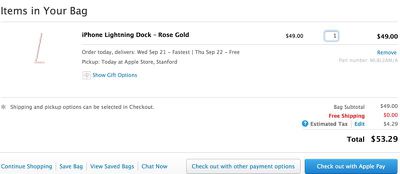
  3. On Apple's site, you're automatically taken to the cart, where "Check out with Apple Pay" is an option. Choose it.
  4. At the next checkout screen, choose delivery options and then click on the Apple Pay button.
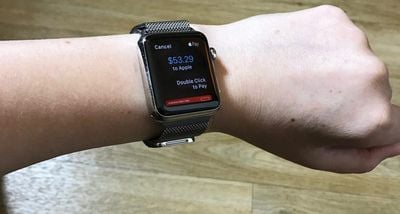
  5. If you're wearing an authenticated Apple Watch, you'll be asked to verify the payment with the watch. Double tap on the side button (watchOS 3) to confirm and make the purchase.

    applepayonapplewatch

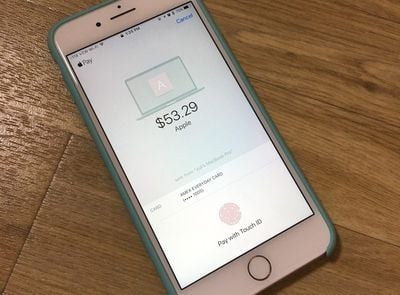
  6. With no Apple Watch, a confirmation screen will pop up on a connected iPhone, locked or unlocked. It requires a fingerprint to be placed on the Touch ID home button to confirm the payment.

    applepayiphone

  7. Once the payment is confirmed on the Apple Watch or the iPhone, that's it. The purchase is made and on its way.
When checking out on the web, all payment and shipping information is entered automatically, so you don't need to do anything but tap the confirm button to pay. It's quick, simple, fast, and safe. There is, however, a popup that will let you select the card you want to use, choose the shipping address, and more, if you need to make alterations.
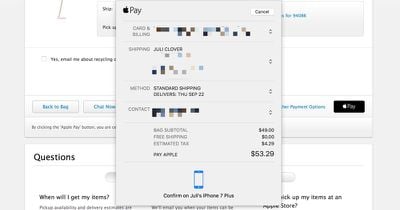
applepayconfirm
Apple Pay on the web is a Continuity feature so it requires a Mac with Bluetooth 4.0 support. It is compatible with the following machines running macOS Sierra:

- MacBook (Early 2015 or newer)
- MacBook Pro (2012 or newer)
- MacBook Air (2012 or newer)
- Mac mini (2012 or newer)
- iMac (2012 or newer)
- Mac Pro (Late 2013)

Apple Pay also requires an iPhone 6 or later running iOS 10 or an Apple Watch with watchOS 3, and it only works with the Safari browser. Apple Pay on the web is also available on iOS devices and will be available as long as one card has been added to the Wallet app on the iPhone.


Related Forum: macOS Sierra

Top Rated Comments

jent Avatar
124 months ago
Not sure this is appealing to me. It seems like more work. Is it just because it's more secure?
It also allows you to make purchases online without giving your credit card information.
Score: 5 Votes (Like | Disagree)
ghostface147 Avatar
124 months ago
Crap. I'm one year too old for Apple Pay on the web. That's ok. I'd rather have my 17" MacBook Pro.
Score: 3 Votes (Like | Disagree)
sythesigh Avatar
124 months ago
Crap. I'm one year too old for Apple Pay on the web. That's ok. I'd rather have my 17" MacBook Pro.
That's what the continuity hack solves
Score: 2 Votes (Like | Disagree)
garirry Avatar
124 months ago
I'm curious though, when the MacBook Pro will be released, if it'll have a fingerprint scanner, would you be able to add Apple Pay directly to macOS and pay without an iPhone? Alternatively, you may be able to use your phone's Apple Pay info but by authenticating through the MBP's touch ID.
Not sure this is appealing to me. It seems like more work. Is it just because it's more secure?
Oh trust me it just seems difficult. Click "pay by apple pay" and a prompt pops up on your watch or iPhone. It's definitely not difficult.
Score: 2 Votes (Like | Disagree)
124 months ago
So glad Apple Pay is available on the web now. Gonna make purchasing a lot easier!
Definitely. No one in the U.K. appears to take it yet but here's hoping.

We just need a few more banks/countries on board now.
Score: 1 Votes (Like | Disagree)
tennisproha Avatar
124 months ago
So glad Apple Pay is available on the web now. Gonna make purchasing a lot easier!
Score: 1 Votes (Like | Disagree)

Popular Stories

iOS 26

iOS 26.4 Adds Two New Features to CarPlay

Tuesday March 24, 2026 1:55 pm PDT by
iOS 26.4 was released today, and it includes a couple of new features for CarPlay: an Ambient Music widget and support for voice-based chatbot apps. To update your iPhone 11 or newer to iOS 26.4, open the Settings app and tap on General → Software Update. CarPlay will automatically offer the new features so long as the iPhone connected to your vehicle is running iOS 26.4 or later....
Apple Business hero

Apple Unveils 'Apple Business' All-in-One Platform

Tuesday March 24, 2026 8:53 am PDT by
Apple today announced Apple Business, a new all-in-one platform that unifies device management, productivity tools, and customer outreach features. The service is designed to be a consolidated replacement for several of Apple's existing business-focused offerings, including Apple Business Essentials, Apple Business Manager, and Apple Business Connect. It provides organizations with a single...
AirPods Pro Firmware Feature

Apple Releases New Firmware for AirPods Pro 3, AirPods Pro 2 and AirPods 4

Tuesday March 24, 2026 12:31 pm PDT by
Apple today released new firmware for the AirPods Pro 2, AirPods Pro 3, and the AirPods 4. The firmware has a version number of 8B39, up from 8B34 on the AirPods Pro 3, 8B28 on the AirPods Pro 2, and 8B21 on the AirPods 4. There is no word on what's included in the firmware, but Apple has a support document with limited notes. Most updates are limited to bug fixes and performance...