Starting with macOS Sierra, Apple introduced an "Auto Unlock" feature that makes it easier for Apple Watch owners to unlock their Macs, with the Apple Watch being used for authentication purposes instead of a traditional password.

It's a feature that's limited to more recent Macs so it's not going to work on some older machines, but when it is available, Auto Unlock is a super useful option that genuinely saves a bit of time. It isn't always enabled by default, so there are a few steps to go through to turn Auto Unlock on. Here's how to use it.

  1. Navigate to the Apple logo on the upper left hand of the screen and select "System Preferences."
  2. Click on "Security & Privacy" from the first row of apps.
  3. Auto Unlock is an option under the "General" section. Click the check box to turn it on.
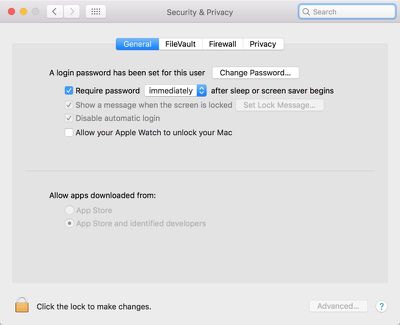
    autounlocksierra

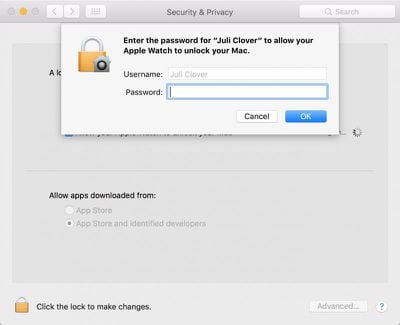
  4. Enter your password.

    enteryourpassword

Once enabled, Auto Unlock works automatically whenever your authenticated Apple Watch is near your Mac (as in within a few feet). When waking a Mac from sleep and the password entry screen pops up, it will say "Unlocking with Apple Watch..." instead of bringing up the password text box.

loginscreenautounlock
A few seconds later, the Mac will unlock and you will receive a notification on your Apple Watch letting you know the unlocking was successful. If Auto Unlock fails to authenticate for some reason, the password entry option will pop up after approximately 10 seconds and you will be required to enter your password to log in.
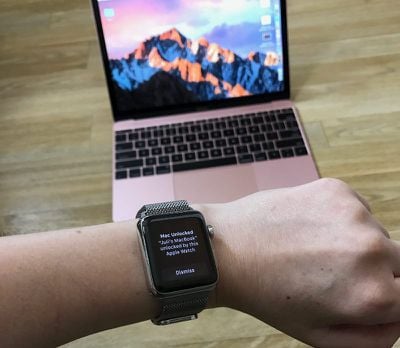
applewatchautounlockmac
Auto Unlock is a Continuity feature, so it is limited to some of Apple's more recent machines. It is supported by all Mac models introduced in mid-2013 or later, and it requires an Apple Watch running watchOS 3 or later paired with an iPhone 5 or later. Handoff must be turned on in System Preferences (General --> Allow Handoff) and your iPhone, Apple Watch, and Mac must be signed into the same iCloud account.
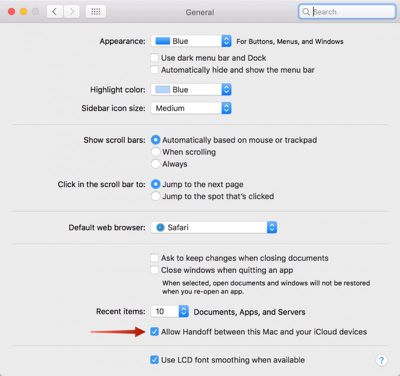
sierraunlockallowhandoff
To enable Auto Unlock, you will also need to turn on Two-Factor Authentication if it isn't on already.

For those of you using the original Two-Step Verification instead of the Two-Factor Authentication feature introduced with iOS 10, you will need to disable Two-Step Verification on the Apple ID management site and then enable Two-Factor Authentication on an iOS device. A passcode also needs to be established on the Apple Watch.
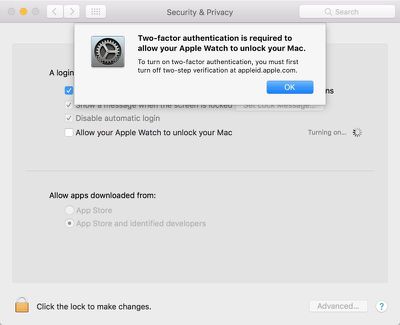
autounlock2farequired
Apple doesn't offer troubleshooting tips if Auto Unlock isn't working, but signing out of iCloud and back in again and restarting your devices may help solve any issues.

There are still instances where you will need to log in with a password, like after rebooting your machine, but for the most part, Auto Unlock successfully replaces password entry on the Mac.


Related Forum: macOS Sierra

Top Rated Comments

konqerror Avatar
123 months ago
Same here. I can't think of any technical reason that this wouldn't work. I'd be shocked if it doesn't work on a 2012 rMBP. Oh wait, this is Apple. Wouldn't shock me in the slightest.
Because it uses time-of-flight WiFi, it requires a Mac with a 802.11ac card.
Score: 7 Votes (Like | Disagree)
3square Avatar
123 months ago
Why is this limited to only the watch? Real Question - is this a technical issue?
i think it has to do with which device has the most recent/constant authentication. For the iPhone, only once you unlock with touchID, only then it is considered authenticated. Since anyone can take your phone and place it near your mac to unlock it.

With the watch, from the moment you put it on AND authenticate it with your iPhone touchID, the watch will always be considered authenticated. Until you remove the watch.

Can anyone please verify my theory? remove the watch off your wrist and try to unlock your Mac.

i'm sure apple can set it up to work with your phone. but that would require you to use touchID on your phone every time. Apple being apple, I assume would rather take the most seamless path. I honestly wouldn't mind using the phone as a second method. Maybe with the next update?
Score: 6 Votes (Like | Disagree)
WiseAJ Avatar
123 months ago
Probably limiting it so you buy a new computer.
Now they just need to release said new computers.
Score: 5 Votes (Like | Disagree)
pat500000 Avatar
123 months ago
Same here. I can't think of any technical reason that this wouldn't work. I'd be shocked if it doesn't work on a 2012 rMBP. Oh wait, this is Apple. Wouldn't shock me in the slightest.
Probably limiting it so you buy a new computer.
Score: 4 Votes (Like | Disagree)
DMVillain Avatar
123 months ago
I have Continuity and Handoff on my Late-2012 rMBP, so I'm anxious to see if this works for me.
Score: 4 Votes (Like | Disagree)
shareef777 Avatar
123 months ago
I have Continuity and Handoff on my Late-2012 rMBP, so I'm anxious to see if this works for me.
Same here. I can't think of any technical reason that this wouldn't work. I'd be shocked if it doesn't work on a 2012 rMBP. Oh wait, this is Apple. Wouldn't shock me in the slightest.
Score: 3 Votes (Like | Disagree)

Popular Stories

Apple Logo Zoomed

Tim Cook Teases Plans for Apple's Upcoming 50th Anniversary

Thursday February 5, 2026 12:54 pm PST by
Apple turns 50 this year, and its CEO Tim Cook has promised to celebrate the milestone. The big day falls on April 1, 2026. "I've been unusually reflective lately about Apple because we have been working on what do we do to mark this moment," Cook told employees today, according to Bloomberg's Mark Gurman. "When you really stop and pause and think about the last 50 years, it makes your heart ...
wwdc sans text feature

Apple Rumored to Announce New Product on February 19

Thursday February 5, 2026 12:22 pm PST by
Apple plans to announce the iPhone 17e on Thursday, February 19, according to Macwelt, the German equivalent of Macworld. The report, citing industry sources, is available in English on Macworld. Apple announced the iPhone 16e on Wednesday, February 19 last year, so the iPhone 17e would be unveiled exactly one year later if this rumor is accurate. It is quite uncommon for Apple to unveil...
Finder Siri Feature

Why Apple's iOS 26.4 Siri Upgrade Will Be Bigger Than Originally Promised

Friday February 6, 2026 3:06 pm PST by
In the iOS 26.4 update that's coming this spring, Apple will introduce a new version of Siri that's going to overhaul how we interact with the personal assistant and what it's able to do. The iOS 26.4 version of Siri won't work like ChatGPT or Claude, but it will rely on large language models (LLMs) and has been updated from the ground up. Upgraded Architecture The next-generation...
iOS 26

iOS 26.3 and iOS 26.4 Will Add These New Features to Your iPhone

Tuesday February 3, 2026 7:47 am PST by
While the iOS 26.3 Release Candidate is now available ahead of a public release, the first iOS 26.4 beta is likely still at least a week away. Following beta testing, iOS 26.4 will likely be released to the general public in March or April. Below, we have recapped known or rumored iOS 26.3 and iOS 26.4 features so far. iOS 26.3 iPhone to Android Transfer Tool iOS 26.3 makes it easier...
iphone 17 pro dark blue 1

iPhone 18 Pro Max Rumored to Deliver Next-Level Battery Life

Friday February 6, 2026 5:14 am PST by
The iPhone 18 Pro Max will feature a bigger battery for continued best-in-class battery life, according to a known Weibo leaker. Citing supply chain information, the Weibo user known as "Digital Chat Station" said that the iPhone 18 Pro Max will have a battery capacity of 5,100 to 5,200 mAh. Combined with the efficiency improvements of the A20 Pro chip, made with TSMC's 2nm process, the...