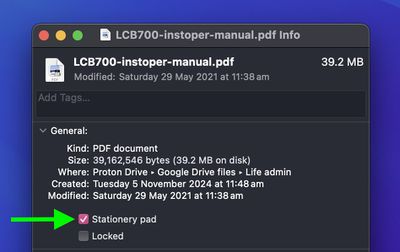
Stationery Pad is a handy way to nix a step in your workflow if you regularly use document templates on your Mac. The long-standing Finder feature essentially tells a file's parent application to open a copy of it by default, ensuring that the original file remains unedited.
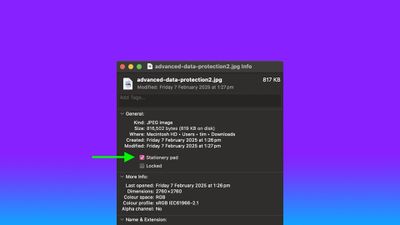
stationery pad
Stationery Pad doesn't get much attention these days, but it's a neat alternative to repeatedly editing templates and using the "Save As..." command, which can lead to overwriting the original file if you're not too careful.

Almost any file type can be defined as a template with Stationery Pad – it could be used to streamline common Photoshop jobs, create skeleton HTML/CSS files, or help with Word document invoicing. To make use of Stationery Pad, create the file you want to use as a template, then follow the steps below.

Define a File as a Template Using Stationery Pad

  1. Find the file in Finder that you want to use as a template.

  2. Right-click (or Ctrl-click) the file and select Get Info in the contextual dropdown menu. Alternatively, click the file to select it and use the Command+I keyboard shortcut to launch Get Info.
    finder

  3. Check the Stationery Pad checkbox under the General section.
    finder

  4. Click the red traffic light button to close the Get Info window.
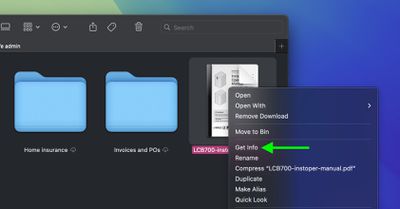
Next time you double-click the template file, Finder will create and open a copy of it, leaving the original untouched. To reverse the behavior, simply uncheck the Stationery Pad checkbox in the template file's Get Info window.


Top Rated Comments

UltimateSyn Avatar
13 months ago
I’ve used Macs for ~25 years and never knew you could do this. Thank you!
Score: 20 Votes (Like | Disagree)
wanha Avatar
13 months ago
Apple is usually great at naming things, but "Stationary pad" is a terribly confusing name for this useful feature
Score: 20 Votes (Like | Disagree)
brightonguy Avatar
13 months ago
If Apple actually renamed this checkbox and call it "This file is a template" or whatever else they want to use as long as it has the word "template" on it, it would have more mainstream awareness. Who the hell uses the term "stationary pad" nowadays?
Score: 13 Votes (Like | Disagree)
AngerDanger Avatar
13 months ago
Not only did I not know what that checkbox did, I'd somehow never even noticed it ?


Apple is usually great at naming things, but "Stationary pad" is a terribly confusing name for this useful feature
Seriously, "Make Template" would be so much less ambiguous.
Score: 9 Votes (Like | Disagree)
Willis Avatar
13 months ago
I remember looking this up around 10-15 years ago and thought oh cool, but had zero use for it. Naturally, I forgot this existed.

Probably the best Mac tip going right now
Score: 6 Votes (Like | Disagree)
neilw Avatar
13 months ago

I’ve used Macs for ~25 years and never knew you could do this. Thank you!
29 years for me, never heard of this before.
Score: 5 Votes (Like | Disagree)

Popular Stories

Apple Logo Zoomed

Tim Cook Teases Plans for Apple's Upcoming 50th Anniversary

Thursday February 5, 2026 12:54 pm PST by
Apple turns 50 this year, and its CEO Tim Cook has promised to celebrate the milestone. The big day falls on April 1, 2026. "I've been unusually reflective lately about Apple because we have been working on what do we do to mark this moment," Cook told employees today, according to Bloomberg's Mark Gurman. "When you really stop and pause and think about the last 50 years, it makes your heart ...
iOS 26

iOS 26.3 and iOS 26.4 Will Add These New Features to Your iPhone

Tuesday February 3, 2026 7:47 am PST by
While the iOS 26.3 Release Candidate is now available ahead of a public release, the first iOS 26.4 beta is likely still at least a week away. Following beta testing, iOS 26.4 will likely be released to the general public in March or April. Below, we have recapped known or rumored iOS 26.3 and iOS 26.4 features so far. iOS 26.3 iPhone to Android Transfer Tool iOS 26.3 makes it easier...
imac video apple feature

Apple Makes Its Second-Biggest Acquisition Ever

Tuesday February 3, 2026 12:45 pm PST by
Apple recently acquired Israeli startup Q.ai for close to $2 billion, according to Financial Times sources. That would make this Apple's second-biggest acquisition ever, after it paid $3 billion for the popular headphone maker Beats in 2014. This is also the largest known Apple acquisition since the company purchased Intel's smartphone modem business and patents for $1 billion in 2019....
wwdc sans text feature

Apple Rumored to Announce New Product on February 19

Thursday February 5, 2026 12:22 pm PST by
Apple plans to announce the iPhone 17e on Thursday, February 19, according to Macwelt, the German equivalent of Macworld. The report, citing industry sources, is available in English on Macworld. Apple announced the iPhone 16e on Wednesday, February 19 last year, so the iPhone 17e would be unveiled exactly one year later if this rumor is accurate. It is quite uncommon for Apple to unveil...
Finder Siri Feature

Why Apple's iOS 26.4 Siri Upgrade Will Be Bigger Than Originally Promised

Friday February 6, 2026 3:06 pm PST by
In the iOS 26.4 update that's coming this spring, Apple will introduce a new version of Siri that's going to overhaul how we interact with the personal assistant and what it's able to do. The iOS 26.4 version of Siri won't work like ChatGPT or Claude, but it will rely on large language models (LLMs) and has been updated from the ground up. Upgraded Architecture The next-generation...