

 If you use FaceTime to frequently call certain people in your contacts, you can save time by adding them to your Favorites list.
Your iPhone's native Phone app makes it easy to call the people you talk to most by adding them to your Favorites list. This lets you tap the person's name to immediately start a FaceTime call.
The following steps show you how to add someone to your Favorites as a FaceTime contact.
- Launch the stock Phone app on your iPhone.
- Tap the Favorites tab at the bottom of the screen.
- Tap the plus (+) button in the top left-corner of the screen.
- Search a name in your contacts or select a contact from the list.
- Tap Video in the pop-up menu.
- Select FaceTime from the video options available.

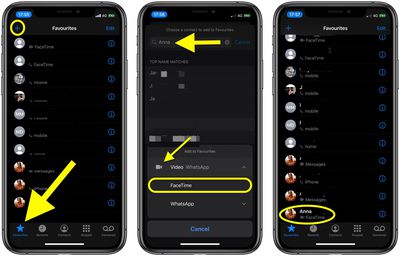
You'll be returned to the Favorites screen and see the new favorite listed along with FaceTime as the contact type just below their name. Next time you want to call them using FaceTime, simply launch the Phone app and then tap their FaceTime contact in the Favorites tab.
Tag: FaceTime Guide
























![Apple Pulls Keynote, Pages and Numbers From App Store [Update: Back]](https://images.macrumors.com/t/Okb7kitB_gNr6qe5Pex9nQIysD8=/112x112/article-new/2026/01/Apple-Creator-Studio-iWork-suite.jpg)





















