Animoji are animated emoji characters designed to mimic your facial expressions, while Memoji are customizable humanoid Animoji characters that you can design to look just like you.
In iOS 12 and later, you can entertain friends and family by "wearing" your favorite Memoji and Animoji during live FaceTime chats using the Effects camera. The following steps show you how.
Note that to use an animated Animoji and Memoji in FaceTime, you need an iPhone or iPad Pro with a TrueDepth camera (if your device has Face ID, then you're good). Others on the call with you will see them regardless of the device they have.
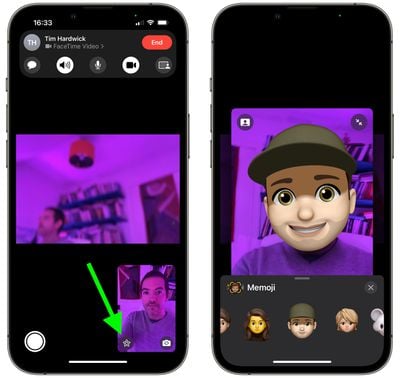
- Open the FaceTime app on your iPhone or iPad and make a call.
- When the call has connected, tap the star-shaped Effects icon inside the image of yourself (if you don't see it, tap the screen).
- Tap the Animoji button (the face within a frame).

- Scroll horizontally and tap the Memoji or Animoji that you want to use, and it will be displayed over your face.
- Continue your call with your Memoji/Animoji active, or tap the big None (X) button to deactivate it and return to the FaceTime menu.
Quick tip: Tap the smaller "X" above the Animoji menu and you can also apply other camera effects while on the call, including filters, text, shapes, and stickers.