

The Maps app in iOS 11 is outfitted with several new features that significantly improve the app's functionality. Indoor maps let you find restaurants, bathrooms, and other locations in airports and malls, while other new features like speed limits and lane guidance improve turn-by-turn directions.
Fun fact: In iOS 11, Apple has also updated the Maps icon. The new version is meant to show off a corner of Apple Park, Apple's new campus with its now-famous enormous ring-shaped main building.
Indoor Mapping
For the first time, Apple is introducing detailed indoor maps in iOS 11, finally making use of all those mapping companies that it's purchased over the course of the last few years.
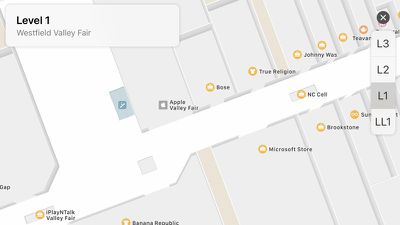
iOS 11 includes indoor maps of select malls and airports around the world, displaying full layouts of each location with icons for restaurants, elevators, bathrooms, shops, and other notable indoor landmarks. In airports, you'll see a clear view of the different terminals and gates so you can find your way to your flight.
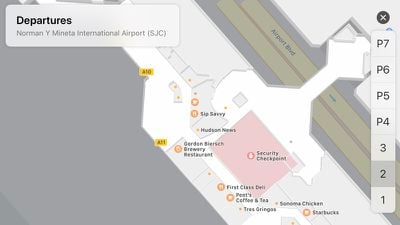
Right now, indoor mapping is limited to a handful of malls and airports, but Apple says support will be dramatically expanded over time.
Lane Guidance
If you've ever missed a turn because the Maps app didn't let you know what lane to be in, you're going to be happy with the changes made in iOS 11. With a new lane guidance feature, Maps will always let you know what lane you should be in so you'll never miss a sudden turn or an exit.
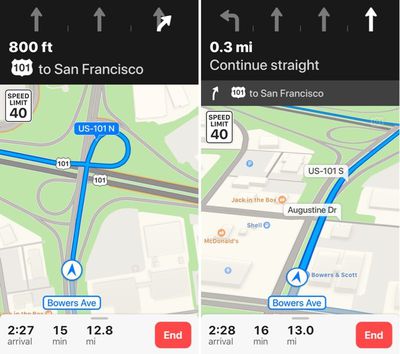
Lane guidance displays the number of lanes on the road and highlights the lane you're supposed to be in. It is currently available in the United States and China.
Speed Limits
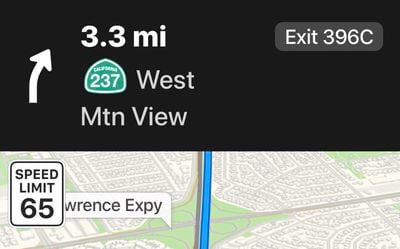
Speed limits, initially launching in the United States and United Kingdom, is a small but highly useful change, and it's one of those features that makes you wonder why it wasn't in the Maps app all along. Speed limits displays the speed limit of the road you're on right on your iPhone's display when you're using turn-by-turn directions.
Light Guidance
For routes that you travel often, there's an option to enable "Light Guidance." Light Guidance, previously available to CarPlay users, cuts down on the directions you receive, since you likely know the route, and instead displays an overview of the trip and alternative routes.
Augmented Reality Flyover
When using the Flyover feature in iOS 11, you can explore cities by tilting and moving your device, mimicking the feel of actually being in the citing you're looking at. You can rotate the iPhone or iPad 360 degrees in the new Flyover mode for a much more immersive experience, and it will even move forward as you walk forward in real life.





















Top Rated Comments
Lane guidance is the one feature of google maps that I really missed. I hated how Google maps app drained my battery but had to use Google maps when I needed that info. Glad it’s in the included maps app now.
[doublepost=1505870667][/doublepost]Never installed any google apps. Apple maps works great for me.
[doublepost=1505888305][/doublepost]Yes, and dozens of other companies/agencies. Within 25 miles of where I am now I can identify data from two DOTs, 7 counties, at least 20 cities, two pseudo-agencies, and the Corps of Engineers - all of them I can count as my present and former clients. And, Mapbox. That's just eyeballing the Maps apps. TomTom/Tele Atlas is just another data aggregator which packages and resells data…
Given that Apple uses data from TomTom, it should have been possible for Apple Maps to both show speed limits and alarm the user in the event of exceeding the limit. I can only guess it was withheld by TomTom so that its products had a USP, or not purchased by Apple due to high licensing costs or perceived liability issues.
If we are to become dependent on CarPlay, we need real-time speed alarms.