Recognizing the utility of Markup annotation tools, Apple has extended their availability in recent versions of iOS, but it's worth bearing in mind that you can access a similar and equally useful annotation toolset within several native Mac applications.

In macOS, accessing an application's Markup toolbar lets you draw on and annotate images or PDF documents within the app using arrows, shapes, and text. You can also use it to quickly sign a document with your digital signature.
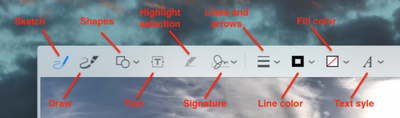
macos markup tools
We've highlighted which native apps support Markup in this article. But before you can access the toolset in desktop apps, you'll need to check that the relevant extension is enabled on your Mac. Keep reading to learn how it's done.

How to Enable the Markup Extension in macOS

  1. Click the Apple () symbol in your Mac's menu bar and select System Preferences....
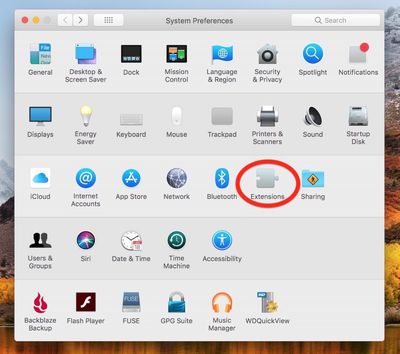
    macos extensions

  2. Click the Extensions preference pane.

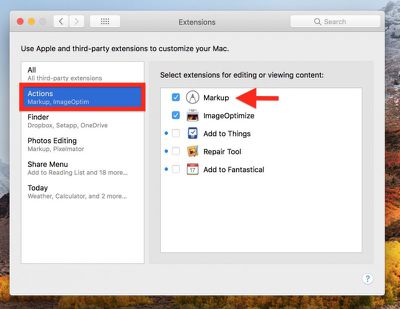
  3. Click Actions in the left column of the Extension pane.
    macos Markup extension

  4. If it isn't already ticked, click on the box next to the Markup extension in the right column.
macos mail markup
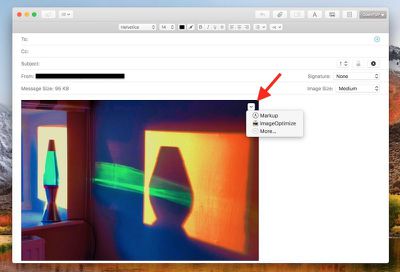
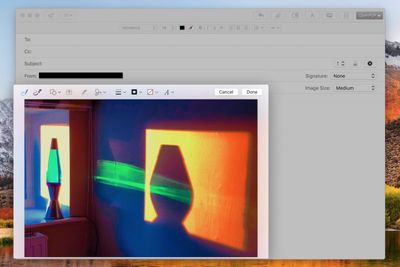
One of the most useful Markup integrations can be found in Mail. Once you've dragged an image into your message, hover your mouse cursor over it, click the arrow button that appears in the upper right corner, and select Markup from the dropdown menu.
macos mail markup 2
Your attached image will be foregrounded with the Markup toolbar across the top, ready for you to apply your annotations.

Markup can be accessed in the same manner within TextEdit as well as some third-party document editors. To test whether it's available, simply hover your cursor over the image once it's inside your document and look for the arrow in the upper right corner.

macos preview markup
In Preview, the Markup toolbar has its own button next to the Search input field on the right of the taskbar. You also get a few extra Markup tools here, like Adjust Color, Adjust Size, and Crop, so if you can't annotate an image within your application of choice then Preview should be your next stop.

macos photos markup
Finally, the Markup toolset is also accessible in Apple's Photos application: Next time you're editing an image, click the Extensions icon (the three dots in a circle) and select Markup to enter annotation mode.


Top Rated Comments

syklee26 Avatar
102 months ago
Apple pencil support (on trackpad) with more expansive markup tools in macos would be awesome.
Score: 4 Votes (Like | Disagree)
chucker23n1 Avatar
102 months ago
Having Markup available in many places (such as Mail and Notes) is cool, but in practice I find the annotation tools a bit baffling. Maybe I just need to get used to them. I want a highlight pen like in Windows Snipping Tool.

Is there a third-party extension that does this?
Score: 2 Votes (Like | Disagree)
chucker23n1 Avatar
102 months ago
I browse the internet on an iPad docked to a keyboard/case. No reason this can't happen on a Macbook as well.
There are plenty of reasons. There's plenty Apple would need to do to change macOS to make it suitable for touch, such as adding a virtual keyboard, making the controls suitable in size for touch targets, changing the gestures, …. And you'd roughly end up with the touch experience of Windows 7, which wasn't great.
Score: 1 Votes (Like | Disagree)
satchmo Avatar
102 months ago
Apple pencil support (on trackpad) with more expansive markup tools in macos would be awesome.
I'll go further and suggest touch screens on all Apple products.
I don't understand the opposition.

No, you're not going to draw vertically on an iMac or laptop. But there are plenty of times where a quick finger touch to select a button is quicker than a cursor.

Make it optional. If you don't like using touch...guess what...don't touch the screen.
Score: 1 Votes (Like | Disagree)

Popular Stories

Apple Logo Zoomed

Tim Cook Teases Plans for Apple's Upcoming 50th Anniversary

Thursday February 5, 2026 12:54 pm PST by
Apple turns 50 this year, and its CEO Tim Cook has promised to celebrate the milestone. The big day falls on April 1, 2026. "I've been unusually reflective lately about Apple because we have been working on what do we do to mark this moment," Cook told employees today, according to Bloomberg's Mark Gurman. "When you really stop and pause and think about the last 50 years, it makes your heart ...
Finder Siri Feature

Why Apple's iOS 26.4 Siri Upgrade Will Be Bigger Than Originally Promised

Friday February 6, 2026 3:06 pm PST by
In the iOS 26.4 update that's coming this spring, Apple will introduce a new version of Siri that's going to overhaul how we interact with the personal assistant and what it's able to do. The iOS 26.4 version of Siri won't work like ChatGPT or Claude, but it will rely on large language models (LLMs) and has been updated from the ground up. Upgraded Architecture The next-generation...
wwdc sans text feature

Apple Rumored to Announce New Product on February 19

Thursday February 5, 2026 12:22 pm PST by
Apple plans to announce the iPhone 17e on Thursday, February 19, according to Macwelt, the German equivalent of Macworld. The report, citing industry sources, is available in English on Macworld. Apple announced the iPhone 16e on Wednesday, February 19 last year, so the iPhone 17e would be unveiled exactly one year later if this rumor is accurate. It is quite uncommon for Apple to unveil...
iOS 26

iOS 26.3 and iOS 26.4 Will Add These New Features to Your iPhone

Tuesday February 3, 2026 7:47 am PST by
While the iOS 26.3 Release Candidate is now available ahead of a public release, the first iOS 26.4 beta is likely still at least a week away. Following beta testing, iOS 26.4 will likely be released to the general public in March or April. Below, we have recapped known or rumored iOS 26.3 and iOS 26.4 features so far. iOS 26.3 iPhone to Android Transfer Tool iOS 26.3 makes it easier...
iphone 17 pro dark blue 1

iPhone 18 Pro Max Rumored to Deliver Next-Level Battery Life

Friday February 6, 2026 5:14 am PST by
The iPhone 18 Pro Max will feature a bigger battery for continued best-in-class battery life, according to a known Weibo leaker. Citing supply chain information, the Weibo user known as "Digital Chat Station" said that the iPhone 18 Pro Max will have a battery capacity of 5,100 to 5,200 mAh. Combined with the efficiency improvements of the A20 Pro chip, made with TSMC's 2nm process, the...