contacts iconIf you've been maintaining and migrating the same Contacts list across Macs over the years then you've probably come across your fair share of duplicate contact cards. They can also appear seemingly out of nowhere after setting up iCloud Contacts on your Mac for the first time.

Unless you intentionally keep certain information for the same contact separated out for whatever reason, duplicate cards will add nothing but irritation to your day, so here we're going to show you how to merge and/or remove them, whether you're sat at your Mac or not.

How to Merge and Remove Duplicate Contacts on your Mac

As with any computer procedure that involves deleting data, make sure you have a backup of your system before following these steps.

  1. Launch the Contacts app on your Mac (found in Applications/Contacts).
    mac duplicates 1

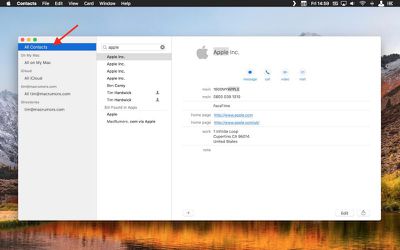
  2. In the Groups pane on the left, make sure All Contacts is selected at the top of the list. (If the Groups view is hidden, select the menu bar option View -> Show Groups to reveal it.)

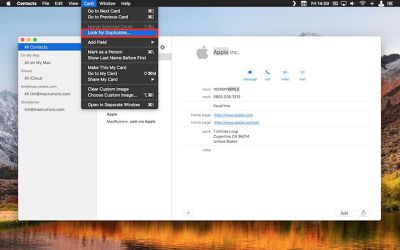
  3. From the menu bar, select Card -> Look for Duplicates....
    mac duplicates 2

  4. A dropdown dialog will appear telling you how many duplicate cards were found that either have the same name but contain different information, or have both the same name and the same information. To merge the duplicate cards and information, click the Merge button.
How to Remove Duplicate iCloud Contacts on PC and Mac

If you don't have access to your Mac you can remotely delete duplicate entries in your Contacts list in the following way. Oddly, there's no way to select multiple contacts on an iPhone or iPad running iOS 11, so this manual method is the best workaround, although bear in mind it only applies to contacts synced to ‌iCloud‌.

  1. Launch a web browser on your device or computer.

  2. Navigate to icloud.com.

  3. Sign in using your ‌iCloud‌ credentials.

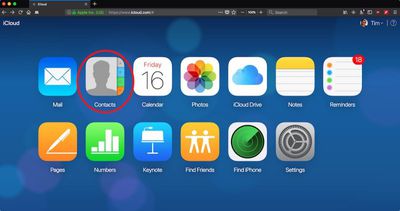
  4. Click Contacts.
    Screen Shot 2 1

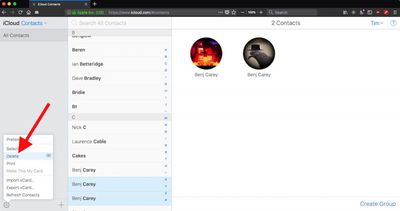
  5. Select All Contacts in the upper left corner of the screen.

  6. Hold down the Command (⌘) key and manually click the duplicate cards you want to delete.
    icloud

  7. Click the cog icon in the lower left corner and select Delete from the popup menu.

  8. Confirm you want to remove the selected contacts by clicking the Delete option in the dialog pane.
Tag: iCloud

Top Rated Comments

NightFox Avatar
104 months ago
So is there no way to check the duplicates before you allow them to be merged, or select which ones you want to be merged?
Score: 9 Votes (Like | Disagree)
garrick2007 Avatar
104 months ago
The last time I did that, I ended up losing some of my contacts permanently.
File>Export>Contacts Archive
Score: 6 Votes (Like | Disagree)
HUGE AL Avatar
98 months ago
...back in the day I used to have 2 giant Rolodex's - and it was quite a job keeping those updated - or even figuring out where I put the contact info - company or contact name? - lol
:)

Back in the day, Apple used to allow us to connect and manually sync...accurately. Nowadays, their "support" can't even do anything other than tell you they are a "senior advisor" over and over. :rolleyes::mad:
Score: 4 Votes (Like | Disagree)
Abazigal Avatar
104 months ago
The last time I did that, I ended up losing some of my contacts permanently.
Score: 3 Votes (Like | Disagree)
Kaaarl Avatar
104 months ago
FullContact ('http://FullContact') is a nice service to get rid of duplicates and get all your address books in sync. I use it daily and don't have any duplicates in my contacts anymore.
Score: 3 Votes (Like | Disagree)
Jesse Waugh Avatar
104 months ago
This should be automatic. It’s a bug.
Score: 3 Votes (Like | Disagree)

Popular Stories

Apple Logo Zoomed

Tim Cook Teases Plans for Apple's Upcoming 50th Anniversary

Thursday February 5, 2026 12:54 pm PST by
Apple turns 50 this year, and its CEO Tim Cook has promised to celebrate the milestone. The big day falls on April 1, 2026. "I've been unusually reflective lately about Apple because we have been working on what do we do to mark this moment," Cook told employees today, according to Bloomberg's Mark Gurman. "When you really stop and pause and think about the last 50 years, it makes your heart ...
iOS 26

iOS 26.3 and iOS 26.4 Will Add These New Features to Your iPhone

Tuesday February 3, 2026 7:47 am PST by
While the iOS 26.3 Release Candidate is now available ahead of a public release, the first iOS 26.4 beta is likely still at least a week away. Following beta testing, iOS 26.4 will likely be released to the general public in March or April. Below, we have recapped known or rumored iOS 26.3 and iOS 26.4 features so far. iOS 26.3 iPhone to Android Transfer Tool iOS 26.3 makes it easier...
imac video apple feature

Apple Makes Its Second-Biggest Acquisition Ever

Tuesday February 3, 2026 12:45 pm PST by
Apple recently acquired Israeli startup Q.ai for close to $2 billion, according to Financial Times sources. That would make this Apple's second-biggest acquisition ever, after it paid $3 billion for the popular headphone maker Beats in 2014. This is also the largest known Apple acquisition since the company purchased Intel's smartphone modem business and patents for $1 billion in 2019....
wwdc sans text feature

Apple Rumored to Announce New Product on February 19

Thursday February 5, 2026 12:22 pm PST by
Apple plans to announce the iPhone 17e on Thursday, February 19, according to Macwelt, the German equivalent of Macworld. The report, citing industry sources, is available in English on Macworld. Apple announced the iPhone 16e on Wednesday, February 19 last year, so the iPhone 17e would be unveiled exactly one year later if this rumor is accurate. It is quite uncommon for Apple to unveil...
Finder Siri Feature

Why Apple's iOS 26.4 Siri Upgrade Will Be Bigger Than Originally Promised

Friday February 6, 2026 3:06 pm PST by
In the iOS 26.4 update that's coming this spring, Apple will introduce a new version of Siri that's going to overhaul how we interact with the personal assistant and what it's able to do. The iOS 26.4 version of Siri won't work like ChatGPT or Claude, but it will rely on large language models (LLMs) and has been updated from the ground up. Upgraded Architecture The next-generation...