
How to Use the New One-Handed Keyboard in iOS 11 - MacRumors
Skip to Content

How to Use the New One-Handed Keyboard in iOS 11

by

There are a lot of little small tweaks and feature changes buried in iOS 11, and an option for a one-handed keyboard is one of them. With the one-handed keyboard, the entire on-screen keyboard can be shifted to either the left or the right so you can type more comfortably with a single hand even with a phone as large as the iPhone 7 Plus.

The feature is compatible with 4.7-inch and 5.5-inch iPhones, although it appears it may not work on 4.7-inch iPhones if display zoom has been turned on.
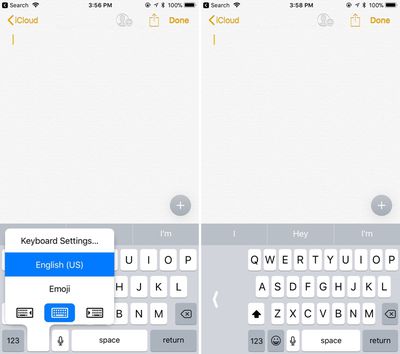
ios11onehandedkeyboard
Once you know the feature is available it's easy to get to and activate, as long as you have multiple keyboards turned on in Settings. Here's how:

  1. With the keyboard open, long press on the globe or the emoji symbol if you have the emoji keyboard activated. A simple tap won't work because this brings up emoji or other keyboard options.
  2. At the bottom of the display, there are three keyboard options: shifted left, centered, and shifted right. Choose right or left to pick one of the one-handed keyboards.

With the one-handed keyboard enabled, the keys are shifted to the left or right by about an inch on the iPhone 7 Plus. The keys remain off-center for as long as you're using the keyboard, unless you tap the large white arrow.

Tapping on that arrow returns the keyboard to its standard center position, and you'll need to repeat the above steps to get it to shift over again.
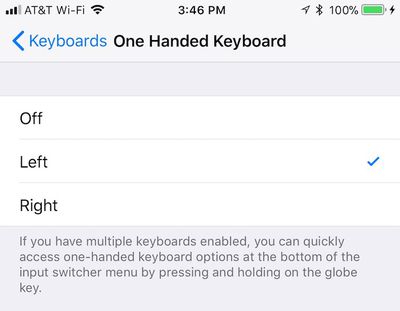
one hand keyboard settings
If you don't have multiple keyboards set up, you'll need to either turn on another keyboard by navigating to the Keyboards option within the General section of your Settings app or manually turn on one-handed keyboard to the left or right on that same page.


Related Forum: iOS 11

Top Rated Comments

drzen Avatar
111 months ago
Microsoft's implementation was much better with the curved arc one handed keyboard mode.

Score: 5 Votes (Like | Disagree)
Heebeejeebies Avatar
111 months ago
Thanks, folks...we added a clarification on the models it works with.

Seeing some reports from 6s owners that it doesn't work even with zoom turned off. (Like the post above this one. :))

I don't think we have a 6s among our staff members to test on, so would appreciate any other reports.
I've got a 6s. Works fine for me.
Score: 2 Votes (Like | Disagree)
111 months ago
not available on SE but probably not necessary
Yes the whole phone is one-handed :cool:
Score: 1 Votes (Like | Disagree)
dtb200 Avatar
111 months ago
care to explain what are you sharing here?
Yes - it's a screen recording of what happens on my 6s when I look for the one-handed typing option
Score: 1 Votes (Like | Disagree)
needfx Avatar
111 months ago
https://www.icloud.com/sharedalbum/#B0Q5aVbMKMisEi
care to explain what are you sharing here?
Score: 1 Votes (Like | Disagree)
WildCowboy Avatar
111 months ago
Thanks, folks...we added a clarification on the models it works with.

Seeing some reports from 6s owners that it doesn't work even with zoom turned off. (Like the post above this one. :))

I don't think we have a 6s among our staff members to test on, so would appreciate any other reports.
Score: 1 Votes (Like | Disagree)

Popular Stories

iOS 26

iOS 26.4 Adds Two New Features to CarPlay

Tuesday March 24, 2026 1:55 pm PDT by
iOS 26.4 was released today, and it includes a couple of new features for CarPlay: an Ambient Music widget and support for voice-based chatbot apps. To update your iPhone 11 or newer to iOS 26.4, open the Settings app and tap on General → Software Update. CarPlay will automatically offer the new features so long as the iPhone connected to your vehicle is running iOS 26.4 or later....
Apple Business hero

Apple Unveils 'Apple Business' All-in-One Platform

Tuesday March 24, 2026 8:53 am PDT by
Apple today announced Apple Business, a new all-in-one platform that unifies device management, productivity tools, and customer outreach features. The service is designed to be a consolidated replacement for several of Apple's existing business-focused offerings, including Apple Business Essentials, Apple Business Manager, and Apple Business Connect. It provides organizations with a single...
AirPods Pro Firmware Feature

Apple Releases New Firmware for AirPods Pro 3, AirPods Pro 2 and AirPods 4

Tuesday March 24, 2026 12:31 pm PDT by
Apple today released new firmware for the AirPods Pro 2, AirPods Pro 3, and the AirPods 4. The firmware has a version number of 8B39, up from 8B34 on the AirPods Pro 3, 8B28 on the AirPods Pro 2, and 8B21 on the AirPods 4. There is no word on what's included in the firmware, but Apple has a support document with limited notes. Most updates are limited to bug fixes and performance...















