
How to Disable COVID-19 Exposure Notifications in iOS 13.5 - MacRumors
Skip to Content

How to Disable COVID-19 Exposure Notifications in iOS 13.5

by

Apple in iOS 13.5 is introducing an exposure notification API designed to allow apps created by public health authorities worldwide to notify people who come into contact with someone who has COVID-19 about their exposure to the virus.
exposurenotificationapi
Apple's Exposure Notification feature is privacy focused and shares no personally identifiable information or location data with the public health authorities creating the apps, but some users may want to opt out of the feature, which is enabled by default when upgrading to iOS 13.5.

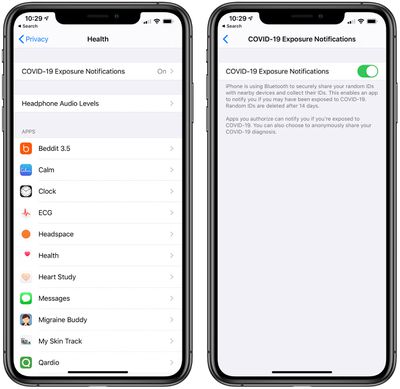
Apple in the iOS 13.5 update added a toggle to disable COVID-19 Exposure Notifications for those who do not want to participate and do not want to be notified should they come into contact with someone who has COVID-19. Here's how to get to it:

  1. Open the Settings app.
  2. Scroll down and tap on Privacy.
  3. Tap on Health.
  4. Tap on COVID-19 Exposure Notifications.
  5. Tap the toggle to turn the feature off.

The purpose of the exposure notification system is to limit the spread of COVID-19 as much as possible by informing people who have been exposed so they can self-isolate and get recommendations from their local health authorities. Because it works by allowing two smartphones to interface with one another using random identifier beacons and Bluetooth, it works best when most people have it turned on.

Re-enabling Exposure Notifications can be done by following the steps above and tapping the toggle to turn the feature back on. If the toggle is green, it's on, and if the toggle is gray, it's off.

iOS 13.5 is available in a beta capacity at the current time, and there won't be apps that take advantage of Exposure Notifications until the update is released. Receiving Exposure Notifications also requires downloading an app from a public health organization that uses the API and agreeing to its terms and conditions. Simply having the toggle turned on won't do anything without the app.


Related Forum: iOS 13

Top Rated Comments

Itada Avatar
77 months ago
The tin foil is going to be strong in this thread.
Score: 33 Votes (Like | Disagree)
rk-apple Avatar
77 months ago
Let's hope this works. Contact tracing is a key element to fighting this virus!
Score: 28 Votes (Like | Disagree)
V_Man Avatar
77 months ago
Thanks for this info. Won’t be using it.
Score: 26 Votes (Like | Disagree)
GuruZac Avatar
77 months ago
My only qualm with this is I don’t see contact tracing ever going away. They say it’s for COVID-19, then they’ll tell us it’s to assist with the next inevitable pandemic, but it will mostly be a way for big tech/governments to justify monitoring the movement of all of their citizens and inevitably abuse that privilege in nefarious ways, a la China‘s CCP.
Score: 23 Votes (Like | Disagree)
Radeon85 Avatar
77 months ago
Wish all the tin foil hat conspiracy theorists would give it a bloody rest :rolleyes:
Score: 19 Votes (Like | Disagree)
asopublic Avatar
77 months ago
Made sure it was turned ON and I want an app so I can participate. I read the APIs.
Score: 18 Votes (Like | Disagree)

Popular Stories

iOS 26

iOS 26.4 Adds Two New Features to CarPlay

Tuesday March 24, 2026 1:55 pm PDT by
iOS 26.4 was released today, and it includes a couple of new features for CarPlay: an Ambient Music widget and support for voice-based chatbot apps. To update your iPhone 11 or newer to iOS 26.4, open the Settings app and tap on General → Software Update. CarPlay will automatically offer the new features so long as the iPhone connected to your vehicle is running iOS 26.4 or later....
Apple Business hero

Apple Unveils 'Apple Business' All-in-One Platform

Tuesday March 24, 2026 8:53 am PDT by
Apple today announced Apple Business, a new all-in-one platform that unifies device management, productivity tools, and customer outreach features. The service is designed to be a consolidated replacement for several of Apple's existing business-focused offerings, including Apple Business Essentials, Apple Business Manager, and Apple Business Connect. It provides organizations with a single...
AirPods Pro Firmware Feature

Apple Releases New Firmware for AirPods Pro 3, AirPods Pro 2 and AirPods 4

Tuesday March 24, 2026 12:31 pm PDT by
Apple today released new firmware for the AirPods Pro 2, AirPods Pro 3, and the AirPods 4. The firmware has a version number of 8B39, up from 8B34 on the AirPods Pro 3, 8B28 on the AirPods Pro 2, and 8B21 on the AirPods 4. There is no word on what's included in the firmware, but Apple has a support document with limited notes. Most updates are limited to bug fixes and performance...















