How to Delete Your Siri Audio History and Opt Out of Siri Audio Sharing on Mac - GeekWebGuides
Skip to Content

How to Delete Your Siri Audio History and Opt Out of Siri Audio Sharing on Mac

by

This article explains how to delete your Siri audio interaction history and opt out of sharing audio recordings with Apple on Macs.

macbook pro hey siri
In 2019, it was discovered that Apple hired contractors to listen to a small percentage of anonymized ‌Siri‌ recordings to evaluate the virtual assistant's responses with the purpose of improving accuracy and reliability.

The Guardian revealed that Apple employees working on ‌Siri‌ often heard confidential details while listening to the audio recordings. Apple was subsequently criticized for not making it clear to customers that some of their ‌Siri‌ recordings were being used to improve the service.

Soon after the report, Apple suspended its ‌Siri‌ grading practices and promised users that it would introduce tools in forthcoming updates that would allow them to opt out of sharing their audio recordings.

With the release of macOS Catalina 10.15.1 in October 2019, those new tools arrived. Apple now includes an option on Mac that allows users to delete their ‌Siri‌ and Dictation history and opt out of sharing audio recordings. The following steps show you how to do both.

How to Opt Out of ‌Siri‌ Audio Sharing on Mac

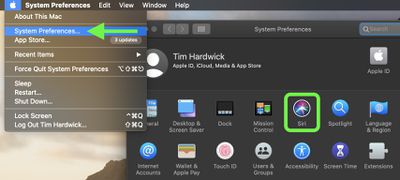
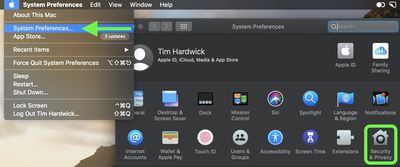
  1. Launch System Preferences from your Mac's Dock, from the Applications folder, or from the Apple menu bar ( -> System Preferences…).
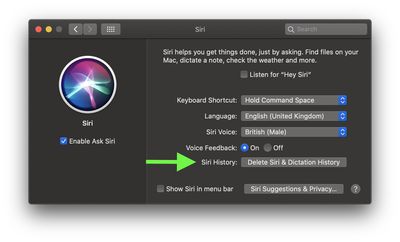
  2. Select Siri in the preference panel.
    system prefs

  3. Next to Siri History, click the Delete Siri & Dictation History button.
    system prefs

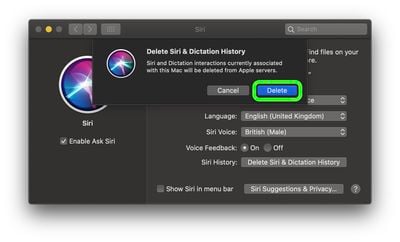
  4. Confirm that your want to delete the history associated with this Mac from Apple’s servers by clicking Delete.
    how to opt out of siri mac1

Note that these options only apply to your Mac and not to any other devices signed into the same Apple account. For instructions on how to find the same options on iPhone and iPad, click here.

How to Delete Your ‌Siri‌ Audio History on Mac

  1. Launch System Preferences from your Mac's Dock, from the Applications folder, or from the Apple menu bar ( -> System Preferences…).
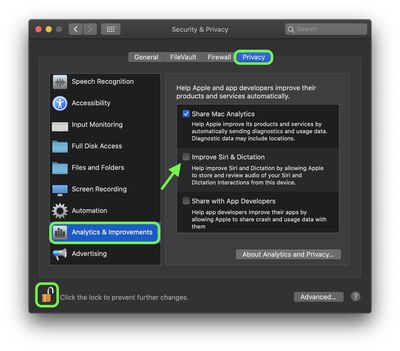
  2. Select Security & Privacy in the preference panel.
    system prefs

  3. Choose the Privacy tab.
  4. Select Analytics & Improvement from the sidebar.
  5. Click the padlock icon in the bottom-left corner of the window and authenticate with an admin account if prompted.
  6. Uncheck the box next to Improve Siri & Dictation to opt-out of Siri audio recordings being stored on Apple servers for review and improvement.
    privacy Mac

Note that these options only apply to your Mac and not to any other devices signed into the same Apple account. For instructions on how to find the same options on iPhone and iPad, click here.


Popular Stories

Apple TV 4K 4th Generation Top View5

New Apple TV 4K Announced With A19 Chip, Updated Siri Remote, More

Tuesday October 13, 2026 6:08 am PDT by
Apple today announced the fourth-generation Apple TV 4K, with key features including an A19 chip, Siri AI support, an updated Siri Remote that has Find My support with Precision Finding, built in far-field microphones, support for surround sound with four HomePods in front and rear pairs, and more. The A19 chip in the new Apple TV 4K delivers up to 50% faster CPU performance and up to twice...
homepod mini 2 feature6

Apple Announces $149 HomePod Mini 2 With Siri AI, 'Sound Glow', and Four-Speaker Surround Sound

Tuesday October 13, 2026 6:11 am PDT by
Apple today announced a new HomePod mini equipped with Siri AI, new colors, and improved audio experiences. The new HomePod mini has an S10 chip that supports advanced computational audio, and Apple says it optimizes dynamic range, loudness, and acoustic performance in real-time. A Sound Glow feature turns the HomePod mini's top into a "visual canvas" that glows and animates in sync with...
New Apple TV 4K and Siri Remote Have These 14 New Features Feature

New Apple TV 4K and Siri Remote Have These 14 New Features

Tuesday October 13, 2026 10:26 am PDT by
The new Apple TV 4K and updated Siri Remote unveiled today have quite a few new features, as outlined in our all-in-one summary below. Here are 11 changes coming with the new Apple TV: A19 chip, for up to 50% faster CPU performance and up to twice as fast graphics performance compared to the previous model with the A15 chip. 8GB of RAM is very likely, up from 4GB of RAM in the previous ...
Latest Stories
Happy 25th Anniversary, iPod
20 minutes ago
iPhone Duo Demand Reportedly Exceeds Apple's Expectations
3 hours ago
iPhone Duo Launch Begins as First Orders Reach Customers
9 hours ago
1Password for Agents Keeps Your Passwords Hidden From AI
10 hours ago
iPhone Duo 24 Hours Later: Your Questions Answered
10 hours ago
Apple's iWork Apps Get 'Intelligent Assistant' and iPhone Duo Support
11 hours ago
Apple is Apparently Considering a Slightly Larger iPhone Duo
11 hours ago
Giant iPhone Duo Displays Coming to Four Apple Stores
13 hours ago
Apple Pulls Keynote, Pages and Numbers From App Store [Update: Back]
13 hours ago
Apple Updates More Apps With iPhone Duo Support
14 hours ago
Apple Will Label Apps 'Made for iPhone Duo' in App Store
17 hours ago
Amazon Takes $49 Off iPad With Prices Starting at $399.99
17 hours ago
F1 on Apple TV Now Available in Dolby Atmos
18 hours ago
Apple Reveals More Than 50 Apps That Will Be Updated for iPhone Duo
18 hours ago
Apple Blocks Certificates That Could Help Attackers Fake Websites
20 hours ago
Giant iPhone Duo Installations Spotted at Apple Fifth Avenue
20 hours ago
iPhone Duo 2 Prototypes Include Under-Display Face ID
21 hours ago
Tesla App Gains iPad and iPhone Duo Support
1 day ago
Apple Reportedly Boosts iPhone Duo Orders by 44%
1 day ago
Fortnite Returning to Australian App Store After Court Ruling
1 day ago
Apple Ordered to Open iPhone to Rival App Stores in Australia
1 day ago
Apple Suppliers Face Hurdles Cutting Circuit Board Emissions
1 day ago
Things Updated for iPhone Duo With Adaptive Layout
1 day ago
Simplicity and Siri AI Are HomeView's Killer Features, Apple Says
1 day ago
iPhone Duo Reviewers Really Miss Face ID
1 day ago
Does the iPhone Duo Run Hot? Here's What Reviews Found
1 day ago
Apple Music's New Look is Now Live on Apple's Website
1 day ago
Anthropic Launches Claude Duet, a Proactive AI Agent
1 day ago
What 32,000 Folds Did to the iPhone Duo's Hinge
1 day ago
iPhone Duo's Hidden FaceTime Camera Takes 'Trash' Photos
2 days ago