How to Ask Siri on HomePod to Play Apple Music Playlists, Genres, Moods, and More - MacRumors
Skip to Content

How to Ask Siri on HomePod to Play Apple Music Playlists, Genres, Moods, and More

by

One of the main uses for Siri on HomePod is to control your Apple Music collection. There are ‌Siri‌ voice commands for accessing content like playlists, genres, moods, liking or disliking songs, playing more music based on something you've heard, starting a new radio station, and much more.

Because the list of ‌Siri‌ commands is so extensive, this guide won't be covering every possible option and genre supported by available through ‌Siri‌, but it should serve as a good starting point when getting to know what exactly your ‌HomePod‌ can do with your ‌Apple Music‌ library.

Playlists and Library

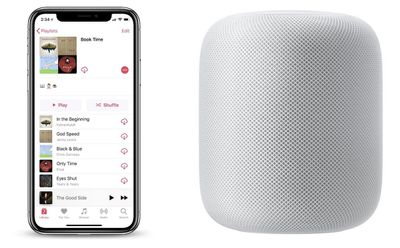
Your playlists may be the content you'll interact with most often in ‌Apple Music‌, and ‌Siri‌ on ‌HomePod‌ can play any ‌Apple Music‌ playlist you've made in the past on an iOS device or Mac. ‌Siri‌ can also play ‌Apple Music‌'s personally curated mix playlists.

homepod book time playlist
For items in your library, use the "play my" command and ‌Siri‌ will play albums and songs already added to your library. For everything else, ‌Siri‌ will play any songs available on ‌Apple Music‌, even if they aren't in your library yet.

  • "Hey ‌Siri‌, play my Book Time playlist."
  • "Hey ‌Siri‌, shuffle my Book Time playlist."
  • "Hey ‌Siri‌, add this song to my Book Time playlist."
  • "Hey ‌Siri‌, add this to my library."
  • "Hey ‌Siri‌, play My New Music Mix."
  • "Hey ‌Siri‌, play the A-List Pop playlist."
  • "Hey ‌Siri‌, play my music from Sam Smith."
  • "Hey ‌Siri‌, play the newest music from Vance Joy."

Genres, Moods, and Radio

‌Siri‌ can understand a wide range of commands requesting various musical genres and moods found in ‌Apple Music‌. You can find some of these moods in ‌Apple Music‌ itself by navigating to the Browse tab, tapping Playlists, then looking through all of the Activities and Moods. You can also request songs based on decades, specific years, and exact dates. We've compiled a few examples below to get you started.
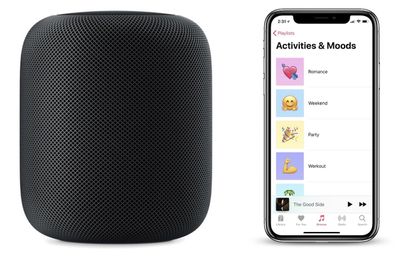
homepod how to activities image

  • "Hey ‌Siri‌, play some recent pop music."
  • "Hey ‌Siri‌, play some chill music."
  • "Hey ‌Siri‌, play some romantic music."
  • "Hey ‌Siri‌, play some music to dance to."
  • "Hey ‌Siri‌, play the best songs from the '90s."
  • "Hey ‌Siri‌, play the top 10 songs from 1986."
  • "Hey ‌Siri‌, play the top song from April 17, 1992."
  • "Hey ‌Siri‌, create a radio station based on The Killers."

Here are some examples of more keywords that you could enter into the above commands:

  • Sad
  • Angry
  • Lazy
  • Somber
  • Calm
  • Fun
  • Romance
  • Weekend
  • Cooking
  • Party
  • Workout
  • Focus
  • Motivation
  • Bedtime

You'll also find the same results for essentially every genre, like Country, Alternative, Blues, and others.

General Controls

There are multiple commands you can relay to ‌Siri‌ to control music playback, with some examples below.

  • "Hey ‌Siri‌, play music."
  • "Hey ‌Siri‌, pause."
  • "Hey ‌Siri‌, skip this song."
  • "Hey ‌Siri‌, skip forward 30 seconds."
  • "Hey ‌Siri‌, jump back 10 seconds."
  • "Hey ‌Siri‌, previous track."
  • "Hey ‌Siri‌, raise/lower the volume."
  • "Hey ‌Siri‌, increase the volume to 50 percent."
  • "Hey ‌Siri‌, turn on repeat."

Other Commands

  • "Hey ‌Siri‌, play Party in the USA."
  • "Hey ‌Siri‌, I like/dislike this."
  • "Hey ‌Siri‌, what song is this?"
  • "Hey ‌Siri‌, what was the last song called?"
  • "Hey ‌Siri‌, who sings this?"
  • "Hey ‌Siri‌, who is the drummer in this?"
  • "Hey ‌Siri‌, what year is this song from?"
  • "Hey ‌Siri‌, how many songs are on this album?"
  • "Hey ‌Siri‌, play more like this."
  • "Hey ‌Siri‌, after this play Rolling in the Deep."
  • "Hey ‌Siri‌, play some Florence and the Machine."
  • "Hey ‌Siri‌, tell me more about this artist."
  • "Hey ‌Siri‌, I want to hear the live version of this song."

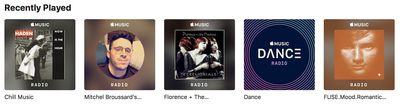
If you ever want to revisit the playlists and radio stations that ‌Siri‌ creates for you through voice commands on ‌HomePod‌, head over to the For You tab in ‌Apple Music‌. If you scroll down a bit, you should see "Recently Played" filled with the content that ‌Siri‌ played on ‌HomePod‌.

recently played apple music
If you have any other useful ‌Siri‌ commands we didn't mention, be sure to share them in the comments.

Related Roundup: HomePod
Buyer's Guide: HomePod (Caution)

Top Rated Comments

justperry Avatar
114 months ago
Too many Homepod articles to my liking lately, and no, I don't read these HP articles, just think MR is overdoing it.
Score: 14 Votes (Like | Disagree)
Delgibbons Avatar
114 months ago
I appreciate guides, but if Siri worked correctly we wouldn’t need them.

What happened to the promise of natural language recognition? Siri should understand us — we shouldn’t have to memorize phrases specifically to Siri’s liking.
Ha! Homepod is a bit like one of those old text adventures.

"Pick up key"

"Use key in lock"

:D
Score: 8 Votes (Like | Disagree)
114 months ago
I appreciate guides, but if Siri worked correctly we wouldn’t need them.

What happened to the promise of natural language recognition? Siri should understand us — we shouldn’t have to memorize phrases specifically to Siri’s liking.
Score: 8 Votes (Like | Disagree)
Wanted797 Avatar
114 months ago
Can I ask Siri when MacRumors will be doing a story that’s not about HomePod?
Score: 6 Votes (Like | Disagree)
jsmith189 Avatar
114 months ago
Genres/years don't work internationally anymore.

https://forums.macrumors.com/threads/sorry-but-i-dont-know-the-historical-music-charts-for-your-country.2105322/

Can I ask Siri when MacRumors will be doing a story that’s not about HomePod?
God forbid an Apple website talk about the new Apple product!
Score: 4 Votes (Like | Disagree)
114 months ago
Ha! Homepod is a bit like one of those old text adventures.

"Pick up key"

"Use key in lock"

:D
Siri: “I don’t see lock here.” ;)
Score: 3 Votes (Like | Disagree)

Popular Stories

Apple TV 4K 4th Generation Top View5

New Apple TV 4K Announced With A19 Chip, Updated Siri Remote, More

Tuesday October 13, 2026 6:08 am PDT by
Apple today announced the fourth-generation Apple TV 4K, with key features including an A19 chip, Siri AI support, an updated Siri Remote that has Find My support with Precision Finding, built in far-field microphones, support for surround sound with four HomePods in front and rear pairs, and more. The A19 chip in the new Apple TV 4K delivers up to 50% faster CPU performance and up to twice...
homepod mini 2 feature6

Apple Announces $149 HomePod Mini 2 With Siri AI, 'Sound Glow', and Four-Speaker Surround Sound

Tuesday October 13, 2026 6:11 am PDT by
Apple today announced a new HomePod mini equipped with Siri AI, new colors, and improved audio experiences. The new HomePod mini has an S10 chip that supports advanced computational audio, and Apple says it optimizes dynamic range, loudness, and acoustic performance in real-time. A Sound Glow feature turns the HomePod mini's top into a "visual canvas" that glows and animates in sync with...
New Apple TV 4K and Siri Remote Have These 14 New Features Feature

New Apple TV 4K and Siri Remote Have These 14 New Features

Tuesday October 13, 2026 10:26 am PDT by
The new Apple TV 4K and updated Siri Remote unveiled today have quite a few new features, as outlined in our all-in-one summary below. Here are 11 changes coming with the new Apple TV: A19 chip, for up to 50% faster CPU performance and up to twice as fast graphics performance compared to the previous model with the A15 chip. 8GB of RAM is very likely, up from 4GB of RAM in the previous ...
Latest Stories
Apple Will Label Apps 'Made for iPhone Duo' in App Store
35 minutes ago
Amazon Takes $49 Off iPad With Prices Starting at $399.99
1 hour ago
F1 on Apple TV Now Available in Dolby Atmos
2 hours ago
Apple Reveals More Than 50 Apps That Will Be Updated for iPhone Duo
2 hours ago
Apple Blocks Certificates That Could Help Attackers Fake Websites
4 hours ago
Giant iPhone Duo Installations Spotted at Apple Fifth Avenue
4 hours ago
iPhone Duo 2 Prototypes Include Under-Display Face ID
5 hours ago
Tesla App Gains iPad and iPhone Duo Support
8 hours ago
Apple Reportedly Boosts iPhone Duo Orders by 44%
9 hours ago
Fortnite Returning to Australian App Store After Court Ruling
9 hours ago
Apple Ordered to Open iPhone to Rival App Stores in Australia
10 hours ago
Apple Suppliers Face Hurdles Cutting Circuit Board Emissions
10 hours ago
Things Updated for iPhone Duo With Adaptive Layout
10 hours ago
Simplicity and Siri AI Are HomeView's Killer Features, Apple Says
11 hours ago
iPhone Duo Reviewers Really Miss Face ID
16 hours ago
Does the iPhone Duo Run Hot? Here's What Reviews Found
17 hours ago
Apple Music's New Look is Now Live on Apple's Website
18 hours ago
Anthropic Launches Claude Duet, a Proactive AI Agent
18 hours ago
What 32,000 Folds Did to the iPhone Duo's Hinge
19 hours ago
iPhone Duo's Hidden FaceTime Camera Takes 'Trash' Photos
21 hours ago
iPhone Duo Has 'Edge Light' Feature That Debuted on Macs Last Year
21 hours ago
Apple Support App Updated for iPhone Duo's Larger Display
21 hours ago
Amazon Sweetens the Deal on Entry-Level 16-Inch MacBook Pro With $570 Off
22 hours ago
iPhone Duo Tips Over on MagSafe Stands When Unfolded
22 hours ago
Apple Music's New Look Officially Announced
23 hours ago
iPhone Duo Supports Apple Pencil Starting With iOS 27.2
1 day ago
iPhone Duo Accessories Roundup: Cases and Screen Protectors From OtterBox, ZAGG, and More
1 day ago
Apple Stores Will Have 'Limited' Availability of iPhone Duo for Walk-In Customers
1 day ago
iPhone Duo Reviews Explain Why Device is Both 'Fun' and 'Frustrating'
1 day ago
Apple Says 'Reachability' Feature Coming to iPhone Duo Later This Year
1 day ago