Connect Two Pairs of Headphones to Mac Simultaneously - MacRumors
Skip to Content

Connect Two Pairs of Headphones to Mac Simultaneously

by

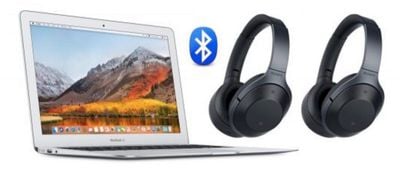
Next time you're on a flight with someone and you both want to watch a video on your Mac without disturbing other passengers, try this convenient solution for sharing your Mac's audio among two pairs of headphones.
listen to mac two pairs of headphones
The method described below should work regardless of whether you're using one wired pair and one wireless pair of headphones, two pairs of Bluetooth headphones, or even several pairs.

How to Output Mac Audio to Two Audio Devices

  1. Make sure that the headphones you want to use together are paired with your Mac over Bluetooth and/or connected via the headphone jack.
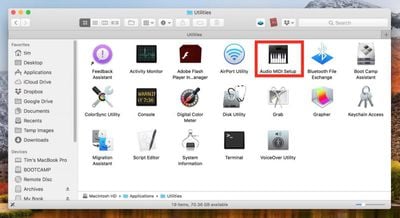
  2. Launch the Audio MIDI Setup app, located in Applications/Utilities.
    how to share mac audio between two pairs bluetooth headphones01

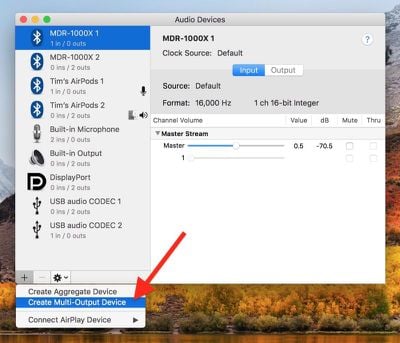
  3. Click the plus (+) button at the lower left of the Audio Devices window and select Create Multi-Output Device.
    how to share mac audio between two pairs bluetooth headphones02

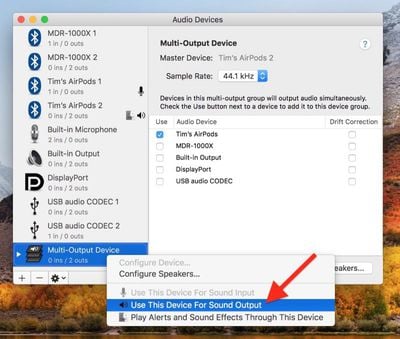
  4. Right-click (or Ctrl-click) the Multi-Output Device in the list that you just created, and select Use This Device For Sound Output. (You can also opt to Play Alerts and Sound Effects Through This Device from the same menu.)
    how to share mac audio between two pairs bluetooth headphones03

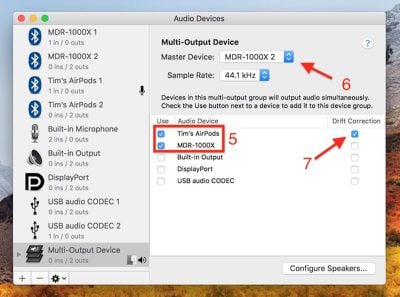
  5. Tick the sets of headphones that you want to use in the Audio Device list. (If one is a wired pair, tick Built-in Output.)
    how to share mac audio between two pairs bluetooth headphones04

  6. Select a Master Device in the drop-down menu.
  7. Tick Drift Correction for the secondary device in the Audio Device list.
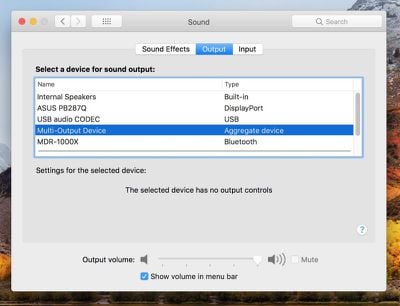
  8. Launch System Settings (select  -> System Settings... from the menu bar) and select Sound in the side column.
    how to share mac audio between two pairs bluetooth headphones05

  9. Under "Output & Input," click the Output tab and choose the Multi-Output Device or "Aggregate device" in the list, and you should be good to go.
Top Rated Comments

KGB7 Avatar
99 months ago
In my day, we used a headphone jack splitter.
Score: 17 Votes (Like | Disagree)
99 months ago
to me, this is one of the greatest strengths of macs in the audio sphere...I often create multi in/ multi out devices that span a few firewire/USB devices to address my signal routing needs. Ableton/Mainstage/Logic all play along just fine. Whatever foundation apple laid (years ago) to support this, is phenomenal.
Be quiet man, they might remove that feature if they find out people like and use it
Score: 11 Votes (Like | Disagree)
anandhts Avatar
99 months ago
would love to have the same feature in iOS devices..
Score: 8 Votes (Like | Disagree)
BMcCoy Avatar
99 months ago
No there are still some airlines that prohibited BT onboard. Such as Air Euroa.
I was replying to the post saying that Bluetooth is banned in Europe.
It's not.

It's not banned in Europe - the European Aviation Safety Agency (EASA) has ratified the regulations permitting Bluetooth as well as other aspects of personal electronic devices (PEDs), confirming the low risk of interference to the aircraft navigation and communications systems.

However, airlines remain free to apply more restrictive policies.
The vast majority of airlines that operate in Europe have adopted the EASA regulations in full.
Some have adopted modified rules, depending on the type model of aircraft. Some have adopted some restrictions relating to aircraft altitude.

So Bluetooth is not banned.
A few small airlines have some restrictions, but all the big names are fine.
Score: 4 Votes (Like | Disagree)
nathan_reilly Avatar
99 months ago
to me, this is one of the greatest strengths of macs in the audio sphere...I often create multi in/ multi out devices that span a few firewire/USB devices to address my signal routing needs. Ableton/Mainstage/Logic all play along just fine. Whatever foundation apple laid (years ago) to support this, is phenomenal.
Score: 4 Votes (Like | Disagree)
GGJstudios Avatar
99 months ago
This is great but more often I want the inverse: one pair of headphones (usually Bluetooth) streaming audio from several devices simultaneously. Eg. Listening to audio on my work computer, pick up my phone and listen to a short message, then quickly resume working—without going into menus on each device to switch.
I do this regularly with my Bose QC35 headphones. They connect to my iPhone and MBP simultaneously, so if a call comes in while I'm listening to something on the computer, I just pause what I'm listening to and take the call. No switching or selecting required. I wish my AirPods would do the same thing.
Score: 3 Votes (Like | Disagree)

Popular Stories

iOS 26

iOS 26.4 Adds Two New Features to CarPlay

Tuesday March 24, 2026 1:55 pm PDT by
iOS 26.4 was released today, and it includes a couple of new features for CarPlay: an Ambient Music widget and support for voice-based chatbot apps. To update your iPhone 11 or newer to iOS 26.4, open the Settings app and tap on General → Software Update. CarPlay will automatically offer the new features so long as the iPhone connected to your vehicle is running iOS 26.4 or later....
Apple Business hero

Apple Unveils 'Apple Business' All-in-One Platform

Tuesday March 24, 2026 8:53 am PDT by
Apple today announced Apple Business, a new all-in-one platform that unifies device management, productivity tools, and customer outreach features. The service is designed to be a consolidated replacement for several of Apple's existing business-focused offerings, including Apple Business Essentials, Apple Business Manager, and Apple Business Connect. It provides organizations with a single...
AirPods Pro Firmware Feature

Apple Releases New Firmware for AirPods Pro 3, AirPods Pro 2 and AirPods 4

Tuesday March 24, 2026 12:31 pm PDT by
Apple today released new firmware for the AirPods Pro 2, AirPods Pro 3, and the AirPods 4. The firmware has a version number of 8B39, up from 8B34 on the AirPods Pro 3, 8B28 on the AirPods Pro 2, and 8B21 on the AirPods 4. There is no word on what's included in the firmware, but Apple has a support document with limited notes. Most updates are limited to bug fixes and performance...