Connecting AirPods to Mac: A Step by Step Guide - MacRumors
Skip to Content

Connecting AirPods to Mac: A Step by Step Guide

by

If you've set up first-generation or second-generation AirPods with your iPhone and your Mac is signed in to iCloud with the same Apple ID, then your AirPods should be ready to use with your Mac.
how to pair airpods with your mac
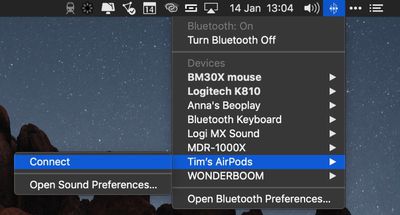
Ideally, all you need to do is put your AirPods in your ears, click the Bluetooth icon in your Mac's menu bar, select your AirPods from the dropdown list, and click Connect.

If you don't see your AirPods in the Bluetooth menu, you can pair them manually with your Mac in the following way.

How to Connect AirPods to Mac

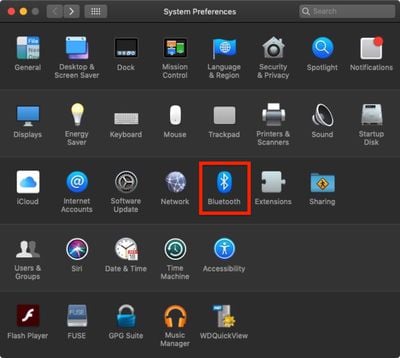
  1. On your Mac, launch System Preferences from the Apple menu bar ( -> System Preferences...).
  2. Click the Bluetooth pane.
    how to pair airpods with mac

  3. Make sure Bluetooth is turned on.
  4. With your AirPods in their charging case, open the lid.
  5. Press and hold the button on the back of the charging case until the status light between the AirPods flashes white.
    how to pair airpods with mac 2

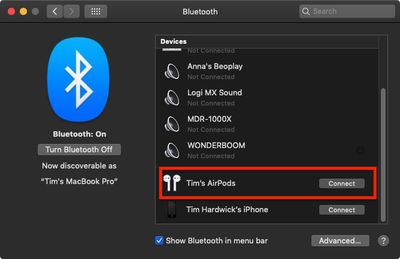
  6. Select your AirPods in the Bluetooth devices list and click Connect.
Next time you want to use your AirPods with your Mac, place them in your ears and they should automatically pair. If they don't (if they pair with your nearby iPhone instead, for example) simply click the Bluetooth icon in your Mac's menu bar, select your AirPods in the dropdown list, and click Connect.

How to Customize AirPod Controls on a Mac

Apple AirPods support a number of gestural touch controls that you can customize, including the option to change tracks with a double tap.

All of these options can be accessed in the Settings app while the AirPods are connected to your iPhone or iPad. But you can also access them when your AirPods are connected to your Mac. Here's how:

  1. On your Mac, launch System Preferences from the Apple menu bar ( -> System Preferences...).
  2. Click the Bluetooth pane.
    how to pair airpods with mac

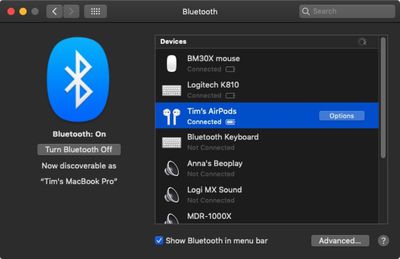
  3. In the Bluetooth devices list, click the Options button next to your AirPods.
    how to pair airpods with mac 3

From this menu, you can enable or disable manual ear detection, choose to use the left or right AirPod microphone, and choose what happens when you double tap an AirPod.
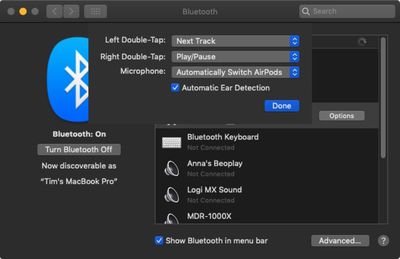
how to pair airpods with mac 4
Double-tap options include Siri, Play/Pause, Off, Next Track, and Previous Track. Note that you can also set different gestures for the left and the right AirPod.


Related Roundup: AirPods 4
Buyer's Guide: AirPods (Neutral)
Related Forum: AirPods

Top Rated Comments

94 months ago
“Ideally, all you need to do is put your AirPods in your ears, click the Bluetooth icon in your Mac's menu bar, select your AirPods from the dropdown list, and click connect...”

This is the biggest problem with AirPods + multiple devices. Why should the user go through 3 steps to connect? Why not give a pop-up to connect or dismiss when the Mac or iPad, or any other device detects AirPods?
Score: 2 Votes (Like | Disagree)
92 months ago
Selected Bluetooth: On - OK
Selected My AirPods: Connected
Selected Preferences > Sound > Output - BUT NO AIRPODS IN THE DEVICES!!!!

They connect just fine to my phone.
Score: 1 Votes (Like | Disagree)
94 months ago
Wow, what a terrific idea! Wireless right next to your brain! Sign me up!!!

Apple is gonna need those billions when the brain cancer tumors start showing up in 10-15 years.

Seriously? This is profit-seeking toymaking malfeasance bordering on abject evil. This ain't using an iPhone on speaker setting.
1990 called, they want their irrational fear (and me using this stupid statement) back.

This isn't putting your head inside a 1000 watt microwave. This is such a tiny risk that it can't be scientifically calculated because it's estimated to be fractions around 1/1,000,000th of 1%.
Score: 1 Votes (Like | Disagree)
pdaholic Avatar
94 months ago
Sometimes my AirPods will just decide that no matter what I do, they refuse to connect to my 2013 MacBook Pro. Have to forget the device and pair it all over again. Granted it might occur one out of 30 times that I paid them, but still...
Score: 1 Votes (Like | Disagree)
Futurix Avatar
94 months ago
I don't have as much of an issue with the Mac connection option as the steps to reconnect on a phone. Unlock > Settings > Bluetooth > Tap ... So dumb.
You can just choose AirPods in the Now Playing widget in Control Centre (or use the device selection button in the same way in Music / Podcasts / TV / Spotify / etc).
And in case of Control Centre there is no need to unlock.
Score: 1 Votes (Like | Disagree)
Michael Tsai Avatar
94 months ago
This is the biggest problem with AirPods + multiple devices. Why should the user go through 3 steps to connect?
I develop an app called ToothFairy ('https://c-command.com/toothfairy/') that makes this much easier. You can just press a hotkey or click an icon in the menu bar to connect to your AirPods.
Score: 1 Votes (Like | Disagree)

Popular Stories

iOS 26

iOS 26.4 Adds Two New Features to CarPlay

Tuesday March 24, 2026 1:55 pm PDT by
iOS 26.4 was released today, and it includes a couple of new features for CarPlay: an Ambient Music widget and support for voice-based chatbot apps. To update your iPhone 11 or newer to iOS 26.4, open the Settings app and tap on General → Software Update. CarPlay will automatically offer the new features so long as the iPhone connected to your vehicle is running iOS 26.4 or later....
Apple Business hero

Apple Unveils 'Apple Business' All-in-One Platform

Tuesday March 24, 2026 8:53 am PDT by
Apple today announced Apple Business, a new all-in-one platform that unifies device management, productivity tools, and customer outreach features. The service is designed to be a consolidated replacement for several of Apple's existing business-focused offerings, including Apple Business Essentials, Apple Business Manager, and Apple Business Connect. It provides organizations with a single...
AirPods Pro Firmware Feature

Apple Releases New Firmware for AirPods Pro 3, AirPods Pro 2 and AirPods 4

Tuesday March 24, 2026 12:31 pm PDT by
Apple today released new firmware for the AirPods Pro 2, AirPods Pro 3, and the AirPods 4. The firmware has a version number of 8B39, up from 8B34 on the AirPods Pro 3, 8B28 on the AirPods Pro 2, and 8B21 on the AirPods 4. There is no word on what's included in the firmware, but Apple has a support document with limited notes. Most updates are limited to bug fixes and performance...