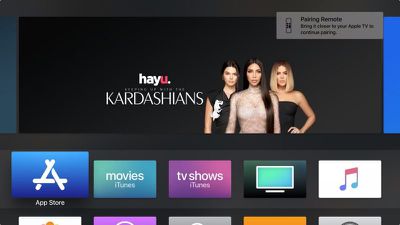
When you set up a new Apple TV and power up the set-top box, the Apple Remote that comes in the box should pair automatically as soon as you press one of the buttons. If the Apple Remote stops working, it's probably out of juice and needs charging for 30 minutes via a USB to Lightning cable connected to a USB outlet.

apple tv siri remote charging
But if that doesn't fix the problem, your best bet is to re-pair the device with your Apple TV. This article shows you how. The following instructions will also come in useful if you need to pair a new replacement Apple Remote in the event that the one that came with your Apple TV stops working completely or is damaged beyond repair.

In addition, at the end of this article we've included a quick tip for pairing your Mac with an Apple TV Remote, for controlling things like iTunes, VLC, and Keynote.

How to Pair an Apple Remote with Apple TV

  1. Make sure your Apple TV is powered on.
  2. Point the Apple Remote three inches away from the set-top box, then press and hold the remote's Menu and Volume Up buttons for five seconds.
    apple tv remote pair

  3. If you see a notification on your television screen asking you to bring the Apple Remote closer, place the Remote on top of the Apple TV.
  4. If you don't see Remote connected notification on the television screen, unplug your Apple TV from the wall power outlet, wait at least six seconds, then plug it back in.
  5. If necessary, repeat steps 1 to 3.

How to Control Your Mac With an Apple Remote.

Apple used to include a small white or silver infrared remote control with some Macs, which allowed Mac users to control things like Keynote presentations and iTunes media from afar.
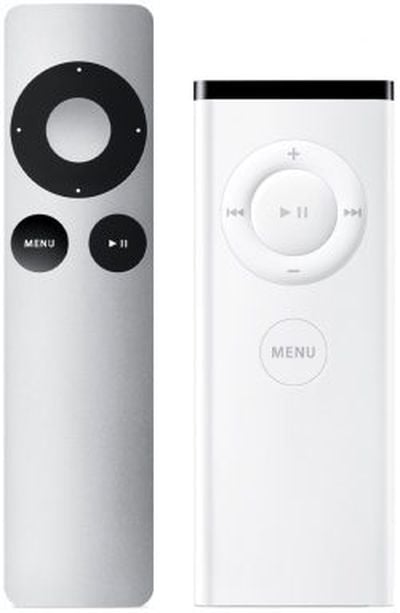
apple tv remotes first second gen
When newer Macs no longer included an IR receiver (indicated by a black line of the front edge of the body) Apple stopped including these remotes, but Apple TV owners can optionally use their Apple TV Remote to control their Mac, thanks to a free third-party Bluetooth macOS utility called SiriMote by Eternal Storms Software.

SiriMote isn't available in the App Store, but you can download it directly from the Eternal Storms website [Direct Link]. After downloading SiriMote, drag it from your Downloads folder to your Applications folder, then launch the app and follow the onscreen instructions to pair your Apple Remote with your Mac.


Related Roundup: Apple TV
Buyer's Guide: Apple TV (Don't Buy)

Top Rated Comments

iapplelove Avatar
93 months ago
I would buy an Apple TV in a heartbeat, if the remote was actually decent.
I just use my phone.
Score: 2 Votes (Like | Disagree)
Juicy Box Avatar
93 months ago
No.

I came to that conclusion based on your posts. You hate everything.
You must of missed this one, it was right under the one you quoted:

This is true, the Apple TV can use just about any IR remote using the Remote Learning feature that a lot of people do not know about.

The Remote Learning feature has been around for over a decade, but many people, including long time ATV users did not know it was there.

It is in the settings, and the Remote Learning feature is really easy to use, and takes less than 30 seconds to do.

Also, I have not found a IR remote that would not work with it. I was even able to use my space heater IR remote and my Roomba remote to control an ATV.
It doesn't look like I stated I hated the Remote Learning feature, actually it would seem I quite like it. Looks like you are wrong about me.

Never had to "learn" or program anything, it just worked from day 1.
This is a great solution if everything is compatible. I have a series 6 TCL that it doesn't work.

One good thing about the Remote Learning feature is that you can use any IR remote, including old universal remotes that have all the playback buttons that most modern remotes do not have, like Skip, Step, FF, RW.... It makes it very useful when watching videos.

One thing that it obviously does not do for older remotes, but might for modern universal remotes with a Mic is do Siri. Does anyone know if this works?
Score: 1 Votes (Like | Disagree)
iapplelove Avatar
93 months ago
You came to that conclusion because I prefer physical buttons over a touch screen?
No.

I came to that conclusion based on your posts. You hate everything.
Score: 1 Votes (Like | Disagree)
martyjmclean Avatar
93 months ago
I would buy an Apple TV in a heartbeat, if the remote was actually decent.
Score: 1 Votes (Like | Disagree)
Juicy Box Avatar
93 months ago
Well, the black line was only on certain laptops (unibody aluminium MacBooks and Pros, and on the first Air body style). Non-unibody MacBooks has a pill shaped one and non-unibody MacBook Pros as well as Mac minis had round ones. iMacs had them hidden in the Apple logos. The silver remotes were never included with any Mac (though they were designed to match the new iMacs released at the same time (the first 21 and 27 inch models in 2009). The white remotes were indeed included with some Macs (starting with late 2005 iMac G5 with iSight camera). The remote was also designed to match it, and could magnetically stick to the side. The remote was subsequently also included with all Macs that had IR ports until they were no longer included with early 2008 models (or possibly even some late 2007 models).
Thanks, I was wondering what Macs had IR. It looks like more than I thought.
[doublepost=1545235646][/doublepost]
[doublepost=1545211978][/doublepost]how can you say, he hates everything. ('https://wiseshopping.in/semi-automatic-washing-machine/')
I am not sure how @iapplelove came to this conclusion, I guess they took a peek at my posting history.

Although, I am sure that for every post of mine stating my dislike for something, there is one or more post about something that I enjoy.

Maybe it was just a knee jerk reaction to someone disliking something that they like.
Score: 1 Votes (Like | Disagree)

Popular Stories

Apple Logo Zoomed

Tim Cook Teases Plans for Apple's Upcoming 50th Anniversary

Thursday February 5, 2026 12:54 pm PST by
Apple turns 50 this year, and its CEO Tim Cook has promised to celebrate the milestone. The big day falls on April 1, 2026. "I've been unusually reflective lately about Apple because we have been working on what do we do to mark this moment," Cook told employees today, according to Bloomberg's Mark Gurman. "When you really stop and pause and think about the last 50 years, it makes your heart ...
wwdc sans text feature

Apple Rumored to Announce New Product on February 19

Thursday February 5, 2026 12:22 pm PST by
Apple plans to announce the iPhone 17e on Thursday, February 19, according to Macwelt, the German equivalent of Macworld. The report, citing industry sources, is available in English on Macworld. Apple announced the iPhone 16e on Wednesday, February 19 last year, so the iPhone 17e would be unveiled exactly one year later if this rumor is accurate. It is quite uncommon for Apple to unveil...
Finder Siri Feature

Why Apple's iOS 26.4 Siri Upgrade Will Be Bigger Than Originally Promised

Friday February 6, 2026 3:06 pm PST by
In the iOS 26.4 update that's coming this spring, Apple will introduce a new version of Siri that's going to overhaul how we interact with the personal assistant and what it's able to do. The iOS 26.4 version of Siri won't work like ChatGPT or Claude, but it will rely on large language models (LLMs) and has been updated from the ground up. Upgraded Architecture The next-generation...
iOS 26

iOS 26.3 and iOS 26.4 Will Add These New Features to Your iPhone

Tuesday February 3, 2026 7:47 am PST by
While the iOS 26.3 Release Candidate is now available ahead of a public release, the first iOS 26.4 beta is likely still at least a week away. Following beta testing, iOS 26.4 will likely be released to the general public in March or April. Below, we have recapped known or rumored iOS 26.3 and iOS 26.4 features so far. iOS 26.3 iPhone to Android Transfer Tool iOS 26.3 makes it easier...
iphone 17 pro dark blue 1

iPhone 18 Pro Max Rumored to Deliver Next-Level Battery Life

Friday February 6, 2026 5:14 am PST by
The iPhone 18 Pro Max will feature a bigger battery for continued best-in-class battery life, according to a known Weibo leaker. Citing supply chain information, the Weibo user known as "Digital Chat Station" said that the iPhone 18 Pro Max will have a battery capacity of 5,100 to 5,200 mAh. Combined with the efficiency improvements of the A20 Pro chip, made with TSMC's 2nm process, the...