How to Pair a PS5 DualSense and Xbox Series X Controller With iPhone, iPad, and Apple TV - MacRumors
Skip to Content

How to Pair a PS5 DualSense and Xbox Series X Controller With iPhone, iPad, and Apple TV

by

With the release of iOS 14.5 and tvOS 14.5, Apple users can now connect their PS5 DualSense and Xbox Series X controllers to an iPhone, iPad, and Apple TV. Keep reading to learn how it works.
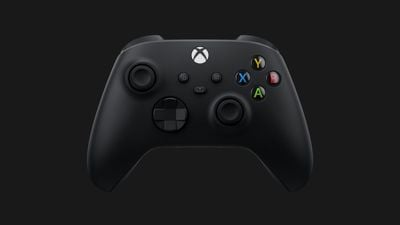
xbox series x controller microsoft
Since iOS 13 and tvOS 13, users have been able to connect popular console controllers to an iPhone or ‌Apple TV‌ to play Apple Arcade games and other iOS games, instead of having to spend extra money on MFi-compatible controllers.

The newest updates, iOS 14.5 and tvOS 14.5, introduce additional support for the latest gaming controllers from Sony and Microsoft, allowing the PS5 DualSense controller and the Xbox Series X controller to be used with iPhones and iPads.

The following steps walk you through the process of pairing your DualSense or Series X controller to your Apple device. If you haven't already, you'll need to update your iPhone/‌iPad‌ to iOS 14.5 (Settings > General > Software Update) or your ‌Apple TV‌ to tvOS 14.5 (Settings -> System -> Software Updates).

How to Connect the PS5 DualSense controller to iPhone or iPad

  1. Open your iOS device's Settings app and navigate to Bluetooth.
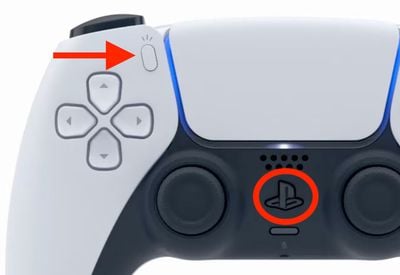
  2. On your DualSense controller, press and hold the Share button (next to the D-Pad, with three lines radiating out from the top) and the PS button (in between the thumbsticks) at the same time. Hold them for at least three seconds, until you see the light bar flashing blue.
    sony

  3. On your iPhone/‌iPad‌, under "Other Devices," tap on your PS5 DualSense controller.
  4. Tap Pair.

To save battery once you're done using the controller, return to the Bluetooth settings screen and tap the info ("i") icon next to the PS5 controller, then tap Disconnect or Forget this device to remove it from the list.

How to Connect the Xbox Series X controller to iPhone or iPad

  1. Open your iOS device's Settings app and navigate to Bluetooth.
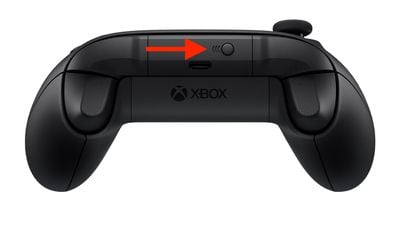
  2. On your Xbox Series X controller, hold down the pairing button located on the top of the controller for a few seconds.
    xbox series x

  3. On your iPhone/‌iPad‌, under "Other Devices," tap on your Xbox Series X controller.
  4. Tap Pair.

To save battery once you're done using the controller, return to the Bluetooth settings screen and tap the info ("i") icon next to the Xbox Series X controller, then tap Disconnect or Forget this device to remove it from the list.

How to Connect the PS5 DualSense Controller to Apple TV

  1. Open the Settings app on ‌Apple TV‌ and select Remotes and Devices -> Bluetooth.
  2. On your DualSense controller, press and hold the Share button (next to the D-Pad, with three lines radiating out from the top) and the PS button (in between the thumbsticks) at the same time. Hold them for at least three seconds, until you see the light bar flashing blue.
    sony

  3. On your ‌Apple TV‌, select the DualSense Controller to pair it, which will be confirmed with a notification on tvOS.

How to Connect the Xbox Wireless Controller to Apple TV

  1. Open the Settings app on ‌Apple TV‌ and select Remotes and Devices -> Bluetooth.
  2. On your Xbox Series X controller, hold down the pairing button located on the top of the controller for a few seconds.
    xbox series x

  3. On your ‌Apple TV‌, select the Xbox Series X controller to pair it, which will be confirmed with a notification on tvOS.

The above steps should work for most wireless console controllers, including the DualShock 4 Wireless controller and Xbox Wireless controller.


Top Rated Comments

blazerunner Avatar
64 months ago
Amazing; connect a non Apple controller to every Apple platform except the one that matters. LOL... Mac OS gaming is DEAD.
Score: 4 Votes (Like | Disagree)
bennyf Avatar
64 months ago

It's rather amazing that you can pair one of these controllers with an iPhone, but I have no idea what I would even want to play with one.
Screen real estate on phone is at such a premium it makes a lot of sense if you don't have an iPad. Minecraft is one example. Wonderbox from Apple Arcade is another that benefits a ton from not having fingers blocking part of the screen.
Score: 3 Votes (Like | Disagree)
64 months ago
Also worth knowing for the latest Xbox controller, which enables quick switching between the console and another paired device: https://www.theverge.com/22273528/how-to-xbox-series-x-controller-swap-connection-phone-pc
Score: 2 Votes (Like | Disagree)
64 months ago

Is the Mac version only available on the Mac app store? I didn't see it in steam.
Don't know about Steam, but I bought Borderlands 3 Super Deluxe through Epic in February 2020. It was released in September 2019, it was actually available on Mac before it was on Xbox.
Score: 1 Votes (Like | Disagree)
64 months ago

Have you tried Horizon Zero Dawn?
I bought it on Steam, have not played it yet.
Score: 1 Votes (Like | Disagree)
64 months ago

Amazing; connect a non Apple controller to every Apple platform except the one that matters. LOL... Mac OS gaming is DEAD.
I only connect the controller to my Mac so I can play my PS games remotely :p Before they nuked 32 bit apps I had quite a few games on Steam, butI used a mouse to play these.
Score: 1 Votes (Like | Disagree)

Popular Stories

iOS 26

iOS 26.4 Adds Two New Features to CarPlay

Tuesday March 24, 2026 1:55 pm PDT by
iOS 26.4 was released today, and it includes a couple of new features for CarPlay: an Ambient Music widget and support for voice-based chatbot apps. To update your iPhone 11 or newer to iOS 26.4, open the Settings app and tap on General → Software Update. CarPlay will automatically offer the new features so long as the iPhone connected to your vehicle is running iOS 26.4 or later....
Apple Business hero

Apple Unveils 'Apple Business' All-in-One Platform

Tuesday March 24, 2026 8:53 am PDT by
Apple today announced Apple Business, a new all-in-one platform that unifies device management, productivity tools, and customer outreach features. The service is designed to be a consolidated replacement for several of Apple's existing business-focused offerings, including Apple Business Essentials, Apple Business Manager, and Apple Business Connect. It provides organizations with a single...
AirPods Pro Firmware Feature

Apple Releases New Firmware for AirPods Pro 3, AirPods Pro 2 and AirPods 4

Tuesday March 24, 2026 12:31 pm PDT by
Apple today released new firmware for the AirPods Pro 2, AirPods Pro 3, and the AirPods 4. The firmware has a version number of 8B39, up from 8B34 on the AirPods Pro 3, 8B28 on the AirPods Pro 2, and 8B21 on the AirPods 4. There is no word on what's included in the firmware, but Apple has a support document with limited notes. Most updates are limited to bug fixes and performance...