
The Apple Watch may have a small screen, but it's still large enough to show off those pictures of your little one's dance recital to the grandparents. As long as you've got an album synced from your iPhone, you can even view pictures while your smartphone is out of range.
apple_watch_photos
To help you get the most out of your photo viewing experience, we've put together this tutorial to explain how to set up and customize the Photos app on Apple Watch

Create an Album in Photos on iPhone

The first step to getting the most important pictures on your Apple Watch is to create an album for it in your Photos app on iPhone.

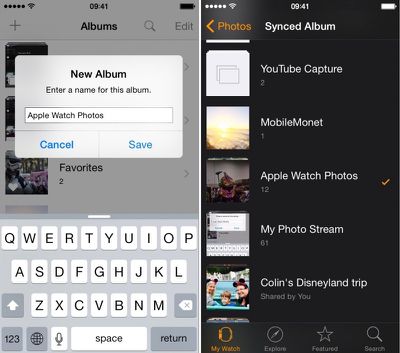
  1. Open the Photos app on the iPhone and select "Albums." Then tap the add icon (+) to create a new one.
  2. Name the new album. For simplicity, I named mine Apple Watch Photos.
  3. Select the photos you wish to add to the album and select done.
apple_watch_photos_setup

Sync an Album to Apple Watch

  1. Open the Apple Watch app on your iPhone and navigate to My Watch.
  2. Scroll down and select the Photos app from the list.
  3. Tap Synced Album. Then select your newly created Apple Watch album.
  4. Photos will automatically sync with your Apple Watch and be available to view, even when your iPhone is out of range.

You can also select a preexisting album instead. You might prefer the immediacy of syncing with your Camera Roll or Photo Stream for currently added pictures instead. The Apple Watch Photos app is defaulted to your Favorites album.

Manage Photo Storage

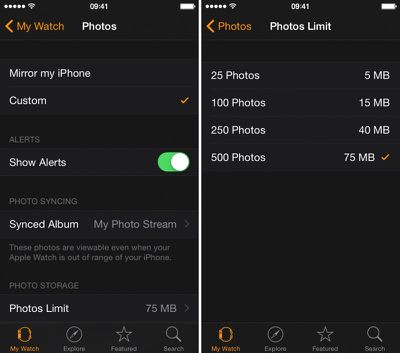
You can customize how many photos you want synced to your Apple Watch for more control over how much room they take up. Select from 25 to 500 photos or five to 75 MB of storage space.
Apple Watch Photos App 4

Use Photos App to View a Synced Album

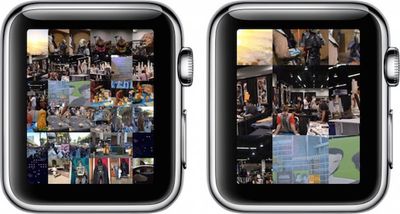
Apple Watch Photos 1Once you've synced an album to Apple Watch, view the pictures on your wrist via the Photos app. When you open it, the first screen will be a collage of all pictures in your album. Rotate the Digital Crown to zoom in.

Tap a picture to view it full screen. Use the Digital Crown to zoom in closer. Drag your finger on the screen to pan. Double Tap to fill the screen. Double-tap again to see the full picture. You can browse your album by swiping to the left or right to switch between photos.

Now that you know how to set up and customize your Photos app on Apple Watch, showing off important moments in your life will be simple.

When Apple updates watchOS to version 2 later this year, we will also be able to view videos from within the Photos app and use single photos or photo albums as backgrounds for watch faces.


Related Roundup: Apple Watch 11
Buyer's Guide: Apple Watch (Neutral)

Top Rated Comments

DavidTheExpert Avatar
139 months ago
Can I make a request? I would really like to see a tutorial on how to view the time on the Apple Watch. I've had this thing for over a month and I still can't figure out how to make it show me the date and time. Is there some hidden setting?
Score: 12 Votes (Like | Disagree)
captain cadet Avatar
139 months ago
Or just pull your phone out to show people on a screen that they can actually see your face on...
Score: 10 Votes (Like | Disagree)
UnfetteredMind Avatar
139 months ago
I have to agree with captain cadet, unless you don't have your phone with you, why wouldn't you just take out the iPhone to which the :apple:Watch is tethered to show the pics? Maybe for very brief encounters where you don't even want to bother pulling out the phone (but then maybe it's not even worth trying to show the pic in the first place).
Score: 4 Votes (Like | Disagree)
Noble Actual Avatar
139 months ago
Please...do not use your Watch to show some pictures when you can just use your iPhone or iPad.

Its so damn small. And it's common knowledge that as you grow older, your eyesight gets worse. They probably can't even see it. Showing it on the iPad...now that's a magical and beautiful experience.
Score: 4 Votes (Like | Disagree)
doelcm82 Avatar
139 months ago
How to view photos on the Apple Watch.

* Bring up a photo on the Watch screen.
* Orient your eyes so that they are both directed at the watch
* Orient the watch so that the screen is facing your eyes
* Focus your eyes so that the watch face is sharp (optional lenses worn over or in contact with your eyes not included)
* View the photo.

I am the proud owner of an Apple Watch, but I haven't yet seen one in person. Mine is "On Vehicle for Delivery Today".
Score: 3 Votes (Like | Disagree)
pubwvj Avatar
139 months ago
A more useful guide to these things:

https://www.apple.com/watch/built-in-apps/

https://manuals.info.apple.com/MANUALS/1000/MA1708/en_US/apple_watch_user_guide.pdf

Perhaps this is where MacRumors Bot is skimming from...

How about skipping the fake how-to click-bait and stick to real rumors that we care about...

And if you don't like complaints about bad articles just skip the comments complaining about them.
Score: 3 Votes (Like | Disagree)

Popular Stories

Apple Logo Zoomed

Tim Cook Teases Plans for Apple's Upcoming 50th Anniversary

Thursday February 5, 2026 12:54 pm PST by
Apple turns 50 this year, and its CEO Tim Cook has promised to celebrate the milestone. The big day falls on April 1, 2026. "I've been unusually reflective lately about Apple because we have been working on what do we do to mark this moment," Cook told employees today, according to Bloomberg's Mark Gurman. "When you really stop and pause and think about the last 50 years, it makes your heart ...
wwdc sans text feature

Apple Rumored to Announce New Product on February 19

Thursday February 5, 2026 12:22 pm PST by
Apple plans to announce the iPhone 17e on Thursday, February 19, according to Macwelt, the German equivalent of Macworld. The report, citing industry sources, is available in English on Macworld. Apple announced the iPhone 16e on Wednesday, February 19 last year, so the iPhone 17e would be unveiled exactly one year later if this rumor is accurate. It is quite uncommon for Apple to unveil...
Finder Siri Feature

Why Apple's iOS 26.4 Siri Upgrade Will Be Bigger Than Originally Promised

Friday February 6, 2026 3:06 pm PST by
In the iOS 26.4 update that's coming this spring, Apple will introduce a new version of Siri that's going to overhaul how we interact with the personal assistant and what it's able to do. The iOS 26.4 version of Siri won't work like ChatGPT or Claude, but it will rely on large language models (LLMs) and has been updated from the ground up. Upgraded Architecture The next-generation...
iOS 26

iOS 26.3 and iOS 26.4 Will Add These New Features to Your iPhone

Tuesday February 3, 2026 7:47 am PST by
While the iOS 26.3 Release Candidate is now available ahead of a public release, the first iOS 26.4 beta is likely still at least a week away. Following beta testing, iOS 26.4 will likely be released to the general public in March or April. Below, we have recapped known or rumored iOS 26.3 and iOS 26.4 features so far. iOS 26.3 iPhone to Android Transfer Tool iOS 26.3 makes it easier...
maxresdefault

Apple Shows Off a Key Reason to Upgrade to the iPhone 17

Saturday February 7, 2026 9:26 am PST by
Apple today shared an ad that shows how the upgraded Center Stage front camera on the latest iPhones improves the process of taking a group selfie. "Watch how the new front facing camera on iPhone 17 Pro takes group selfies that automatically expand and rotate as more people come into frame," says Apple. While the ad is focused on the iPhone 17 Pro and iPhone 17 Pro Max, the regular iPhone...














