

In iOS 17, Apple added a new feature to the Photos widget that enables you to view pictures from a specific album in your photo library right on your iPhone's Home Screen. Here's how it works.
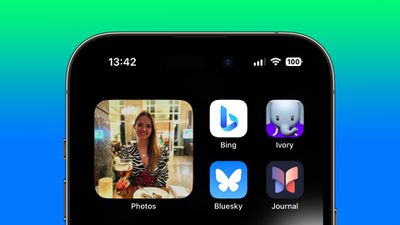
Previously in iOS, the Photos widget was limited to showing featured pictures selected for you by the Photos algorithm, meaning there was no way to choose a custom album in your library for the widget to draw from.
Thankfully in iOS 17, Apple added a new Album option to the available Photos widgets, finally allowing users to choose the album of photos to shuffle through periodically. So now, if you have a particular collection of holiday snaps or shots from some other specific event collected in an album of your own making, your iPhone can pick from this album exclusively.
The following steps show you how it's done on iPhones running iOS 17 and later.
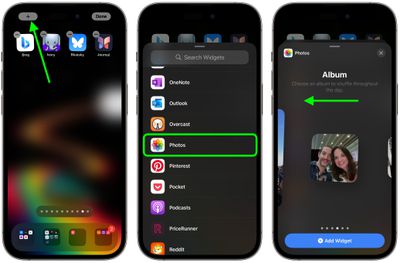
- Press and hold on a space in your iPhone's Home Screen until the icons start to jiggle.
- Tap the + button in the top-left corner of the screen.
- Select Photos in the widgets gallery, either by typing it into the search field or scrolling down to Photos in the list.
- Swipe left to the Album widgets – there are three sizes you can choose from. Select the desired widget size by tapping Add Widget.

- Drag the widget to the desired place on your Home Screen, then tap Done in the top-right corner.
- Next, press and hold on the widget, then select Edit Widget in the dropdown menu.
- Tap the default Favorites selection (in blue text).
- Now select one of your custom albums under "My Albums."
- Finally, tap the blurred area of the screen to return to the Home Screen.
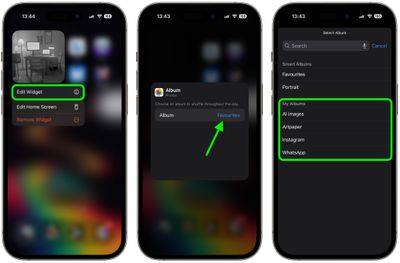
That's all there is to it. Your widget will now automatically shuffle through the photos in the selected album hourly throughout the day.




















