As part of its updated parental controls, Netflix now includes an option that lets account holders PIN protect individual profiles to help prevent kids from using them.
netflixpin
Even if you're not a parent or guardian, so long as you're the account holder you can still use the PIN feature to prevent other people in the same household from watching stuff on your Netflix profile and messing up your recommendations.

The easiest way to set up a PIN for your profile is on the Netflix website. The steps below show you how it's done.

  1. Launch a browser and go to www.netflix.com.
  2. Sign into Netflix using your account credentials, then select your profile.
    Netflix

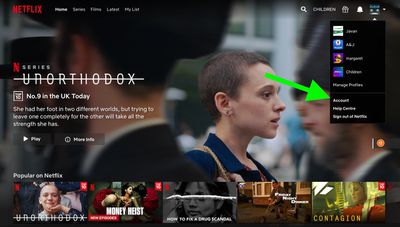
  3. On the main Netflix screen, select your profile avatar and choose the Account option in the menu.
    netflix

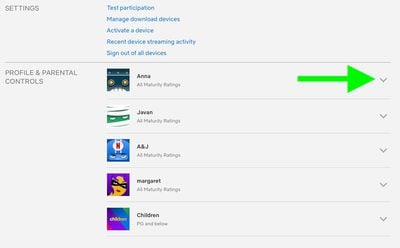
  4. Under the Profile & Parental Controls section, use the chevron against your profile to reveal further options.
    netflix

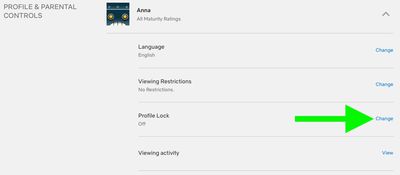
  5. Click Change next to the Profile Lock option.
    netflix

  6. Enter your account password if prompted.
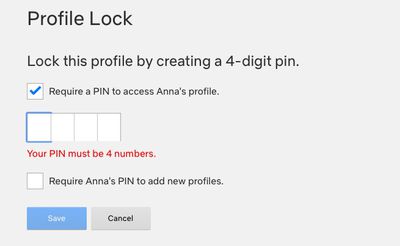
  7. Click the checkbox next to Require a PIN to access [yourname] profile, then enter the four-digit pin that you want to use.
    netflix

  8. Click the second checkbox to require the same pin to add new profiles.
  9. Click Save.

When your PIN is set, Netflix will ask for it whenever your profile is selected at the welcome screen. This will happen on all devices, including smart TVs. Note that you won't be asked for a PIN if your profile is the only one that exists on the account.

In addition to PIN protection for profiles, Netflix has added filters for children's accounts that are based on country ratings, as well as options to remove individual series or films by title, and a feature for reviewing each profile's setting using the Profile and Parental Controls hub in the settings menu.


Tag: Netflix

Top Rated Comments

mw360 Avatar
76 months ago

You might as well let your kids see the F bombs and get them prepared to live in a cruel world. I never understood why parents continue to pretend their kids don't know how to swear even long after they admit Santa doesn't exist.
Thanks. I've filed this in the same place all the other anonymous parenting advice goes.
Score: 4 Votes (Like | Disagree)
ryanwarsaw Avatar
76 months ago

Thanks. I've filed this in the same place all the other anonymous parenting advice goes.
May your children grow up to be as gentle and mild mannered as you are.
Score: 3 Votes (Like | Disagree)
ryanwarsaw Avatar
76 months ago

I don't know why these companies move like their development team is one person working part time. This feature is handy I guess if you're embarrassed about your viewing history, but useless for parenting. The kids profile is way too restrictive for kids of 5+, so ours will pester a parent to use theirs, but since the adult profile now features f-bombs and whatever else in the autoplaying trailers, the parent has to navigate to the show carefully. Thankfully, the developer called in a couple of months back to allow us to disable the autoplaying trailers, but now you can't play the trailers at all, which is a pain when the kids are in bed, and you're trying to browse.
You might as well let your kids see the F bombs and get them prepared to live in a cruel world. I never understood why parents continue to pretend their kids don't know how to swear even long after they admit Santa doesn't exist.
Score: 3 Votes (Like | Disagree)
gsmornot Avatar
76 months ago

How do you remove a PIN in case you forget it?
Use your account password and uncheck the option or type a new one.It does not replace the account password, just adds the PIN option to stop others in the house. Meh
Score: 2 Votes (Like | Disagree)
Sethal Avatar
76 months ago
Disney+ needs this feature!
Score: 2 Votes (Like | Disagree)
4487549 Avatar
76 months ago
The real story here is that we can finally turn off autoplay previews (setting found in the profile section):

Attachment Image
Score: 1 Votes (Like | Disagree)

Popular Stories

Apple Logo Zoomed

Tim Cook Teases Plans for Apple's Upcoming 50th Anniversary

Thursday February 5, 2026 12:54 pm PST by
Apple turns 50 this year, and its CEO Tim Cook has promised to celebrate the milestone. The big day falls on April 1, 2026. "I've been unusually reflective lately about Apple because we have been working on what do we do to mark this moment," Cook told employees today, according to Bloomberg's Mark Gurman. "When you really stop and pause and think about the last 50 years, it makes your heart ...
wwdc sans text feature

Apple Rumored to Announce New Product on February 19

Thursday February 5, 2026 12:22 pm PST by
Apple plans to announce the iPhone 17e on Thursday, February 19, according to Macwelt, the German equivalent of Macworld. The report, citing industry sources, is available in English on Macworld. Apple announced the iPhone 16e on Wednesday, February 19 last year, so the iPhone 17e would be unveiled exactly one year later if this rumor is accurate. It is quite uncommon for Apple to unveil...
Finder Siri Feature

Why Apple's iOS 26.4 Siri Upgrade Will Be Bigger Than Originally Promised

Friday February 6, 2026 3:06 pm PST by
In the iOS 26.4 update that's coming this spring, Apple will introduce a new version of Siri that's going to overhaul how we interact with the personal assistant and what it's able to do. The iOS 26.4 version of Siri won't work like ChatGPT or Claude, but it will rely on large language models (LLMs) and has been updated from the ground up. Upgraded Architecture The next-generation...
iOS 26

iOS 26.3 and iOS 26.4 Will Add These New Features to Your iPhone

Tuesday February 3, 2026 7:47 am PST by
While the iOS 26.3 Release Candidate is now available ahead of a public release, the first iOS 26.4 beta is likely still at least a week away. Following beta testing, iOS 26.4 will likely be released to the general public in March or April. Below, we have recapped known or rumored iOS 26.3 and iOS 26.4 features so far. iOS 26.3 iPhone to Android Transfer Tool iOS 26.3 makes it easier...
maxresdefault

Apple Shows Off a Key Reason to Upgrade to the iPhone 17

Saturday February 7, 2026 9:26 am PST by
Apple today shared an ad that shows how the upgraded Center Stage front camera on the latest iPhones improves the process of taking a group selfie. "Watch how the new front facing camera on iPhone 17 Pro takes group selfies that automatically expand and rotate as more people come into frame," says Apple. While the ad is focused on the iPhone 17 Pro and iPhone 17 Pro Max, the regular iPhone...