Quickly Check Wi-Fi Network Security on iPhone - MacRumors
Skip to Content

Quickly Check Wi-Fi Network Security on iPhone

by

In iOS, Apple makes it easy to spot potentially unsafe Wi-Fi networks before you connect. There are helpful privacy indicators in Control Center that instantly show whether nearby networks are password-protected or open to the public.
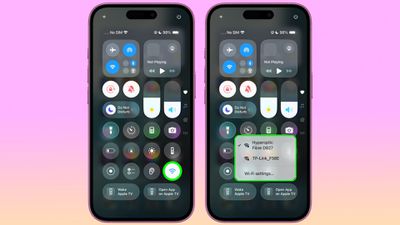
ios control center wifi security

Accessing Wi-Fi Privacy Indicators

Getting to these privacy indicators is straightforward. Pull down from the top-right corner to invoke Control Center, then touch and hold the standalone Wi-Fi control. You'll see a list of detected nearby networks, each displaying a lock icon next to password-protected private networks, with no lock showing for public networks.

If you haven't added the standalone Wi-Fi control (long press a space, then tap Add Control), you can tap the Connectivity group – located by default in the top-left corner of Control Center – and then hold the Wi-Fi symbol within that. This group is also home to controls for Bluetooth, Cellular Data, AirDrop, VPN and Personal Hotspot.
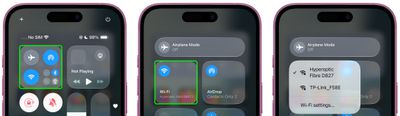
ios control center connectivity panel
The lock symbols make it simple to distinguish between secure private networks and potentially risky public hotspots that don't require a password. It's a small but welcome improvement that helps you quickly make more informed decisions about which networks to join without having to delve into settings, thereby reducing the risk of connecting your iPhone or iPad to unsecured Wi-Fi.


Popular Stories

Dynamic Island iPhone 18 Pro Feature

11 Reasons to Wait for the iPhone 18 Pro

Monday May 11, 2026 9:01 am PDT by
We're only four months out from the launch of Apple's premium next-generation smartphone lineup, and while we're not expecting a sea change in terms of functionality, there are still several enhancements rumored to be coming to the iPhone 18 Pro and iPhone 18 Pro Max. One thing worth noting is that Apple is reportedly planning a major change to its iPhone release cycle this year, adopting a...
iOS 26

iOS 26.5 Features: Everything New in iOS 26.5

Monday May 11, 2026 5:09 pm PDT by
Apple released iOS 26.5 after a few months of beta testing, and while it doesn't have the Siri features we were hoping for since those are being held until iOS 27, there are a handful of useful changes worth knowing about. Subscribe to the MacRumors YouTube channel for more videos. End-to-End Encryption for RCS Support for end-to-end encryption (E2EE) for RCS messages between iPhone and...
General Apps Reddit Feature

Reddit Starts Blocking Mobile Website, Pushing Users to App Instead

Monday May 11, 2026 6:10 am PDT by
Social network Reddit recently began blocking mobile visitors to its website while pushing them to download the official Reddit app, and it's fair to say that the move is not going down well with users. If you visit reddit.com on your iPhone today, you may see a new popup that can't be dismissed, asking you to "get the app to keep using Reddit." A Reddit spokesperson told Ars Technica...