How to Quickly Reset Your Data and Location Access Permissions on iPhone - MacRumors
Skip to Content

How to Quickly Reset Your Data and Location Access Permissions on iPhone

by

In iOS 16, Apple added a new Safety Check feature that's designed to make it easy for users to quickly reset all of the data and location access that they have granted to other people. Keep reading to learn how it works and how to use it.

Apple Privacy Yellow
Safety Check is a new option in iOS 16 that lets you stay aware of and reset all of the access to your data and location that you have granted to others. Apple says the idea behind it is to help people in domestic or intimate partner violence situations. Here's how to use the feature.

  1. Launch the Settings app on your iPhone.
  2. Scroll down and tap through to Privacy & Security.
  3. Scroll down and select Safety Check.

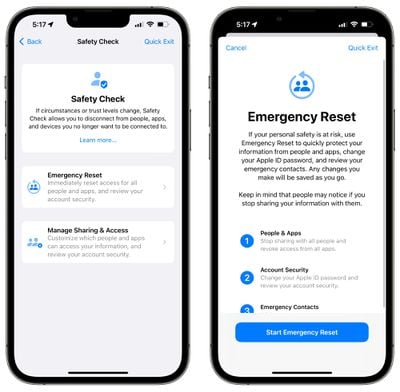
The Safety Check opening screen presents you with two options: Emergency Reset and Manage Sharing & Access. (Note the Quick Exit button that takes you right to the iPhone's Home Screen in case you're in danger of getting caught using it.)

Emergency Reset

Emergency Reset is a one-tap option that lets you protect your iOS device with just a couple of taps.
ios 16 safety check emergency reset
When you use Emergency Reset, it immediately stops sharing everything with all people and apps. This includes things like location information, activity, home data, photo albums, and more.

Emergency Reset also lets you remove all emergency contacts from your iPhone and reset your Apple ID and password so that no one can log into your account.

Manage Sharing

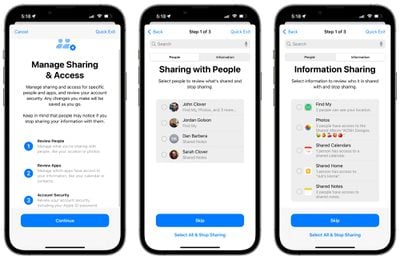
If your situation isn't an emergency, you can use the Manage Sharing & Access option. This includes a walkthrough that lets you see an overview of what you're sharing so you can't be secretly tracked or monitored using location sharing, shared albums, or other ‌iPhone‌ features.

ios 16 manage sharing
These screens include information on who you're sharing data with and what data those people have access to, along with which apps have access to your data. You can select people or apps and choose the "Stop Sharing" option to turn off sharing right away.

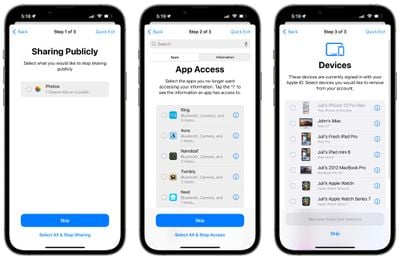
There's also a list of all the third-party apps that you have installed and what data they have access to, along with tools to disable that access. You can see which permissions an app has on an individual basis, or by data such as Bluetooth, Location, Contacts, and more.
ios 16 manage sharing 2
Lastly, Manage Sharing can tell you exactly which devices your iCloud account is logged into, giving you the option to log out, and you can use it to reset your ‌‌Apple ID‌‌ and password as well as deactivate Emergency contacts.
Popular Stories

homeview calendar

Apple's HomeView Touts These 5 Privacy Features

Tuesday October 13, 2026 7:31 am PDT by
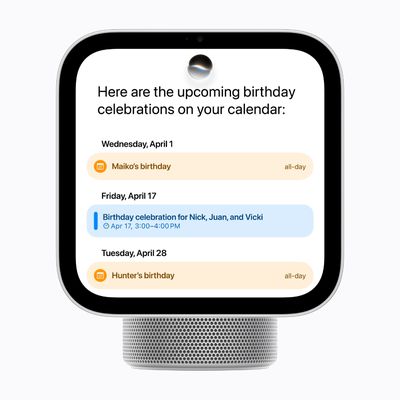
Apple uses a number of methods to keep HomeView users' personal information private, even when a whole household shares the device. The device recognizes up to six people, giving each their own Home Screen with personalized apps and widgets. Apple says personal content stays private to each user, while shared photo albums and music can remain available to everyone in the household, including ...


M5 MacBook Pro

RIP, MacBook Ultra

Monday October 19, 2026 9:37 am PDT by
Apple today sent out invites for an experience in Los Angeles on Wednesday, October 28, and the "Pro and tell" tagline on the invitation likely means that the rumored MacBook models with touch-enabled OLED displays will stick with MacBook Pro branding instead of the once-rumored "MacBook Ultra" name. The long-rumored "iPhone Ultra" ended up being named iPhone Duo, so speculation that Apple...
iPhone Duo Trio

Here's What Apple's Apps Look Like on the iPhone Duo

Tuesday October 20, 2026 11:12 am PDT by
With just three days to go until the iPhone Duo is released, Apple is getting ready for the launch. Behind the scenes, the App Store now has screenshots of Apple's built-in apps running on the Duo. We've seen some apps in marketing materials, but images of the ones we haven't seen give us an idea of what it will be like using the iPhone Duo day to day. Many apps are shown in landscape...
Latest Stories
Apple Pulls Keynote, Pages and Numbers From App Store
32 minutes ago
Apple Updates More Apps With iPhone Duo Support
1 hour ago
Apple Will Label Apps 'Made for iPhone Duo' in App Store
4 hours ago
Amazon Takes $49 Off iPad With Prices Starting at $399.99
4 hours ago
F1 on Apple TV Now Available in Dolby Atmos
5 hours ago
Apple Reveals More Than 50 Apps That Will Be Updated for iPhone Duo
5 hours ago
Apple Blocks Certificates That Could Help Attackers Fake Websites
7 hours ago
Giant iPhone Duo Installations Spotted at Apple Fifth Avenue
8 hours ago
iPhone Duo 2 Prototypes Include Under-Display Face ID
8 hours ago
Tesla App Gains iPad and iPhone Duo Support
12 hours ago
Apple Reportedly Boosts iPhone Duo Orders by 44%
12 hours ago
Fortnite Returning to Australian App Store After Court Ruling
13 hours ago
Apple Ordered to Open iPhone to Rival App Stores in Australia
13 hours ago
Apple Suppliers Face Hurdles Cutting Circuit Board Emissions
13 hours ago
Things Updated for iPhone Duo With Adaptive Layout
14 hours ago
Simplicity and Siri AI Are HomeView's Killer Features, Apple Says
14 hours ago
iPhone Duo Reviewers Really Miss Face ID
19 hours ago
Does the iPhone Duo Run Hot? Here's What Reviews Found
20 hours ago
Apple Music's New Look is Now Live on Apple's Website
21 hours ago
Anthropic Launches Claude Duet, a Proactive AI Agent
22 hours ago
What 32,000 Folds Did to the iPhone Duo's Hinge
22 hours ago
iPhone Duo's Hidden FaceTime Camera Takes 'Trash' Photos
1 day ago
iPhone Duo Has 'Edge Light' Feature That Debuted on Macs Last Year
1 day ago
Apple Support App Updated for iPhone Duo's Larger Display
1 day ago
Amazon Sweetens the Deal on Entry-Level 16-Inch MacBook Pro With $570 Off
1 day ago
iPhone Duo Tips Over on MagSafe Stands When Unfolded
1 day ago
Apple Music's New Look Officially Announced
1 day ago
iPhone Duo Supports Apple Pencil Starting With iOS 27.2
1 day ago
iPhone Duo Accessories Roundup: Cases and Screen Protectors From OtterBox, ZAGG, and More
1 day ago
Apple Stores Will Have 'Limited' Availability of iPhone Duo for Walk-In Customers
1 day ago