macos spotlight icon e1542458658324Apple has enhanced Spotlight search in macOS in recent years, with the addition of Spotlight Suggestions allowing it to tap into a variety of online data sources like weather and sports. Nevertheless, helping you find apps, documents and other files stored on your Mac is still what Spotlight does best.

That's not to say its core function is infallible, however. If Spotlight can't find files that you know exist on your Mac, or if it stops prioritizing results based on your earlier searches, then it's probably a sign that your system's search index is damaged somehow.

If you're experiencing odd behavior when using Spotlight, you should try rebuilding its search database index. There are Terminal commands that will do the job, but you can achieve the same result via the regular macOS user interface in just a few quick steps. Here's how.

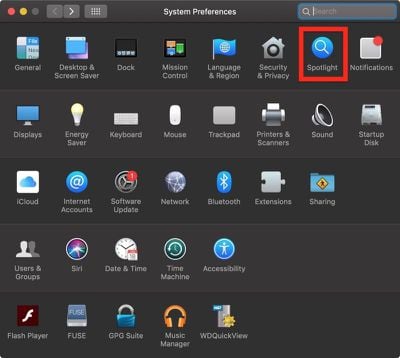
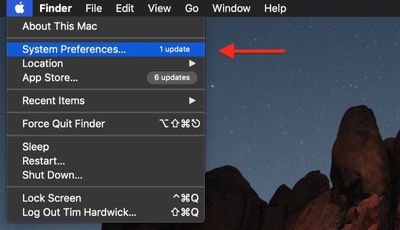
  1. Select System Preferences... from the Apple () menu at the top left of your screen.
    how to reindex spotlight00

  2. Click the Spotlight pane.
    how to reindex spotlight01

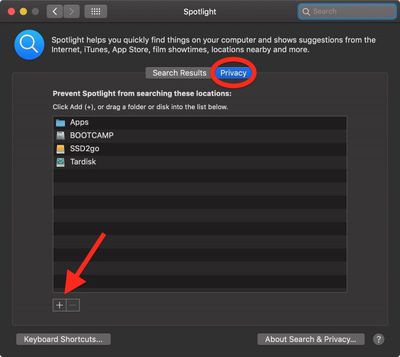
  3. Click the Privacy tab.
  4. Click the Add (+) button.
    how to reindex spotlight02

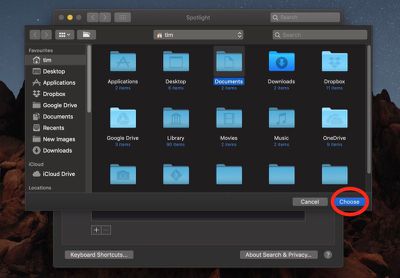
  5. Select the folder or disk whose index you wish to re-build, then click Choose. Alternatively, drag the folder or disk into the list. We've chosen Documents in our example.
    how to reindex spotlight03

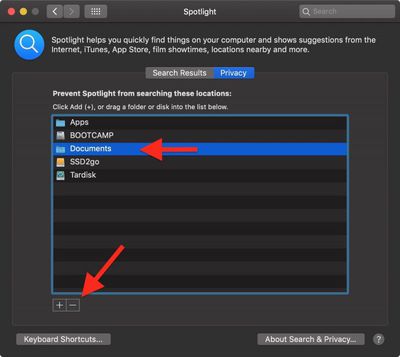
  6. In the same list, click the folder or disk that you just added and then click the Remove (-) button.
    how to reindex spotlight04

  7. Click the red traffic light button to close System Preferences.
Once you've completed these steps, Spotlight will begin reindexing the contents of the folder(s) or disk(s) you chose, which may take some time and a few processor cycles. Depending on which version of macOS you're running, you may see a rebuild progress indicator in Spotlight's menu bar item. With a bit of luck, your Spotlight problems will have been resolved once indexing is complete.

You can also perform a system-wide re-index of the Spotlight database, among many other optimizations, using Titanium Software's free Onyx utility, which is available for all recent versions of macOS.


Top Rated Comments

Weaselboy Avatar
94 months ago
You can also perform a system-wide re-index of the Spotlight database, among many other optimizations, using Titanium Software's free Onyx utility ('https://www.titanium-software.fr/en/onyx.html'), which is available for all recent versions of macOS.

You can also just run this command in Terminal and it will do a system-wide Spotlight reindex.

sudo mdutil -E /

I've tried this rebuild previously and found it did not change anything.
Anyone with different experience?
One issue I have noticed a Spotlight reindex will often fix is if you are getting an incorrect readout for Storage in System Report. If the Spotlight index is corrupted it will make that storage readout all wrong and a reindex can fix it.


Attachment Image
Score: 14 Votes (Like | Disagree)
macdaddy44 Avatar
94 months ago
This is a more extensive rebuild as it removes a possibly corrupt index database -

• mdutil -i off /
• sudo rm -rf /.Spotlight-V100
• sudo rm -rf /.Spotlight-V200
• mdutil -i on /
• mdutil -E /
Score: 6 Votes (Like | Disagree)
VictorTango777 Avatar
94 months ago
It seems that Apple assumes Mac users only need to search Mac formatted drives that are connected directly to Mac computers running Mac OS. Forget about shared folders on Windows servers or read-only volumes such as NTFS drives or DVD media. Even with simple filename based searches, Mac OS 9 from 20 years ago or even Unix find seems to find filenames better than Spotlight when searching "non Apple approved" volumes.

Also, what search engine does Apple use on their own Support website? Trying to search for a simple phrase returns hundreds of pages of irrelevant results. It also seems like their website search uses implicit "OR" instead of "AND" for searches containing multiple words. It's pathetic that I have to use an external Google search to find stuff inside Apple's own website.
Score: 6 Votes (Like | Disagree)
kwikdeth Avatar
94 months ago
Onyx is a great utility, been using it for years. It also gives you access to enable a bunch of other hidden settings and options. For example, One option I like to enable is turning launchpad's background to greyscale. I find this makes it easier and faster to locate items on the launchpad that I don't frequently access.
Score: 5 Votes (Like | Disagree)
djlythium Avatar
94 months ago
I never knew this was possible.

I love these tutorials!
Score: 3 Votes (Like | Disagree)
Mr_Brightside_@ Avatar
94 months ago
Weird timing. I was having an issue with two of my Sierra Macs where the Spotlight window would disappear right after beginning to type. I forced a re-index and it seems to have fixed the issue.
Score: 2 Votes (Like | Disagree)

Popular Stories

Apple Logo Zoomed

Tim Cook Teases Plans for Apple's Upcoming 50th Anniversary

Thursday February 5, 2026 12:54 pm PST by
Apple turns 50 this year, and its CEO Tim Cook has promised to celebrate the milestone. The big day falls on April 1, 2026. "I've been unusually reflective lately about Apple because we have been working on what do we do to mark this moment," Cook told employees today, according to Bloomberg's Mark Gurman. "When you really stop and pause and think about the last 50 years, it makes your heart ...
Finder Siri Feature

Why Apple's iOS 26.4 Siri Upgrade Will Be Bigger Than Originally Promised

Friday February 6, 2026 3:06 pm PST by
In the iOS 26.4 update that's coming this spring, Apple will introduce a new version of Siri that's going to overhaul how we interact with the personal assistant and what it's able to do. The iOS 26.4 version of Siri won't work like ChatGPT or Claude, but it will rely on large language models (LLMs) and has been updated from the ground up. Upgraded Architecture The next-generation...
wwdc sans text feature

Apple Rumored to Announce New Product on February 19

Thursday February 5, 2026 12:22 pm PST by
Apple plans to announce the iPhone 17e on Thursday, February 19, according to Macwelt, the German equivalent of Macworld. The report, citing industry sources, is available in English on Macworld. Apple announced the iPhone 16e on Wednesday, February 19 last year, so the iPhone 17e would be unveiled exactly one year later if this rumor is accurate. It is quite uncommon for Apple to unveil...
iOS 26

iOS 26.3 and iOS 26.4 Will Add These New Features to Your iPhone

Tuesday February 3, 2026 7:47 am PST by
While the iOS 26.3 Release Candidate is now available ahead of a public release, the first iOS 26.4 beta is likely still at least a week away. Following beta testing, iOS 26.4 will likely be released to the general public in March or April. Below, we have recapped known or rumored iOS 26.3 and iOS 26.4 features so far. iOS 26.3 iPhone to Android Transfer Tool iOS 26.3 makes it easier...
iphone 17 pro dark blue 1

iPhone 18 Pro Max Rumored to Deliver Next-Level Battery Life

Friday February 6, 2026 5:14 am PST by
The iPhone 18 Pro Max will feature a bigger battery for continued best-in-class battery life, according to a known Weibo leaker. Citing supply chain information, the Weibo user known as "Digital Chat Station" said that the iPhone 18 Pro Max will have a battery capacity of 5,100 to 5,200 mAh. Combined with the efficiency improvements of the A20 Pro chip, made with TSMC's 2nm process, the...