iOS comes with a handy new Control Center function that allows you to record what you're doing on your screen. It's great if you want to capture gameplay, walk someone through a tutorial in an app, demonstrate a bug, and more, and it's available on both iPhones and iPads.


Enabling Screen Recording Button

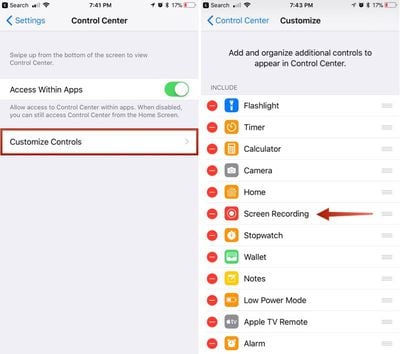
If you don't have the screen recording icon in Control Center, you can add it in the Settings app.

  1. Open the Settings app.
  2. Choose Control Center.
  3. Select "Customize Controls." ios11enablingscreenrecording
  4. Tap the + button next to "Screen Recording" to add it to the "Include" section.

How to Record Your Screen

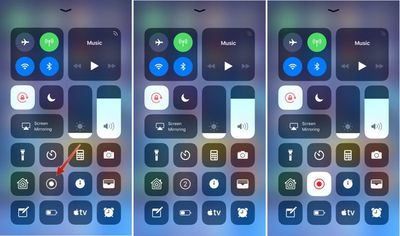
  1. Bring up the Control Center.
  2. Tap the icon for screen recording. It's two nested circles. ios11screenrecording
  3. Your iPhone or iPad will start recording video of your screen automatically following a three second countdown.
While screen recording is turned on, a red bar is plastered across the top of the display so it's clear when you're recording and when you're not.
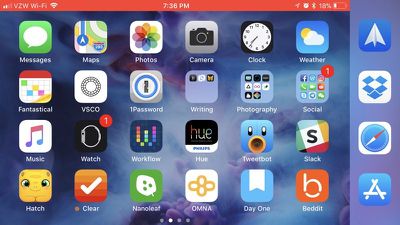
ios11screenrecordingredbanner

Ending a Recording

To stop recording the screen, you can go back to Control Center and toggle the screen recording icon, or your can tap the red bar at the top of the screen and confirm you want to end the recording. The video you made is then saved to the Photos app.
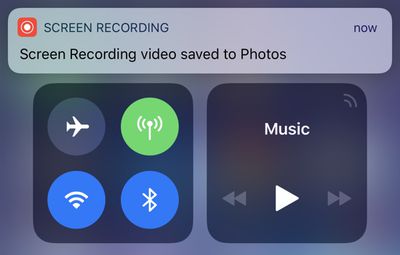
screenrecordingsavedios11

Screen Recording Options

There are a few options that are available when making a screen recording, which can be accessed directly in the Control Center. To bring up these options, simply 3D Touch on the screen recording icon.
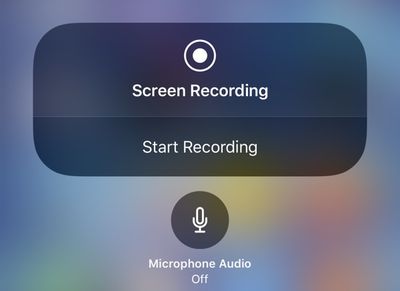
ios11screenrecording3dtouch
From this menu, you can start a screen recording and toggle microphone audio on or off. These are the only options that are available for the feature -- it's fairly basic.


Related Forum: iOS 11

Top Rated Comments

rob.james.arias Avatar
110 months ago
Aka “How to record those Snaps”
Score: 2 Votes (Like | Disagree)
trusso Avatar
110 months ago
I get that exact same option on my iPhone 6+ by just tapping and holding on the screen recording icon.

Really haven't felt I've been missing out on anything over the past several years by not having 3D touch on my iPhone.
You're not. I upgraded to a 6S last year for the larger internal storage, and I've forgotten 3D touch was even a thing. I never use it.
Score: 2 Votes (Like | Disagree)
kdarling Avatar
109 months ago
Starting a Recording
[LIST=1]
* Bring up the Control Center.
* Tap the icon for screen recording. It's two nested circles.

Dear UI vetters at Apple (if you even exist any more):

Please add labels to all your icons, so that people who don't memorize them, and/or older people like my Mom, can figure out what the heck each icon does.

Thank you. Oh, and don't let Ive design any part of an UI any more, please.
Score: 1 Votes (Like | Disagree)
ArtOfWarfare Avatar
110 months ago
Accessing Screen Recording Options

There are a few options that are available when making a screen recording, which can be accessed directly in the Control Center. To bring up these options, simply 3D Touch on the screen recording icon.


From this menu, you can start a screen recording and toggle microphone audio on or off. These are the only options that are available for the feature -- it's fairly basic.

I get that exact same option on my iPhone 6+ by just tapping and holding on the screen recording icon.

Really haven't felt I've been missing out on anything over the past several years by not having 3D touch on my iPhone.
Score: 1 Votes (Like | Disagree)
Glassed Silver Avatar
110 months ago
I get that exact same option on my iPhone 6+ by just tapping and holding on the screen recording icon.

Really haven't felt I've been missing out on anything over the past several years by not having 3D touch on my iPhone.
Contextual previews (linked webpages or maps for example) are a Godsent.

I used to be pretty indifferent about them, thinking it might be a cool feature, but ever since I got my 6S Plus I can honestly say it made iOS a lot more convenient to me.

My iPad Air feels outright awkward without it.

Glassed Silver:win
Score: 1 Votes (Like | Disagree)
aircanman Avatar
110 months ago
I’d like to see an option where it highlights where on the screen you press. This would make it easier for creating tutorial videos.
Score: 1 Votes (Like | Disagree)

Popular Stories

Apple Logo Zoomed

Tim Cook Teases Plans for Apple's Upcoming 50th Anniversary

Thursday February 5, 2026 12:54 pm PST by
Apple turns 50 this year, and its CEO Tim Cook has promised to celebrate the milestone. The big day falls on April 1, 2026. "I've been unusually reflective lately about Apple because we have been working on what do we do to mark this moment," Cook told employees today, according to Bloomberg's Mark Gurman. "When you really stop and pause and think about the last 50 years, it makes your heart ...
iOS 26

iOS 26.3 and iOS 26.4 Will Add These New Features to Your iPhone

Tuesday February 3, 2026 7:47 am PST by
While the iOS 26.3 Release Candidate is now available ahead of a public release, the first iOS 26.4 beta is likely still at least a week away. Following beta testing, iOS 26.4 will likely be released to the general public in March or April. Below, we have recapped known or rumored iOS 26.3 and iOS 26.4 features so far. iOS 26.3 iPhone to Android Transfer Tool iOS 26.3 makes it easier...
imac video apple feature

Apple Makes Its Second-Biggest Acquisition Ever

Tuesday February 3, 2026 12:45 pm PST by
Apple recently acquired Israeli startup Q.ai for close to $2 billion, according to Financial Times sources. That would make this Apple's second-biggest acquisition ever, after it paid $3 billion for the popular headphone maker Beats in 2014. This is also the largest known Apple acquisition since the company purchased Intel's smartphone modem business and patents for $1 billion in 2019....
wwdc sans text feature

Apple Rumored to Announce New Product on February 19

Thursday February 5, 2026 12:22 pm PST by
Apple plans to announce the iPhone 17e on Thursday, February 19, according to Macwelt, the German equivalent of Macworld. The report, citing industry sources, is available in English on Macworld. Apple announced the iPhone 16e on Wednesday, February 19 last year, so the iPhone 17e would be unveiled exactly one year later if this rumor is accurate. It is quite uncommon for Apple to unveil...
Finder Siri Feature

Why Apple's iOS 26.4 Siri Upgrade Will Be Bigger Than Originally Promised

Friday February 6, 2026 3:06 pm PST by
In the iOS 26.4 update that's coming this spring, Apple will introduce a new version of Siri that's going to overhaul how we interact with the personal assistant and what it's able to do. The iOS 26.4 version of Siri won't work like ChatGPT or Claude, but it will rely on large language models (LLMs) and has been updated from the ground up. Upgraded Architecture The next-generation...