

 In iOS 13 and iPadOS, Apple has combined the Find My Friends and the Find My iPhone apps into a single app called "Find My." Find My works similarly to the apps it replaces. For example, just like Find My iPhone, it allows you to put stolen, lost or misplaced Apple devices into Lost Mode.
Remotely turning on Lost Mode ensures that your passcode is required on the device, meaning no one but you can change its Find My status, or erase it without connecting it to a computer. And even if your iPhone is fully erased, the person who has it can't use it. Activation Lock (activated when you turn on Find My on a device where your Apple ID is logged in) stays on and there is no way to bypass it.
Of course, while the Lost Mode feature can increase your chances of retrieving your property, it can't guarantee that you'll ever see the lost device again.
If the worst does happen and you lose all hope of finding your Apple device, you can remove it from your iCloud account by following the steps below.
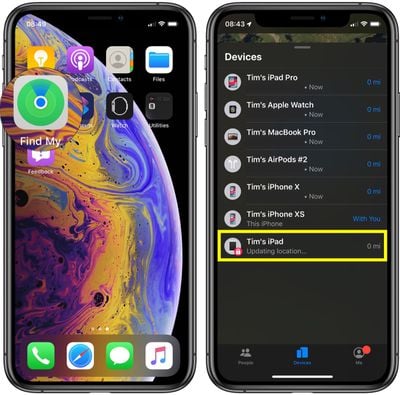
- Launch the Find My app on your iPhone or iPad.
- Swipe up with your finger to reveal your list of devices.

- Tap the lost device in the list – indicated by a padlock within the device's icon.
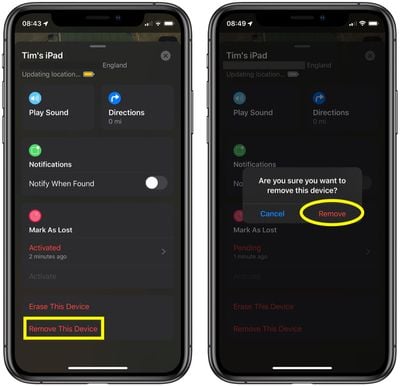
- Swipe up to reveal the menu of device options.
- Tap Remove This Device.
- Tap Remove to confirm.
Find My is the most important feature to have turned on in the event a device is lost, but there are other key security options you should use, including a passcode and two-factor authentication.
With a passcode, no one can access personal data stored on your iPhone, and with two-factor authentication, your Apple ID will be safer from hacking attempts, something a thief or person with malicious intent might try to get access to on a stolen device to disable Activation Lock.




















