Does your iPhone keep displaying certain contacts whenever you go to share something in iOS, and you'd rather not see them? Keep reading to learn how to get rid of them.
share sheet
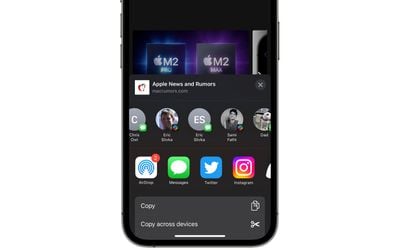
Whenever you go to share something on your ‌iPhone‌ or iPad using the Share button, iOS brings up the activity view – often called the Share Sheet – at the top of which is a row of suggested contacts with whom you've interacted recently. Swiping along this row reveals more contacts, and the icon in the corner of each profile picture indicates the app that you often use to communicate with that person.

These suggested contacts are useful if you share a lot of things with the same people, but there may be times when you'd prefer not to see specific contacts there, for example if someone is a duplicate suggestion over multiple apps, or if you don't want to draw attention to your regular comms with a certain someone. Whatever the reason, you can actually steer these sharing suggestions to appear less often, or not at all. Here's how.

Make Contacts Appear Less Often in iOS Share Sheet

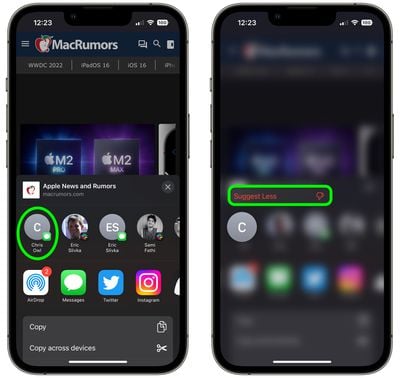
  1. Tap the Share button (the box with an arrow pointing out) in any app to bring up the Share Sheet.
  2. Long press on the suggested contact that you want to see less often in the Share Sheet.
  3. Tap Suggest Less in the popover menu.

share sheet

Bear in mind, doing this won't guarantee that the contact doesn't appear in the Share Sheet again in future, but if you keep repeating it whenever they do show up, iOS will eventually get the message.

Remove All Contacts From iOS Share Sheet

Short of deleting their contact in the Contacts app, the only way to guarantee that someone doesn't keep turning up on your Share Sheet is to disable the contact suggestions row completely.

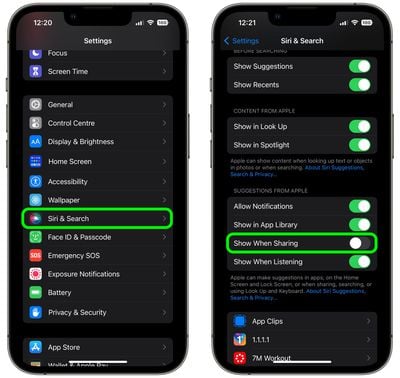
  1. Open the Settings app.
  2. Scroll down and tap Siri & Search.
  3. Under the "Suggestions From Apple" section, toggle off the switch next to Show When Sharing.
settings

That's all there is to it. Now the next time you invoke the Share Sheet, you won't see any contact profiles at the top. You can reverse the change just as easily by switching on the Show When Sharing toggle again.


Top Rated Comments

hellosil Avatar
45 months ago
Remove All Contacts From iOS Share Sheet ?
Thank you!
Score: 11 Votes (Like | Disagree)
ahmedg Avatar
45 months ago
Oh my God. First time ever a feature that I didn’t know existed. And guess what? I searched for something like this just yesterday.
Score: 8 Votes (Like | Disagree)
xxray Avatar
45 months ago
I’m so glad Apple added the option to turn this off. I used to be so scared I’d send someone a link to something I didn’t want to send them… :oops:
Score: 7 Votes (Like | Disagree)
MisterSavage Avatar
45 months ago
I was actually shocked at how dumb the selection process was for this. You only sent a DM to a person one time on Slack? Let's suggest them every single time you share something and not use people you contact all the time.
Score: 6 Votes (Like | Disagree)
JM Avatar
45 months ago
?

1000 blessings on you and you family for this tip ?
Score: 5 Votes (Like | Disagree)
CarAnalogy Avatar
45 months ago
I don’t understand why there isn’t an option to remove a specific contact entirely. Suggest less is kind of patronizing.

“Yeah yeah we know you *think* you don’t want to see this contact, but we know better.”
Score: 4 Votes (Like | Disagree)

Popular Stories

Apple Logo Zoomed

Tim Cook Teases Plans for Apple's Upcoming 50th Anniversary

Thursday February 5, 2026 12:54 pm PST by
Apple turns 50 this year, and its CEO Tim Cook has promised to celebrate the milestone. The big day falls on April 1, 2026. "I've been unusually reflective lately about Apple because we have been working on what do we do to mark this moment," Cook told employees today, according to Bloomberg's Mark Gurman. "When you really stop and pause and think about the last 50 years, it makes your heart ...
iOS 26

iOS 26.3 and iOS 26.4 Will Add These New Features to Your iPhone

Tuesday February 3, 2026 7:47 am PST by
While the iOS 26.3 Release Candidate is now available ahead of a public release, the first iOS 26.4 beta is likely still at least a week away. Following beta testing, iOS 26.4 will likely be released to the general public in March or April. Below, we have recapped known or rumored iOS 26.3 and iOS 26.4 features so far. iOS 26.3 iPhone to Android Transfer Tool iOS 26.3 makes it easier...
imac video apple feature

Apple Makes Its Second-Biggest Acquisition Ever

Tuesday February 3, 2026 12:45 pm PST by
Apple recently acquired Israeli startup Q.ai for close to $2 billion, according to Financial Times sources. That would make this Apple's second-biggest acquisition ever, after it paid $3 billion for the popular headphone maker Beats in 2014. This is also the largest known Apple acquisition since the company purchased Intel's smartphone modem business and patents for $1 billion in 2019....
wwdc sans text feature

Apple Rumored to Announce New Product on February 19

Thursday February 5, 2026 12:22 pm PST by
Apple plans to announce the iPhone 17e on Thursday, February 19, according to Macwelt, the German equivalent of Macworld. The report, citing industry sources, is available in English on Macworld. Apple announced the iPhone 16e on Wednesday, February 19 last year, so the iPhone 17e would be unveiled exactly one year later if this rumor is accurate. It is quite uncommon for Apple to unveil...
Finder Siri Feature

Why Apple's iOS 26.4 Siri Upgrade Will Be Bigger Than Originally Promised

Friday February 6, 2026 3:06 pm PST by
In the iOS 26.4 update that's coming this spring, Apple will introduce a new version of Siri that's going to overhaul how we interact with the personal assistant and what it's able to do. The iOS 26.4 version of Siri won't work like ChatGPT or Claude, but it will rely on large language models (LLMs) and has been updated from the ground up. Upgraded Architecture The next-generation...