How to Reset AirPods Max to Factory Settings - MacRumors
Skip to Content

How to Reset AirPods Max to Factory Settings

by

With the first wave of AirPods Max orders now arriving into the hands of customers, as always there are bound to be a few hiccups encountered when trying to connect and use the over-ear headphones with different devices for the first time.
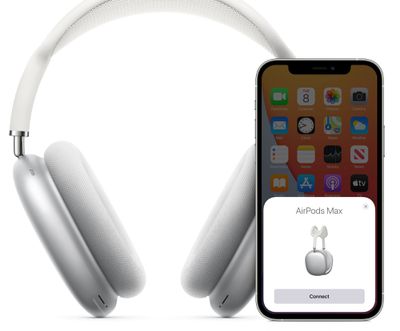
airpods max pairing
If you're experiencing issues, the first thing you should do before anything else is reset the headphones and see if that resolves the problem. If that doesn't work, or if you've decided to return the headphones, you can reset them to factory settings and unpair them from your iCloud account.

How to Reset AirPods Max

  1. Before you reset your AirPods Max, make sure they have some charge by plugging them into a charging point via the supplied USB-C to Lightning Cable.
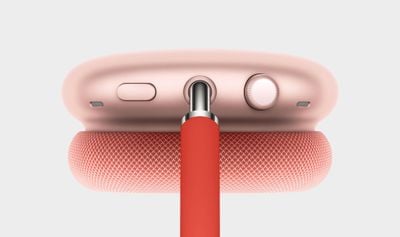
  2. Press and hold the Noise Control button and the Digital Crown until the LED status light at the bottom of the right-hand earcup flashes amber.

If that doesn't solve your problem, you can reset the AirPods Max to factory settings. If you go down that route to return the headphones to Apple, remember to unpair them from your ‌iCloud‌ account.

airpods max digital crown

How to Reset AirPods Max to Factory Settings

  1. Make sure the headphones have some charge by plugging them into a charging point via the supplied USB-C to Lightning Cable.
  2. Press and hold the Noise Control button and the Digital Crown for 15 seconds, until the LED status light at the bottom of the right-hand earcup flashes amber, then white.

If neither of these options work to resolve your particular problem, contact Apple Support.

There are a couple of other notable customization options with the AirPods Max that are worth knowing about. You can reverse the direction of the Digital Crown volume controls, and also customize the mode selection of the Noise Control button.


Related Roundup: AirPods Max 2
Buyer's Guide: AirPods Max (Buy Now)
Related Forum: AirPods

Top Rated Comments

RPhoto Avatar
71 months ago

Wait - so you can remove them from your iCloud account (removing activation lock) just by pressing the buttons on the headset, without entering your iCloud password at any point? That's not great for something that costs £550!
No, I think it's just been worded badly/confusingly.
Score: 2 Votes (Like | Disagree)
71 months ago

Wait - so you can remove them from your iCloud account (removing activation lock) just by pressing the buttons on the headset, without entering your iCloud password at any point? That's not great for something that costs £550!
There is no activation lock in Airpods. You can use stolen Airpods just fine.
Score: 1 Votes (Like | Disagree)
mazz0 Avatar
71 months ago

No, I think it's just been worded badly/confusingly.
Yeah, looks like its been edited. Phew, that would have made them a thief magnet! Mind you, the case might
make thieves too embarrassed to be seen with them. People might think the thief's stolen somebody's bra which I think has a substantially harsher punishment.
Score: 1 Votes (Like | Disagree)

Popular Stories

AirPods Max 2 Design

Apple Releases New Firmware for AirPods Max 2

Tuesday May 5, 2026 11:16 am PDT by
Apple today released new firmware for the AirPods Max 2. The firmware is version 8E258, up from the prior 8E251 firmware that was released just ahead of when the AirPods Max 2 launched. It's not clear what's included in the firmware update, but Apple provides limited details in its AirPods firmware support document. Most updates focus on bug fixes and improvements. The AirPods Max 2 have...
Apple Event Logo

Apple's Next Era Begins September 1

Thursday May 7, 2026 10:36 am PDT by
Apple recently announced that Tim Cook will be stepping down as CEO later this year, after 15 years of leading the company. Effective September 1, Apple's hardware engineering chief John Ternus will become the company's next CEO, while Cook will become executive chairman of Apple's board of directors. In his new role, Apple said Cook will assist with "certain aspects" of the company,...
Instagram Feature 2

PSA: Instagram Encrypted Messaging Ends on Friday, May 8

Tuesday May 5, 2026 8:24 am PDT by
Instagram will remove end-to-end encryption for direct messages between users from May 8, 2026. When the date comes around, Meta will potentially be able to see the contents of all messages between users on the social media platform. Encrypting messages has been an optional feature in Instagram since 2023, but in March of this year the social media platform quietly updated a help page to say ...