How to Reset Your Mac's Bluetooth Module to Fix Connection Issues - GeekWebGuides
Skip to Content

How to Reset Your Mac's Bluetooth Module to Fix Connection Issues

by

BluetoothIconXBluetooth is what your Mac uses to connect to wireless devices like keyboards, mice, trackpads, speakers, and other peripherals. Generally, it's a reliable technology. At some point however, the chances are you'll run into difficulty establishing a Bluetooth connection with one or more of your devices.

Most problems can be fixed by unpairing and repairing the Bluetooth device, changing its batteries, rebooting your Mac, or performing an SMC reset. But if none of these methods work, you can always try resetting your Mac's Bluetooth module. Here's how to do it in macOS using the hidden Bluetooth Debug menu.

How to Reset Your Mac's Bluetooth Module

Before proceeding, bear in mind that if your setup relies exclusively on Bluetooth for communicating with your keyboard and mouse, then you're going to temporarily lose connection to them using the following methods, so you might want to have a backup wired input device option just in case.

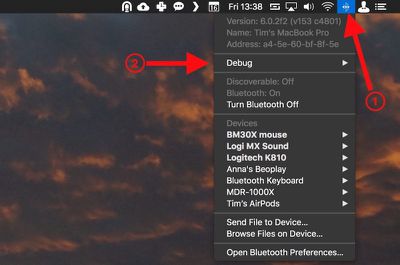
  1. Holding the Shift + Option (Alt) keys on your Mac's keyboard, click the Bluetooth symbol in the top-right corner of the macOS menu bar. (If you don't see it there, you need to check Show Bluetooth in menu bar in System Preferences -> Bluetooth.)
    macos bluetooth debug menu bar

  2. Locate the revealed Debug submenu and hover your mouse cursor over it.

  3. Click Reset the Bluetooth module.
    macos reset Bluetooth module

  4. Now, restart your Mac.

You'll notice a couple of other potentially useful options in the Debug submenu. Factory reset all connected Apple devices does exactly what it says – forces any Apple-branded Bluetooth accessories back to the default settings they came with out of the box. It's a reliable fallback option if you've tried everything else to fix a connection issue, including resetting the Bluetooth module.

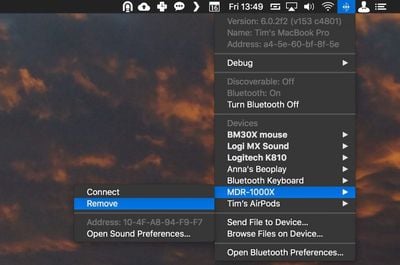
Lastly, the Remove all devices option might prove useful if you're moving your Bluetooth mouse and keyboard to another Mac, for example. However, you can also remove devices on an individual basis from the macOS menu bar, as long as you hold down Shift + Option (Alt) before you click the Bluetooth symbol.
remove Bluetooth device macOS
Removing devices in this manner means you're not also banishing a whole bunch of other established Bluetooth connections like speakers and so on that you might want to keep.


Top Rated Comments

112 months ago
Enjoying all these hints lately a lot more than "news" about iOS games or rumored emoji changes.

Kind of reminds me of that great OS X Hints site (now defunct), if anybody remembers that. http://hints.macworld.com
Score: 7 Votes (Like | Disagree)
112 months ago
get some AirPods. They work great
Not sure how that’d help with my car system, Bluetooth speaker from Bose, etc.
Score: 3 Votes (Like | Disagree)
Rychiar Avatar
112 months ago
I find Bluetooth frustrating with my iPhone. My headset never auto-connects and I have to manually do it in settings. We should've come further than this.
get some AirPods. They work great
Score: 2 Votes (Like | Disagree)
Traverse Avatar
112 months ago
This is actually very useful. I’ve had problems with BT every so often
Score: 2 Votes (Like | Disagree)
Benz63amg Avatar
81 months ago

Thanks for this article; resetting the bluetooth module solved my year-old problem!
What problem was it?
Score: 1 Votes (Like | Disagree)
112 months ago
I find Bluetooth frustrating with my iPhone. My headset never auto-connects and I have to manually do it in settings. We should've come further than this.
No kidding. I was going to ask how to do this in iOS. Ever since iOS 11 (or maybe my iPhone X) Bluetooth has been amazingly buggy. I’ve had conversations with Apple which usually end in reloading the iPhone or the need for a new iPhone, but the problems persist.
Score: 1 Votes (Like | Disagree)

Popular Stories

M5 MacBook Pro

RIP, MacBook Ultra

Monday October 19, 2026 9:37 am PDT by
Apple today sent out invites for an experience in Los Angeles on Wednesday, October 28, and the "Pro and tell" tagline on the invitation likely means that the rumored MacBook models with touch-enabled OLED displays will stick with MacBook Pro branding instead of the once-rumored "MacBook Ultra" name. The long-rumored "iPhone Ultra" ended up being named iPhone Duo, so speculation that Apple...
iPhone Duo Trio

Here's What Apple's Apps Look Like on the iPhone Duo

Tuesday October 20, 2026 11:12 am PDT by
With just three days to go until the iPhone Duo is released, Apple is getting ready for the launch. Behind the scenes, the App Store now has screenshots of Apple's built-in apps running on the Duo. We've seen some apps in marketing materials, but images of the ones we haven't seen give us an idea of what it will be like using the iPhone Duo day to day. Many apps are shown in landscape...
apple pro tell logo

Apple Announcing New Products Next Week: 'Pro and Tell'

Monday October 19, 2026 9:05 am PDT by
Apple's Greg Joswiak today hinted at new product announcements coming next week, sharing a social media post that says "Can't wait to pro and tell next week." Rumors suggest Apple is planning to debut the new MacBook Pro with an OLED touchscreen display, an M6 entry-level MacBook Pro, an M6 iMac, an iPad mini with an OLED display. Can't wait to pro and tell next week....
Latest Stories
Giant iPhone Duo Displays Coming to Four Apple Stores
49 minutes ago
Apple Pulls Keynote, Pages and Numbers From App Store
2 hours ago
Apple Updates More Apps With iPhone Duo Support
2 hours ago
Apple Will Label Apps 'Made for iPhone Duo' in App Store
5 hours ago
Amazon Takes $49 Off iPad With Prices Starting at $399.99
6 hours ago
F1 on Apple TV Now Available in Dolby Atmos
6 hours ago
Apple Reveals More Than 50 Apps That Will Be Updated for iPhone Duo
7 hours ago
Apple Blocks Certificates That Could Help Attackers Fake Websites
8 hours ago
Giant iPhone Duo Installations Spotted at Apple Fifth Avenue
9 hours ago
iPhone Duo 2 Prototypes Include Under-Display Face ID
9 hours ago
Tesla App Gains iPad and iPhone Duo Support
13 hours ago
Apple Reportedly Boosts iPhone Duo Orders by 44%
13 hours ago
Fortnite Returning to Australian App Store After Court Ruling
14 hours ago
Apple Ordered to Open iPhone to Rival App Stores in Australia
14 hours ago
Apple Suppliers Face Hurdles Cutting Circuit Board Emissions
14 hours ago
Things Updated for iPhone Duo With Adaptive Layout
15 hours ago
Simplicity and Siri AI Are HomeView's Killer Features, Apple Says
15 hours ago
iPhone Duo Reviewers Really Miss Face ID
20 hours ago
Does the iPhone Duo Run Hot? Here's What Reviews Found
22 hours ago
Apple Music's New Look is Now Live on Apple's Website
22 hours ago
Anthropic Launches Claude Duet, a Proactive AI Agent
23 hours ago
What 32,000 Folds Did to the iPhone Duo's Hinge
1 day ago
iPhone Duo's Hidden FaceTime Camera Takes 'Trash' Photos
1 day ago
iPhone Duo Has 'Edge Light' Feature That Debuted on Macs Last Year
1 day ago
Apple Support App Updated for iPhone Duo's Larger Display
1 day ago
Amazon Sweetens the Deal on Entry-Level 16-Inch MacBook Pro With $570 Off
1 day ago
iPhone Duo Tips Over on MagSafe Stands When Unfolded
1 day ago
Apple Music's New Look Officially Announced
1 day ago
iPhone Duo Supports Apple Pencil Starting With iOS 27.2
1 day ago
iPhone Duo Accessories Roundup: Cases and Screen Protectors From OtterBox, ZAGG, and More
1 day ago