
How to Restart or Force Restart Apple Vision Pro - MacRumors
Skip to Content

How to Restart or Force Restart Apple Vision Pro

by

Apple's Vision Pro is one of the most sophisticated pieces of hardware that the company has ever launched. However, even the most advanced devices can encounter hiccups, necessitating a simple restart or, in more stubborn cases, a force restart. This article explains how it's done.
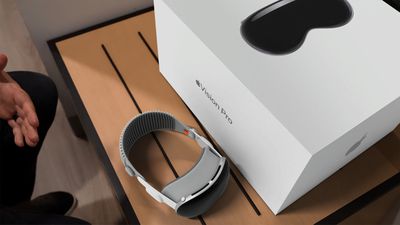
Apple Vision Pro Box and Ref Feature 2
If you're Vision Pro is not responding, glitching out, or presenting other unusual behavior, you can try a simple restart by following these steps.

How to Restart Apple Vision Pro

Shutting Down Vision Pro

  1. Press and hold the Digital Crown and the top button at the same time. The Force Quit Applications window will appear after a couple of seconds. Keep holding the Digital Crown and the top button until the Power button slider appears, then let go.
    apple vision pro screenshot

  2. Look at the onscreen Power button to select it. Then hold your thumb and index finger together to pinch and drag the button to the right.
  3. Wait until the screen turns black, indicating that Apple Vision Pro has shut down. Then take off the device.
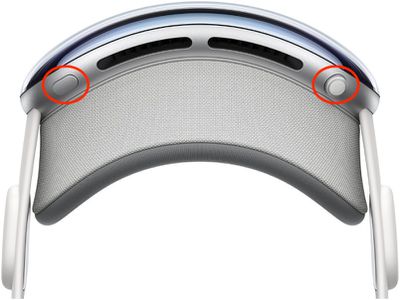
Powering on Vision Pro

Press and hold the top button for three seconds to turn ‌Apple Vision Pro‌ back on. After about a minute, ‌Apple Vision Pro‌ makes a tone that means it's ready to use.

How to Force Restart Apple Vision Pro

If the above steps didn't work for you, don't disconnect the battery on ‌Apple Vision Pro‌ to shut it down. Instead, try a force restart. You can take off ‌Apple Vision Pro‌ while it restarts. Note that you should force restart ‌Apple Vision Pro‌ only as a last resort and only if it's not responding. Also, be sure not to force restart the headset if it's in the middle of updating visionOS.

  1. Press and hold the Digital Crown and the top button at the same time.
    apple vision pro screenshot

  2. Keep holding the Digital Crown and the top button until the screen turns black, then let go.

As ‌Apple Vision Pro‌ is restarting, the Apple logo will appear on the front display.

Related Roundup: Apple Vision Pro
Buyer's Guide: Vision Pro (Buy Now)
Related Forum: Apple Vision Pro

Popular Stories

iOS 26

iOS 26.4 Adds Two New Features to CarPlay

Tuesday March 24, 2026 1:55 pm PDT by
iOS 26.4 was released today, and it includes a couple of new features for CarPlay: an Ambient Music widget and support for voice-based chatbot apps. To update your iPhone 11 or newer to iOS 26.4, open the Settings app and tap on General → Software Update. CarPlay will automatically offer the new features so long as the iPhone connected to your vehicle is running iOS 26.4 or later....
Apple Business hero

Apple Unveils 'Apple Business' All-in-One Platform

Tuesday March 24, 2026 8:53 am PDT by
Apple today announced Apple Business, a new all-in-one platform that unifies device management, productivity tools, and customer outreach features. The service is designed to be a consolidated replacement for several of Apple's existing business-focused offerings, including Apple Business Essentials, Apple Business Manager, and Apple Business Connect. It provides organizations with a single...
AirPods Pro Firmware Feature

Apple Releases New Firmware for AirPods Pro 3, AirPods Pro 2 and AirPods 4

Tuesday March 24, 2026 12:31 pm PDT by
Apple today released new firmware for the AirPods Pro 2, AirPods Pro 3, and the AirPods 4. The firmware has a version number of 8B39, up from 8B34 on the AirPods Pro 3, 8B28 on the AirPods Pro 2, and 8B21 on the AirPods 4. There is no word on what's included in the firmware, but Apple has a support document with limited notes. Most updates are limited to bug fixes and performance...
















