
Volume Buttons Not Working on Siri Remote or Apple TV Remote? How to Fix - MacRumors
Skip to Content

Volume Buttons Not Working on Siri Remote or Apple TV Remote? How to Fix

by

Sometimes the volume buttons on an Apple TV Remote or Siri Remote can become unresponsive for no obvious reason. This article outlines what you can do to get them working again.
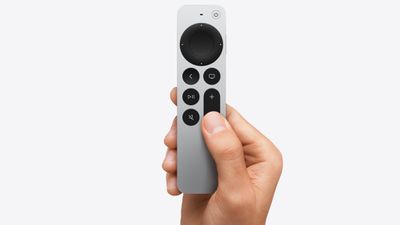
apple tv 4k siri remote
Usually when the remote that comes with Apple's set-top box stops functioning properly, it's either due to a hardware fault and the remote needs replacing, or the battery just needs recharging via the supplied Lightning cable.

Occasionally though, it's just the volume buttons that stop working. It's an annoying bug that rears its head now and again, but fortunately Apple has included a way to restart remotes for ‌Apple TV‌ devices which can get all buttons working again.

The following steps show you how it's done.

How to Restart Siri Remote and Apple TV Remote

  1. Press and hold the TV button and the Volume Down button at the same time. Keep holding both buttons for about five seconds, or until the status light on your ‌Apple TV‌ turns off and on again.
  2. Release both buttons, then wait five to 10 seconds for a Connection Lost notification to appear in the corner of your TV screen.
  3. Wait while the remote restarts. You should see the Connected remote notification appear on the screen, after which you can use your remote again.
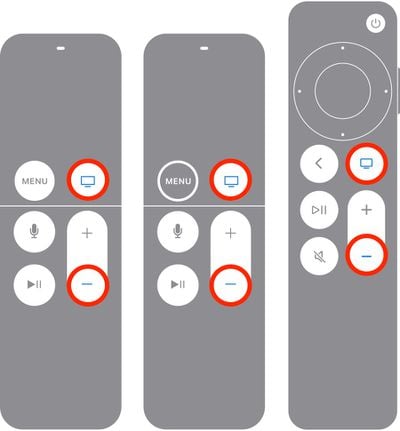
apple tv restart remote

That's all there is to it. If the restart process doesn't fix the frozen buttons on your ‌Siri‌ Remote or ‌Apple TV‌ Remote, it's time to contact Apple support.

Related Roundup: Apple TV
Buyer's Guide: Apple TV (Don't Buy)

Popular Stories

iOS 26

iOS 26.4 Adds Two New Features to CarPlay

Tuesday March 24, 2026 1:55 pm PDT by
iOS 26.4 was released today, and it includes a couple of new features for CarPlay: an Ambient Music widget and support for voice-based chatbot apps. To update your iPhone 11 or newer to iOS 26.4, open the Settings app and tap on General → Software Update. CarPlay will automatically offer the new features so long as the iPhone connected to your vehicle is running iOS 26.4 or later....
Apple Business hero

Apple Unveils 'Apple Business' All-in-One Platform

Tuesday March 24, 2026 8:53 am PDT by
Apple today announced Apple Business, a new all-in-one platform that unifies device management, productivity tools, and customer outreach features. The service is designed to be a consolidated replacement for several of Apple's existing business-focused offerings, including Apple Business Essentials, Apple Business Manager, and Apple Business Connect. It provides organizations with a single...
AirPods Pro Firmware Feature

Apple Releases New Firmware for AirPods Pro 3, AirPods Pro 2 and AirPods 4

Tuesday March 24, 2026 12:31 pm PDT by
Apple today released new firmware for the AirPods Pro 2, AirPods Pro 3, and the AirPods 4. The firmware has a version number of 8B39, up from 8B34 on the AirPods Pro 3, 8B28 on the AirPods Pro 2, and 8B21 on the AirPods 4. There is no word on what's included in the firmware, but Apple has a support document with limited notes. Most updates are limited to bug fixes and performance...















