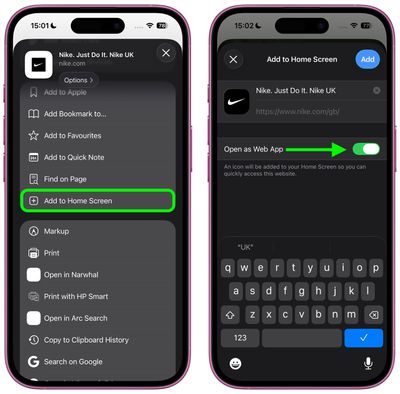
iOS 26 gives you two distinct ways to add websites to your iPhone's Home screen – as web apps or traditional bookmarks. They might look similar at first glance, but choosing the right option can dramatically improve how you access your favorite sites.
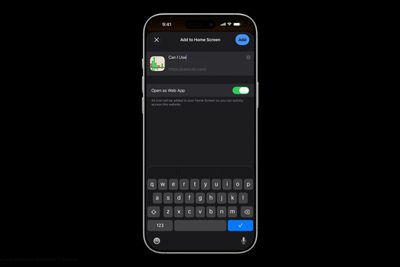
Add to Home Screen dark scaled

Understanding the Difference

When you add a website to your Home screen using the "Add to Home Screen" option, iOS 26 allows the website to be opened as a web app. The update introduces a new feature for adding any website to the Home Screen as a web app, even if it doesn't support progressive web app (PWA) functionality.

Web apps run almost like native apps, with features like offline access, push notifications, and a streamlined interface without Safari's address bar. In contrast, traditional bookmarks simply open the website in Safari when tapped. This choice matters more than you might think. Web apps can provide a faster, more app-like experience, whereas bookmarks work better for informational sites you visit only occasionally.

Add a Web App or Bookmark to Home Screen

In iOS 26, Safari offers an Open as Web App toggle for all websites, even those that don't support have built-in web app support. If you want a bookmark, just switch the toggle off.

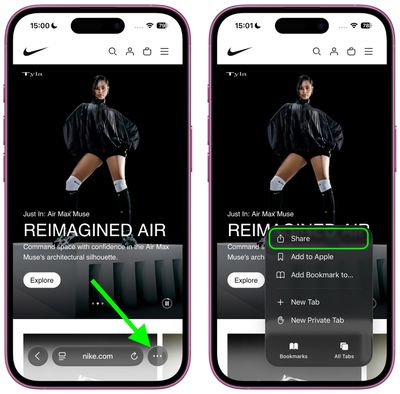
  1. Open Safari and navigate to the website you want to add.
  2. Tap the three dots to the right of Safari's address bar, then tap Share in the pop-up menu.
    safari

  3. Scroll down and tap Add to Home Screen.
  4. If the site supports web apps, you'll see the Open as Web App toggle in the dialog – switch it off if you want a bookmark instead.
  5. Customize the app name if desired, then tap Add.
    safari

Web apps appear on your Home screen with a dedicated icon, and tapping it will launch the site in its own window without Safari's browser interface. Bookmarks display with a generic website icon or the site's favicon, and tapping them opens the page in Safari.

Remove Bookmark or Web App From Home Screen

home screen
Both web apps and bookmarks can be deleted from the Home screen, much like any other app. To remove either kind, long-press the icon on your home screen, then tap Delete Bookmark (for some reason iOS doesn't differentiate the kind in this menu).

iOS 26 and iPadOS 26 are set for a general release in September 2025.

Top Rated Comments

iZac Avatar
27 weeks ago
I may be wrong, so please correct me if so - but I always believe the web version to be superior in one way; My assumption is that Safari allows less overt tracking and data collection of the user than an App Store counterpart.

My only evidence is that whenever I'm on the web version of a service, it keeps nagging me to download the App Store version for the 'best experience'
Score: 8 Votes (Like | Disagree)
flottenheimer Avatar
27 weeks ago
Locating this under 'Share' is an excellent example of how bad usability often is these days.
Score: 7 Votes (Like | Disagree)
Populus Avatar
27 weeks ago

I may be wrong, so please correct me if so - but I always believe the web version to be superior in one way; My assumption is that Safari allows less overt tracking and data collection of the user than an App Store counterpart.

My only evidence is that whenever I'm on the web version of a service, it keeps nagging me to download the App Store version for the 'best experience'
Exactly my thoughts. That’s why, for the past few years, more and more I opt for the web version of a service, especially if they offer a webapp.

If some day I install Discord, for instance, I will do so with the webapp instead of the App itself. I’m not sure how much data can the the App gather from my usage, but my guess is: more than just a sandboxed Safari tab.
Score: 4 Votes (Like | Disagree)
svish Avatar
27 weeks ago
Good to know about the change in iOS 26. Will be setting some pages as simple bookmarks.
Score: 3 Votes (Like | Disagree)
gdmedia Avatar
27 weeks ago
I wonder, if you choose the web option, will you be able to use Reader.

Right now, sometimes when you add a bookmark to your home screen, it will open as an app-like page, with no Safari address bar. This is something set up by the company that supplies the web page. Problem is, without the address bar, you cannot use Reader on that page. If you want to use Reader, you have to make a shortcut that opens that web page and put the shortcut on your home screen. When you open the page from your shortcut, it still includes the address bar and you can use reader.
Score: 2 Votes (Like | Disagree)
alayal Avatar
27 weeks ago
This is one of the best iOS 26 features, the only problems are that some web apps have horrible version of the icons and that safari on iOS don't support extensions for web apps.
Score: 2 Votes (Like | Disagree)

Popular Stories

Apple Logo Zoomed

Tim Cook Teases Plans for Apple's Upcoming 50th Anniversary

Thursday February 5, 2026 12:54 pm PST by
Apple turns 50 this year, and its CEO Tim Cook has promised to celebrate the milestone. The big day falls on April 1, 2026. "I've been unusually reflective lately about Apple because we have been working on what do we do to mark this moment," Cook told employees today, according to Bloomberg's Mark Gurman. "When you really stop and pause and think about the last 50 years, it makes your heart ...
wwdc sans text feature

Apple Rumored to Announce New Product on February 19

Thursday February 5, 2026 12:22 pm PST by
Apple plans to announce the iPhone 17e on Thursday, February 19, according to Macwelt, the German equivalent of Macworld. The report, citing industry sources, is available in English on Macworld. Apple announced the iPhone 16e on Wednesday, February 19 last year, so the iPhone 17e would be unveiled exactly one year later if this rumor is accurate. It is quite uncommon for Apple to unveil...
Finder Siri Feature

Why Apple's iOS 26.4 Siri Upgrade Will Be Bigger Than Originally Promised

Friday February 6, 2026 3:06 pm PST by
In the iOS 26.4 update that's coming this spring, Apple will introduce a new version of Siri that's going to overhaul how we interact with the personal assistant and what it's able to do. The iOS 26.4 version of Siri won't work like ChatGPT or Claude, but it will rely on large language models (LLMs) and has been updated from the ground up. Upgraded Architecture The next-generation...
iOS 26

iOS 26.3 and iOS 26.4 Will Add These New Features to Your iPhone

Tuesday February 3, 2026 7:47 am PST by
While the iOS 26.3 Release Candidate is now available ahead of a public release, the first iOS 26.4 beta is likely still at least a week away. Following beta testing, iOS 26.4 will likely be released to the general public in March or April. Below, we have recapped known or rumored iOS 26.3 and iOS 26.4 features so far. iOS 26.3 iPhone to Android Transfer Tool iOS 26.3 makes it easier...
iphone 17 pro dark blue 1

iPhone 18 Pro Max Rumored to Deliver Next-Level Battery Life

Friday February 6, 2026 5:14 am PST by
The iPhone 18 Pro Max will feature a bigger battery for continued best-in-class battery life, according to a known Weibo leaker. Citing supply chain information, the Weibo user known as "Digital Chat Station" said that the iPhone 18 Pro Max will have a battery capacity of 5,100 to 5,200 mAh. Combined with the efficiency improvements of the A20 Pro chip, made with TSMC's 2nm process, the...