

Starting with iOS 11, Apple began offering a new feature that provides suggestions on how you can save space on your iOS device. These built-in space-saving suggestions, which can be found in the Settings app, can help you free up space on your iPhone when storage space is running low.
Toggling on Space Saving Suggestions
- Open the Settings app.
- Scroll down and tap on "General."
- Choose "iPhone Storage."
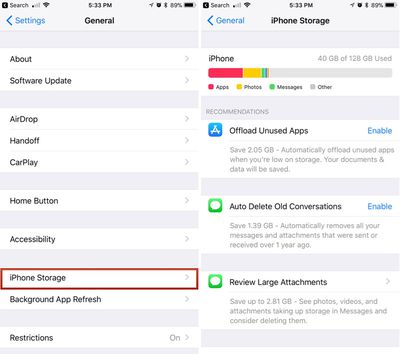
- Tap "Enable" on any of the suggestions Apple provides to turn them on.
Offload Unused Apps
One of Apple's suggestions is to automatically delete unused apps when the storage space on your device is low. If you enable this feature, Apple will delete apps you don't use often, while saving the documents and data so you can download them again and pick right back up where you were if necessary.
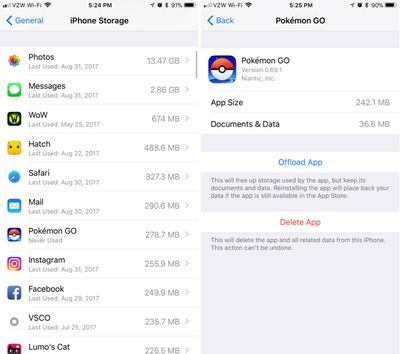
You can also offload individual apps by selecting them from the list of apps located just below all of Apple's suggestions.
Auto Delete Old Conversations
With "Auto Delete Old Conversations" enabled, Apple will automatically delete all messages and attachments that were sent over a year ago. This can save significant space, but be aware that once gone, there's no getting those messages back.
Review Large Attachments
The "Review Large Attachments" feature lets you see a list of the largest files on your device, located in Photos, Mail, and Messages. A tap will let you view a file up close, and a swipe to the left on an item in the file list will bring up an option to delete it. You can mass delete files by tapping on the "Edit" button in the upper right corner of the device.
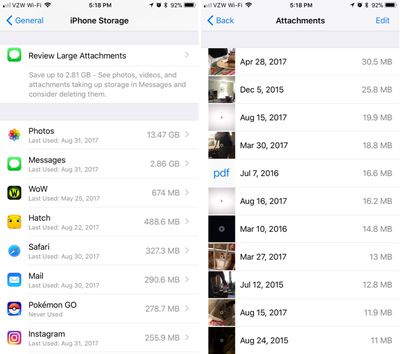
Along with these three options for storing space, the Storage section of the Settings app also displays all of the apps you have installed, with the app using the most storage space at the top. It also lets you know how long ago the app was last used, making it easy to cull items that aren't used often.
Depending on what's installed on your device, you may or may not see all of these storage options, but if you're getting low on space, they should appear.





















Top Rated Comments
IE, I have Floppy Cloud on my iPhone, the app that has a secret NES emulator in it - just put an NES ROM in Dropbox and the app will load up and run the game. I also have a "flashlight app" on my iPhone that actually enables tethering without paying your carrier.
Anyway, both of us have 16gb iPhone 6 and our category picture never looks like all these web sites swooning over the new chart - ours is mostly "Other" - our "System" category takes up 8.5gb!! And none of the web sites detailing how to 'free up space like a pro' says a peep about how to reduce that 'System' category. I know for a fact that base iOS 11 doesn't take up 8.5gb - there must be caches, logs, whatever that could be cleared. Anyone have any ideas on what we could try (short of factory reset)?
A couple things I already do:
- Disable "iCloud Photo Library" for a few minutes and then enable it again - that sometimes frees up a lot of storage (I'm guessing because some caches get cleared and, obviously, some low-grade images are no longer kept on the phone).
- Prune all old conversations in iMessage (especially those with photos). One of the storage recommendations allowed you to do pruning there (including deleting attachments) but like I said, we don't see the recommendations anymore.
Are there any other ways to affect the "System" category?
Any suggestions are much appreciated,
Tom
You can make copies of these apps in iTunes. I think. Though didn't they recently remove the App Store from iTunes? I just realized I haven't synced my iPhone to iTunes in years so I have no idea how it works any more, lol.
The concern is that once the app is "removed" from your device using this feature (not using the app in a long time), it won't automatically come back if you tap on it because it's not in the app store.