

Apple this week released iOS 18.3, iPadOS 18.3, and macOS Sequoia 15.3, software updates that enable Apple Intelligence on supported devices by default. Whether you own an iPhone, iPad, Mac – or indeed all three – regardless of what you think about Apple Intelligence, there's one reason why you may want to disable Apple's AI features at the earliest opportunity: To reclaim storage.

Apple's marketing machine has made much of Apple Intelligence since its announcement at WWDC in June 2024. Apple brought the first features to compatible iPhones, iPads and Macs in October with a point update to iOS 18/iPadOS 18 and macOS Sequoia, followed by a further update in December that brought a more fleshed-out set of AI-powered features, with the most recent update adding some much-needed refinements.
Despite the raft of updates, Apple Intelligence remains in beta, and in terms of the AI suite's current usefulness, opinions remain decidedly mixed. For some, however, when considering the relative worth of these features, the deciding factor will be their local storage overhead. According to Apple's support page, Apple Intelligence now requires 7GB of storage space. This number applies whether you're using an iPhone, iPad, or Mac.
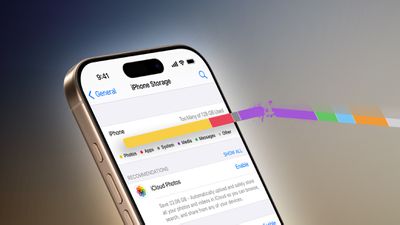
That might sound like a lot, but it's one way that Apple is able to tout the privacy credentials of Apple Intelligence. Many of these features run locally, and in order to do so, they must download AI models to your device(s), which currently requires 7GB of storage. This means if you have an iPhone, iPad, and a Mac, it effectively equates to 21GB of storage across your devices that is being taken up by AI models that you may never even use.
But don't assume that 7GB is any sort of hard cap. In April, Apple is expected to release iOS 18.4 featuring some broad enhancements to Siri's AI capabilities, which will likely hike the storage requirement further. And that's not even taking into consideration the storage demands that iOS 19 will bring later this year...
AI or No AI? Time to Decide
Here's the deal. After updating to iOS 18.3, iPadOS 18.3, or macOS Sequoia 15.3, Apple Intelligence is an opt-out feature, not an opt-in feature. In other words, if you have updated – or plan to update – your devices to the new software, Apple Intelligence will be automatically enabled upon doing so.
Note that this still applies if you already disabled it in the previous point updates but then allowed the latest update welcome screens to steer you towards enabling Apple Intelligence again. If however you chose "Set Up Later" at the on-screen prompt, you have no action to take – these features will respect your prior decision and remain disabled. For everyone else, it's time to decide: Is Apple Intelligence really worth all those precious gigabytes?
Why Disabling Apple Intelligence Reclaims Storage
Apple Intelligence utilizes something called the MobileAsset framework to manage and deliver its machine learning models and related assets to your devices. This framework dynamically downloads and updates the necessary components, ensuring that your devices have access to the latest capabilities without requiring comprehensive system updates.
Thankfully, when you disable Apple Intelligence, the system identifies that the associated assets are no longer in use. The MobileAsset framework then purges these unused assets when additional space is required – optimizing and freeing up your local storage in the process. Here are the steps you need to take to ensure that happens.

How to Disable Apple Intelligence
Disabling Apple Intelligence completely is simply a matter of flipping the associated switch on each supported device running the latest software. Compatible devices include any iPhone 16 model, iPhone 15 Pro and iPhone 15 Pro Max, any iPad with A17 Pro or M1 and later, and any Mac with M1 or later.
Disable Apple Intelligence on iPhone and iPad
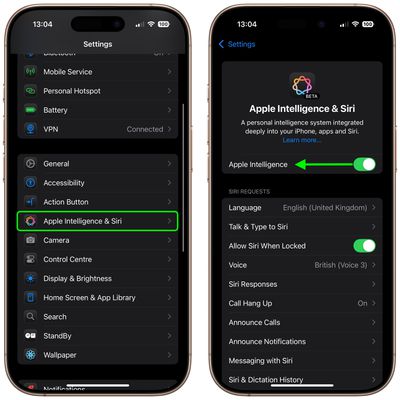
On iPhone and iPad, you can find it in Settings ➝ Apple Intelligence & Siri. Toggle off the switch next to Apple Intelligence.
Disable Apple Intelligence on Mac
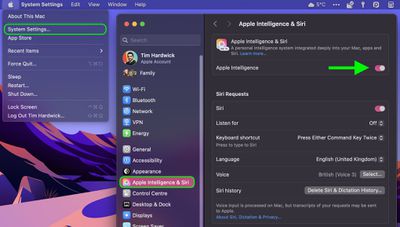
On Mac, open System Settings, select Apple Intelligence & Siri in the sidebar, then click the switch next to Apple Intelligence at the top of the menu window to toggle it off.
What You Lose by Disabling Apple Intelligence
In iOS 18.2 or later, iPadOS 18.2 or later, and macOS Sequoia 15.2 or later, turning off Apple Intelligence will knock out the following features:
- Genmoji
- Image Playground
- Image Wand in the Apple Pencil tool palette
- Writing Tools
- Clean Up in Photos
- Create a Memory movie in Photos (not available in macOS)
- Natural language search in Photos
- Notification summaries
- Reduce Interruptions Focus
- Intelligent Breakthrough & Silencing in Focus
- Priority messages in Mail
- Smart Reply in Mail and Messages
- Summaries in Mail and Messages
- Siri enhancements, including product knowledge, more resilient request handling, new look and feel, more natural voice, the ability to type to Siri, and more
- ChatGPT integration within Siri and Writing Tools
If you don't see any of the features listed above on your device, your specific model likely doesn't support Apple Intelligence, so you don't have anything to worry about.




















