
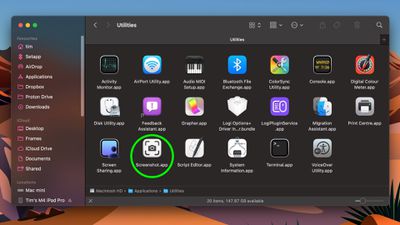
There are several ways you can take screenshots on a Mac. Preview offers the option from its File menu. There's also a little screen capture app in the macOS Utilities folder called Screenshot. But the simplest and most common method is to use your Mac's built-in shortcut key combinations.
screenshot app 1
Taking a screenshot is as easy as hitting Shift-Command-3 to capture the whole screen, or Shift-Command-4 to capture a portion of the screen using the mouse cursor as a crosshair selection tool (a tap of the spacebar also turns it into a camera for capturing windows).

Screenshots taken using key shortcuts are typically saved on your desktop. However, if you tack the Control key onto either of these shortcuts, macOS will copy the captured image to the clipboard instead of saving it as a file on your desktop, which is useful if you want to paste it into an application that can edit or view images, or use Universal Clipboard to paste it on another Apple device.

In Preview, for example, Command-N creates a new document from the contents of the clipboard without you having to specify a filename until you're ready to save it. You can also access this function in Preview's menu bar (File ➝ New From Clipboard).


Top Rated Comments

Euge Avatar
9 months ago

There are just flat-out way too many modifier keys for these things. For a company like Apple that used to go out of their way to keep things simple by way of even eliminating buttons on our phones, it has always been ridiculous to figure out which finger salute you need to use to do certain things. Shift? Control? Option? Command? Maybe it's one of the 16 different combinations of them all together? There doesn't seem to be any rhyme or reason to which ones you need at any given time, and don't even get me started on trying to memorize the cute little icons they have for each of them, and the fact that sometimes instructions will only give you IKEA instructions on which combination to use...

Keep it simple, stupid!

While cool, damn is that the hardest key combo to hold while dragging a mouse. Why can't it be close to paste match style shft+ctrl+optn+cmd and maybe hold down right click until selection is made.
I don't know why MacRumors doesn't just suggest using cmd+shift+5

It's such a better interface to access all screenshot options.
Score: 13 Votes (Like | Disagree)
coolfactor Avatar
9 months ago

There are just flat-out way too many modifier keys for these things. For a company like Apple that used to go out of their way to keep things simple by way of even eliminating buttons on our phones, it has always been ridiculous to figure out which finger salute you need to use to do certain things. Shift? Control? Option? Command? Maybe it's one of the 16 different combinations of them all together? There doesn't seem to be any rhyme or reason to which ones you need at any given time, and don't even get me started on trying to memorize the cute little icons they have for each of them, and the fact that sometimes instructions will only give you IKEA instructions on which combination to use...

Keep it simple, stupid!
These keystrokes have been around for 20+ years. Apple isn't suddenly make it harder just recently.

These keystrokes used to be the _only_ way to capture screenshots (natively), but they more recently added the Screenshot app, as discussed in this article, for those that struggle with keystrokes.
Score: 12 Votes (Like | Disagree)
splitpea Avatar
9 months ago
Better too many shortcuts than too few. Nobody forces you to use or memorize them. And for those of us who prefer keyboard control, having to use the mouse for more than we already do would suck.
Score: 10 Votes (Like | Disagree)
eppsilon Avatar
9 months ago
Since no one has mentioned it: you can also right-click the little screenshot preview for more options on what to do with it.


Attachment Image
Score: 7 Votes (Like | Disagree)
mrgraff Avatar
9 months ago

you dont need to hold all those keys while dragging shift-cmd 4 and released and you'll have a cursor on screen you can drag
And if you let go of the keys and then press spacebar, you can screenshot the window under the cursor. Hit spacebar again to toggle window/screen portion.
Score: 5 Votes (Like | Disagree)
simon the diver Avatar
9 months ago

While cool, damn is that the hardest key combo to hold while dragging a mouse. Why can't it be close to paste match style shft+ctrl+optn+cmd and maybe hold down right click until selection is made.
you dont need to hold all those keys while dragging shift-cmd 4 and released and you'll have a cursor on screen you can drag
Score: 4 Votes (Like | Disagree)

Popular Stories

wwdc sans text feature

Apple Rumored to Announce New Product on February 19

Thursday February 5, 2026 12:22 pm PST by
Apple plans to announce the iPhone 17e on Thursday, February 19, according to Macwelt, the German equivalent of Macworld. The report, citing industry sources, is available in English on Macworld. Apple announced the iPhone 16e on Wednesday, February 19 last year, so the iPhone 17e would be unveiled exactly one year later if this rumor is accurate. It is quite uncommon for Apple to unveil...
Apple Logo Zoomed

Tim Cook Teases Plans for Apple's Upcoming 50th Anniversary

Thursday February 5, 2026 12:54 pm PST by
Apple turns 50 this year, and its CEO Tim Cook has promised to celebrate the milestone. The big day falls on April 1, 2026. "I've been unusually reflective lately about Apple because we have been working on what do we do to mark this moment," Cook told employees today, according to Bloomberg's Mark Gurman. "When you really stop and pause and think about the last 50 years, it makes your heart ...
maxresdefault

Apple Shows Off a Key Reason to Upgrade to the iPhone 17

Saturday February 7, 2026 9:26 am PST by
Apple today shared an ad that shows how the upgraded Center Stage front camera on the latest iPhones improves the process of taking a group selfie. "Watch how the new front facing camera on iPhone 17 Pro takes group selfies that automatically expand and rotate as more people come into frame," says Apple. While the ad is focused on the iPhone 17 Pro and iPhone 17 Pro Max, the regular iPhone...
Finder Siri Feature

Why Apple's iOS 26.4 Siri Upgrade Will Be Bigger Than Originally Promised

Friday February 6, 2026 3:06 pm PST by
In the iOS 26.4 update that's coming this spring, Apple will introduce a new version of Siri that's going to overhaul how we interact with the personal assistant and what it's able to do. The iOS 26.4 version of Siri won't work like ChatGPT or Claude, but it will rely on large language models (LLMs) and has been updated from the ground up. Upgraded Architecture The next-generation...
iOS 26

iOS 26.3 and iOS 26.4 Will Add These New Features to Your iPhone

Tuesday February 3, 2026 7:47 am PST by
While the iOS 26.3 Release Candidate is now available ahead of a public release, the first iOS 26.4 beta is likely still at least a week away. Following beta testing, iOS 26.4 will likely be released to the general public in March or April. Below, we have recapped known or rumored iOS 26.3 and iOS 26.4 features so far. iOS 26.3 iPhone to Android Transfer Tool iOS 26.3 makes it easier...















