
macOS Quick Tip: Screenshot Straight to the Clipboard - MacRumors
Skip to Content

macOS Quick Tip: Screenshot Straight to the Clipboard

by

There are several ways you can take screenshots on a Mac. Preview offers the option from its File menu. There's also a little screen capture app in the macOS Utilities folder called Screenshot. But the simplest and most common method is to use your Mac's built-in shortcut key combinations.
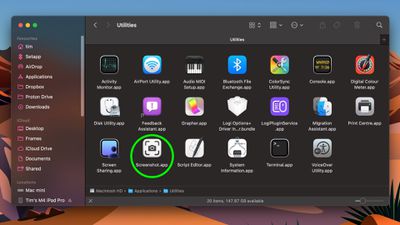
screenshot app 1
Taking a screenshot is as easy as hitting Shift-Command-3 to capture the whole screen, or Shift-Command-4 to capture a portion of the screen using the mouse cursor as a crosshair selection tool (a tap of the spacebar also turns it into a camera for capturing windows).

Screenshots taken using key shortcuts are typically saved on your desktop. However, if you tack the Control key onto either of these shortcuts, macOS will copy the captured image to the clipboard instead of saving it as a file on your desktop, which is useful if you want to paste it into an application that can edit or view images, or use Universal Clipboard to paste it on another Apple device.

In Preview, for example, Command-N creates a new document from the contents of the clipboard without you having to specify a filename until you're ready to save it. You can also access this function in Preview's menu bar (File ➝ New From Clipboard).


Top Rated Comments

Euge Avatar
18 months ago

There are just flat-out way too many modifier keys for these things. For a company like Apple that used to go out of their way to keep things simple by way of even eliminating buttons on our phones, it has always been ridiculous to figure out which finger salute you need to use to do certain things. Shift? Control? Option? Command? Maybe it's one of the 16 different combinations of them all together? There doesn't seem to be any rhyme or reason to which ones you need at any given time, and don't even get me started on trying to memorize the cute little icons they have for each of them, and the fact that sometimes instructions will only give you IKEA instructions on which combination to use...

Keep it simple, stupid!

While cool, damn is that the hardest key combo to hold while dragging a mouse. Why can't it be close to paste match style shft+ctrl+optn+cmd and maybe hold down right click until selection is made.
I don't know why MacRumors doesn't just suggest using cmd+shift+5

It's such a better interface to access all screenshot options.
Score: 13 Votes (Like | Disagree)
18 months ago

There are just flat-out way too many modifier keys for these things. For a company like Apple that used to go out of their way to keep things simple by way of even eliminating buttons on our phones, it has always been ridiculous to figure out which finger salute you need to use to do certain things. Shift? Control? Option? Command? Maybe it's one of the 16 different combinations of them all together? There doesn't seem to be any rhyme or reason to which ones you need at any given time, and don't even get me started on trying to memorize the cute little icons they have for each of them, and the fact that sometimes instructions will only give you IKEA instructions on which combination to use...

Keep it simple, stupid!
These keystrokes have been around for 20+ years. Apple isn't suddenly make it harder just recently.

These keystrokes used to be the _only_ way to capture screenshots (natively), but they more recently added the Screenshot app, as discussed in this article, for those that struggle with keystrokes.
Score: 12 Votes (Like | Disagree)
18 months ago
Better too many shortcuts than too few. Nobody forces you to use or memorize them. And for those of us who prefer keyboard control, having to use the mouse for more than we already do would suck.
Score: 10 Votes (Like | Disagree)
18 months ago
Since no one has mentioned it: you can also right-click the little screenshot preview for more options on what to do with it.


Attachment Image
Score: 7 Votes (Like | Disagree)
mrgraff Avatar
18 months ago

you dont need to hold all those keys while dragging shift-cmd 4 and released and you'll have a cursor on screen you can drag
And if you let go of the keys and then press spacebar, you can screenshot the window under the cursor. Hit spacebar again to toggle window/screen portion.
Score: 5 Votes (Like | Disagree)
18 months ago

While cool, damn is that the hardest key combo to hold while dragging a mouse. Why can't it be close to paste match style shft+ctrl+optn+cmd and maybe hold down right click until selection is made.
you dont need to hold all those keys while dragging shift-cmd 4 and released and you'll have a cursor on screen you can drag
Score: 4 Votes (Like | Disagree)

Popular Stories

M5 MacBook Pro

RIP, MacBook Ultra

Monday October 19, 2026 9:37 am PDT by
Apple today sent out invites for an experience in Los Angeles on Wednesday, October 28, and the "Pro and tell" tagline on the invitation likely means that the rumored MacBook models with touch-enabled OLED displays will stick with MacBook Pro branding instead of the once-rumored "MacBook Ultra" name. The long-rumored "iPhone Ultra" ended up being named iPhone Duo, so speculation that Apple...
iPhone Duo Trio

Here's What Apple's Apps Look Like on the iPhone Duo

Tuesday October 20, 2026 11:12 am PDT by
With just three days to go until the iPhone Duo is released, Apple is getting ready for the launch. Behind the scenes, the App Store now has screenshots of Apple's built-in apps running on the Duo. We've seen some apps in marketing materials, but images of the ones we haven't seen give us an idea of what it will be like using the iPhone Duo day to day. Many apps are shown in landscape...
apple pro tell logo

Apple Announcing New Products Next Week: 'Pro and Tell'

Monday October 19, 2026 9:05 am PDT by
Apple's Greg Joswiak today hinted at new product announcements coming next week, sharing a social media post that says "Can't wait to pro and tell next week." Rumors suggest Apple is planning to debut the new MacBook Pro with an OLED touchscreen display, an M6 entry-level MacBook Pro, an M6 iMac, an iPad mini with an OLED display. Can't wait to pro and tell next week....
Latest Stories
Apple Pulls Keynote, Pages and Numbers From App Store
8 minutes ago
Apple Updates More Apps With iPhone Duo Support
38 minutes ago
Apple Will Label Apps 'Made for iPhone Duo' in App Store
3 hours ago
Amazon Takes $49 Off iPad With Prices Starting at $399.99
4 hours ago
F1 on Apple TV Now Available in Dolby Atmos
5 hours ago
Apple Reveals More Than 50 Apps That Will Be Updated for iPhone Duo
5 hours ago
Apple Blocks Certificates That Could Help Attackers Fake Websites
6 hours ago
Giant iPhone Duo Installations Spotted at Apple Fifth Avenue
7 hours ago
iPhone Duo 2 Prototypes Include Under-Display Face ID
7 hours ago
Tesla App Gains iPad and iPhone Duo Support
11 hours ago
Apple Reportedly Boosts iPhone Duo Orders by 44%
12 hours ago
Fortnite Returning to Australian App Store After Court Ruling
12 hours ago
Apple Ordered to Open iPhone to Rival App Stores in Australia
12 hours ago
Apple Suppliers Face Hurdles Cutting Circuit Board Emissions
13 hours ago
Things Updated for iPhone Duo With Adaptive Layout
13 hours ago
Simplicity and Siri AI Are HomeView's Killer Features, Apple Says
14 hours ago
iPhone Duo Reviewers Really Miss Face ID
19 hours ago
Does the iPhone Duo Run Hot? Here's What Reviews Found
20 hours ago
Apple Music's New Look is Now Live on Apple's Website
21 hours ago
Anthropic Launches Claude Duet, a Proactive AI Agent
21 hours ago
What 32,000 Folds Did to the iPhone Duo's Hinge
22 hours ago
iPhone Duo's Hidden FaceTime Camera Takes 'Trash' Photos
1 day ago
iPhone Duo Has 'Edge Light' Feature That Debuted on Macs Last Year
1 day ago
Apple Support App Updated for iPhone Duo's Larger Display
1 day ago
Amazon Sweetens the Deal on Entry-Level 16-Inch MacBook Pro With $570 Off
1 day ago
iPhone Duo Tips Over on MagSafe Stands When Unfolded
1 day ago
Apple Music's New Look Officially Announced
1 day ago
iPhone Duo Supports Apple Pencil Starting With iOS 27.2
1 day ago
iPhone Duo Accessories Roundup: Cases and Screen Protectors From OtterBox, ZAGG, and More
1 day ago
Apple Stores Will Have 'Limited' Availability of iPhone Duo for Walk-In Customers
1 day ago










































