
With the new Apple TV 4K now in customers' hands, some users are reporting issues when trying to control video with the redesigned Siri Remote.
Siri Remote 2 how to scrub Feature copy
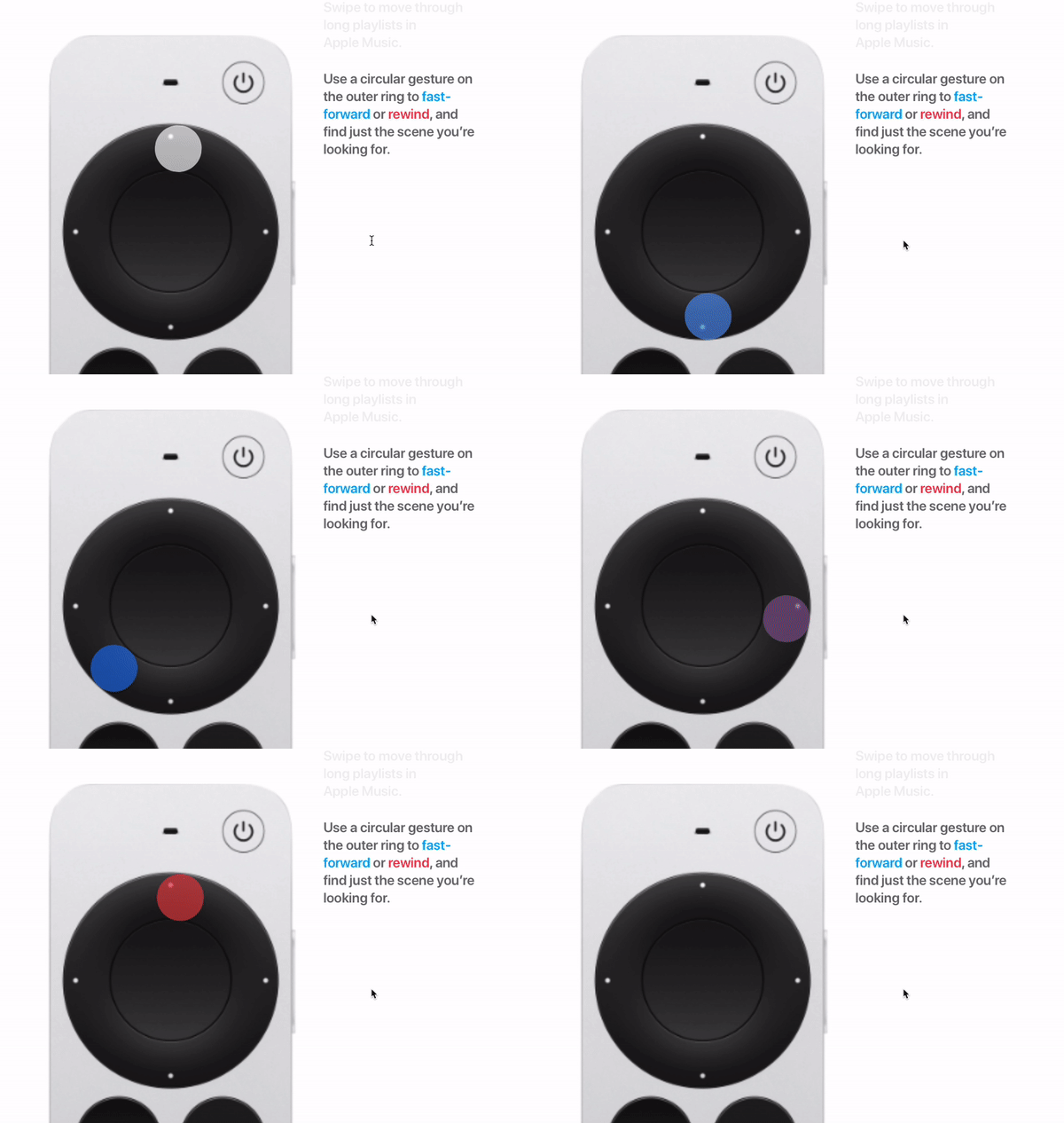
Specifically, some users are complaining that using the circular gesture on the new clickpad ring to fast-forward or rewind paused video isn't working as expected. Rather than scrubbing through video continually in the direction of the gesture, the video scrubs back and forth in opposite directions.

From what we've been able to work out, the problem seems to relate to a subtle additional gesture that users are missing out, either because it isn't very intuitive or Apple doesn't demonstrate it particularly well in the marketing material.
siri remote clickpad video scrubbing
Try following these steps to get it working. We've italicized the crucial gesture that users appear to be omitting.

  1. First, pause the video by pressing the Play/Pause button, or by pressing the center of the clickpad ring. (A small preview thumbnail will appear above the playback timeline at the bottom of the screen.)
  2. Swipe left or right across the clickpad to scrub backward or forward in time. For more granular control, rest your finger on the outer edge of the clickpad ring until a ring icon appears on-screen, then trace a circle with your finger around the clickpad ring in a clockwise or counterclockwise direction.
  3. To begin playback at the new position, press the center of the clickpad.

You should find this method works with Apple's own apps, but we've found inconsistencies in its functioning with third-party apps, especially those that don't use Apple's native playback UI. For instance, it worked for us in Netflix, but the Disney+ app had persistent issues responding to the circular gesture.


It could be that some third-party apps need updating before they recognize the new clickpad ring on the second-generation ‌Siri‌ Remote, so hopefully any niggles will be smoothed out soon.

Related Roundup: Apple TV
Buyer's Guide: Apple TV (Don't Buy)

Top Rated Comments

femike Avatar
62 months ago
Is the Apple TV team so small that they didn't have time or care to test it out? They had 6 years to update this remote.
Score: 47 Votes (Like | Disagree)
omglolbbq Avatar
62 months ago
Apple need to enforce the use of standard UI components the same way they do in CarPlay so that features work consistently across the system and the user doesn’t have to learn ten different interfaces.
Score: 24 Votes (Like | Disagree)
Shasterball Avatar
62 months ago
The redesigned remote is 90% of the reason people are buying this thing. Apple appreciated this as they already sell the 2nd gen remote as a standalone. After all these years, and knowing the main desire to upgrade, why is the design still awkward?
Score: 19 Votes (Like | Disagree)
srbNYC Avatar
62 months ago

I miss being able to jump forward/back 10 seconds at a time by clicking on the right/left edge of the old remote. With the new remote, the video pauses and waits for me to scrub... scrubbing is less precise and requires more of my focus.
Use the left and right buttons for that; same functionality as the previous remote's touchscreen-edges.
Score: 16 Votes (Like | Disagree)
Xak444 Avatar
62 months ago

and everyone was so excited about this new remote ... hmmm ...
People will never be happy no matter what you do
Score: 11 Votes (Like | Disagree)
joediianni Avatar
62 months ago
Honestly… Third day into all new Apple TV’s in the house. I miss the old remote. The old gesture section was more like an extension of the iPhone and felt natural. This new one is large, clunky, button driven, I don’t know… Feels like it went back in time so far.
Score: 11 Votes (Like | Disagree)

Popular Stories

wwdc sans text feature

Apple Rumored to Announce New Product on February 19

Thursday February 5, 2026 12:22 pm PST by
Apple plans to announce the iPhone 17e on Thursday, February 19, according to Macwelt, the German equivalent of Macworld. The report, citing industry sources, is available in English on Macworld. Apple announced the iPhone 16e on Wednesday, February 19 last year, so the iPhone 17e would be unveiled exactly one year later if this rumor is accurate. It is quite uncommon for Apple to unveil...
Apple Logo Zoomed

Tim Cook Teases Plans for Apple's Upcoming 50th Anniversary

Thursday February 5, 2026 12:54 pm PST by
Apple turns 50 this year, and its CEO Tim Cook has promised to celebrate the milestone. The big day falls on April 1, 2026. "I've been unusually reflective lately about Apple because we have been working on what do we do to mark this moment," Cook told employees today, according to Bloomberg's Mark Gurman. "When you really stop and pause and think about the last 50 years, it makes your heart ...
Finder Siri Feature

Why Apple's iOS 26.4 Siri Upgrade Will Be Bigger Than Originally Promised

Friday February 6, 2026 3:06 pm PST by
In the iOS 26.4 update that's coming this spring, Apple will introduce a new version of Siri that's going to overhaul how we interact with the personal assistant and what it's able to do. The iOS 26.4 version of Siri won't work like ChatGPT or Claude, but it will rely on large language models (LLMs) and has been updated from the ground up. Upgraded Architecture The next-generation...
maxresdefault

Apple Shows Off a Key Reason to Upgrade to the iPhone 17

Saturday February 7, 2026 9:26 am PST by
Apple today shared an ad that shows how the upgraded Center Stage front camera on the latest iPhones improves the process of taking a group selfie. "Watch how the new front facing camera on iPhone 17 Pro takes group selfies that automatically expand and rotate as more people come into frame," says Apple. While the ad is focused on the iPhone 17 Pro and iPhone 17 Pro Max, the regular iPhone...
iOS 26

iOS 26.3 and iOS 26.4 Will Add These New Features to Your iPhone

Tuesday February 3, 2026 7:47 am PST by
While the iOS 26.3 Release Candidate is now available ahead of a public release, the first iOS 26.4 beta is likely still at least a week away. Following beta testing, iOS 26.4 will likely be released to the general public in March or April. Below, we have recapped known or rumored iOS 26.3 and iOS 26.4 features so far. iOS 26.3 iPhone to Android Transfer Tool iOS 26.3 makes it easier...
















